JSONata Transformation with AI-Assisted Vibe Coding
Introduction
ai12z Copilot enables seamless interaction between users and various integrations such as forms, CRM systems, and external APIs. To ensure effective communication, data often needs to be transformed between different formats.
JSONata is a lightweight query and transformation language for JSON data. It allows you to extract, transform, and create new JSON structures with a simple yet powerful syntax. In ai12z Copilot, JSONata transforms both requests sent to integrations and responses received from them.
What is Vibe Coding?
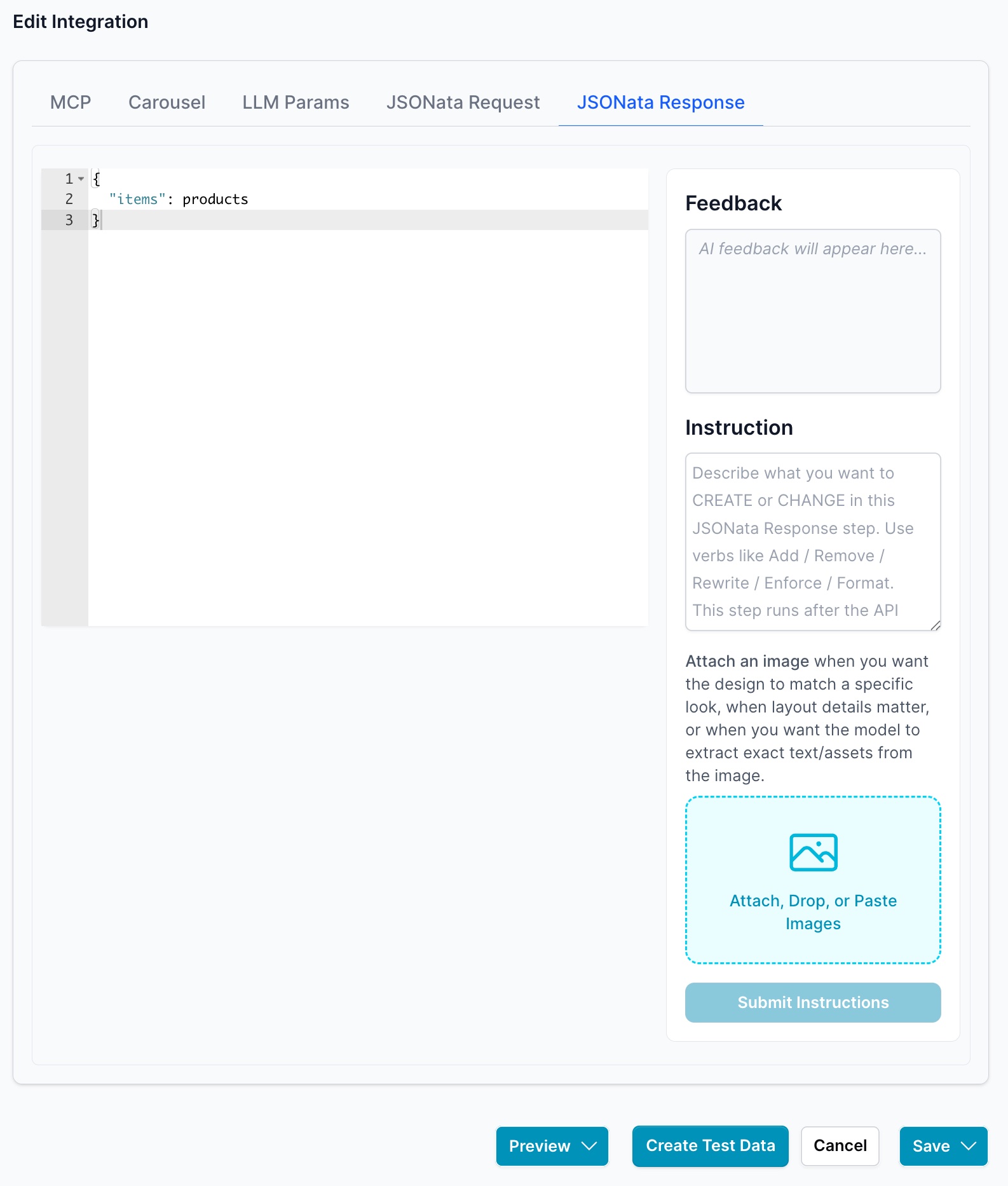
Vibe Coding is an AI-assisted development approach that allows you to describe what you want in natural language, and the AI generates the technical implementation. Instead of manually writing JSONata expressions, you:
- Provide sample input data
- Describe your desired output in plain English (or provide an example)
- Attach reference images when layout or visual details matter
- Let the AI generate the JSONata transformation code
This approach makes complex data transformations accessible to everyone, regardless of their technical expertise.
Transforming Requests with Vibe Coding
Example: Formatting Data for HubSpot Integration
When integrating with CRM systems like HubSpot, data must be formatted correctly for their APIs. Using vibe coding, you describe what you want, and AI generates the JSONata transformation.
Steps:
-
Capture User Input
When a user signs up for a newsletter, the form integration captures details like first name, last name, email, and phone number.
-
Access the Integration Configuration
Navigate to your HubSpot Custom Integration in the JSONata Request tab.
-
Use Vibe Coding to Create the Transformation
Click Create Test Data to open the test interface, then access the JSONata Request tab.
-
Provide Sample Input Data
Enter test data as it comes from the LLM:
{
  "firstName": "John",
  "lastName": "Doe",
  "email": "john.doe@example.com",
  "phone": "123-456-7890"
} -
Describe What You Want (Vibe Coding)
In the Instruction field, describe your transformation using action verbs:
- "Transform the data to match HubSpot's contact properties format with email, firstname, lastname, and phone fields"
- "Convert to HubSpot API format with properties array structure"
- "Rewrite the data to match the attached HubSpot API screenshot"
Optional: Attach a screenshot of HubSpot's API documentation showing the expected format.
-
Generate with AI
Click Submit Instructions. The AI analyzes your description and generates the JSONata expression:
{
  "properties": [
    {"property": "email", "value": email},
    {"property": "firstname", "value": firstName},
    {"property": "lastname", "value": lastName},
    {"property": "phone", "value": phone}
  ]
} -
Review Feedback and Results
The Feedback section shows the AI's analysis and any suggestions. Review the generated JSONata and transformed output.
-
Save the Transformation
Click Save to apply the JSONata transformation to your integration.
Benefits:
- No JSONata Knowledge Required: Describe what you want in plain language
- Visual Reference Support: Attach images to show the exact format you need
- Data Consistency: Ensures correct formatting, preventing API errors
- Time Efficient: Generate complex transformations in seconds
Special Parameters Always Available in JSONata Requests
The following parameters are always available in a JSONata request without needing to be declared as LLM parameters:
| Parameter | Description |
|---|---|
agentId | The ID of the current agent |
conversationId | The ID of the current conversation session |
orgId | The organization ID |
base64Images | Array of base64-encoded images uploaded by the user |
Example JSONata Request
{
  "sessionId": conversationId,
  "userInput": {
    "text": text
  },
  "projectContext": {
    "orgId": orgId,
    "projectId": agentId,
    "userId": "unknown"
  }
}
Using Uploaded Images in Integrations
When users upload images through the ai12z bot, those images are automatically available to your integrations as base64Images — an array of base64-encoded images. No special configuration is required.
{ "properties": { "email": email }, "images": base64Images }
Example: Visual Product Search with Images
A user uploads a photo and asks to find similar shirts. The LLM extracts filtering preferences and passes them alongside the image to your integration.
LLM parameters (declared in your integration):
{
  "productType": "shirt",
  "gender": "male",
  "size": "L",
  "priceRange": { "min": 20, "max": 100 },
  "color": "blue",
  "sleeve": "long",
  "style": "casual",
  "brand": "preferred_brand"
}
JSONata transformation combining LLM parameters and the uploaded image:
{
  "searchCriteria": {
    "productType": productType,
    "gender": gender,
    "size": size,
    "priceRange": priceRange,
    "color": color,
    "sleeve": sleeve,
    "style": style,
    "brand": brand
  },
  "images": base64Images,
  "requestType": "visual_similarity_search"
}
Configuring Your Agent's System Prompt
Inform your agent that images are automatically available by adding this to your system prompt:
"When users upload images through the chat, those images are automatically available to your integrations. They are passed as base64-encoded data in the
base64Imagesarray. You can use these images for analysis, matching, visual search, or any other processing without additional user input."
Benefits of Automatic Image Integration
- Seamless Experience: Images uploaded in chat are automatically available
- Zero Configuration: No special setup required
- Flexible Processing: Use vibe coding to transform image data for your API
- Multi-Image Support: Handle single or multiple uploads in one request
Transforming Responses with Vibe Coding
Example: Simplifying Weather Forecast Data
APIs often return extensive data with unnecessary fields. Use vibe coding to simplify responses before passing them to the LLM, improving performance and clarity.
Steps:
-
Test Your Integration
Run a test to see the full API response. Identify the data points you need (e.g., temperature, humidity, weather description, time).
-
Access the JSONata Response Tab
Navigate to the JSONata Response tab in your integration configuration.
-
Create Test Data
Click Create Test Data and provide sample parameters:
{
  "city": "Boston",
  "units": "imperial"
} -
Use Vibe Coding to Simplify the Response
In the Instruction field, describe what you want to extract:
Example Instructions:
- "Extract only the temperature, humidity, weather description, and time from each forecast entry"
- "Simplify the response to show only main weather details in a flat structure"
- "Remove all metadata and keep only the essential forecast data"
- "Transform to match the format shown in the attached screenshot"
Optional: Attach a screenshot showing your desired output format.
-
Submit Instructions
Click Submit Instructions. The AI generates a JSONata expression:
{
  "city": city.name,
  "list": list.{
    "dt_txt": dt_txt,
    "temp": main.temp,
    "humidity": main.humidity,
    "description": weather[0].description
  }
} -
Review the Transformation
Check the Feedback for AI suggestions and verify the transformed output shows only your specified fields.
-
Save and Test
Click Save to apply the transformation, then test again to confirm the response is simplified.
Benefits:
- Improved Performance: Less data means faster LLM processing
- Focused Information: Only relevant data reaches your agent
- Easier Maintenance: Natural language instructions are self-documenting
- Visual Guidance: Attach images to show exactly what format you need
Mastering Vibe Coding for JSONata
Vibe coding makes JSONata transformations accessible to everyone by using AI to generate code from natural language descriptions.
How to Use Vibe Coding:
-
Access the JSONata Tab
In your integration configuration, navigate to either the JSONata Request or JSONata Response tab.
-
Provide Test Data
Click Create Test Data and enter sample data that represents your actual use case. This helps the AI understand your data structure.
-
Write Your Instructions
In the Instruction field, describe what you want using clear action verbs:
Effective instruction verbs:
- Add: Include new fields or sections
- Remove: Exclude unnecessary data
- Rewrite: Change the structure completely
- Enforce: Apply specific rules or conditions
- Format: Structure data in a particular way
- Match: Align with an existing format or standard
- Extract: Pull out specific fields
- Transform: Convert from one format to another
-
Attach Reference Images (Optional)
When layout details matter or you want the AI to match a specific format:
- Click Attach, Drop, or Paste Images
- Upload a screenshot of the desired format
- The AI will analyze the image to understand structure and field names
-
Submit Instructions
Click Submit Instructions. The AI processes your description and generates the JSONata expression.
-
Review the Results
- Feedback: AI explains what it created and any considerations
- Generated Code: The JSONata expression appears in the code editor
- Preview: See the transformed output with your test data
-
Iterate if Needed
If the output isn't perfect, refine your instructions and resubmit. Be more specific about:
- Field names and their desired format
- Conditional logic or filters
- Data structure and nesting
-
Save and Apply
Once satisfied, click Save to apply the transformation to your integration.
Best Practices for Vibe Coding:
- Be Specific: Clear instructions produce better results
- Use Examples: Show sample input and describe expected output
- Leverage Images: Screenshots communicate format requirements instantly
- Start Simple: Begin with basic transformations, then add complexity
- Test Thoroughly: Use realistic test data that covers edge cases
- Iterate: Refine instructions based on initial results
Advantages of Vibe Coding:
- Zero Learning Curve: No JSONata syntax knowledge required
- AI-Powered: Understands natural language and visual references
- Self-Documenting: Instructions serve as documentation
- Time-Efficient: Generate complex transformations in seconds
- Visual Support: Use images to communicate exact requirements
Additional Resources
-
Learn More About JSONata
- Visit the JSONata Official Website to explore the language in depth.
- Access tutorials, documentation, and examples to enhance your understanding.
-
ai12z Copilot Support
- Refer to the ai12z Copilot user guide for comprehensive instructions.
- Contact the support team for personalized assistance.
Conclusion
Vibe coding revolutionizes how you create JSONata transformations in ai12z Copilot. By describing what you want in natural language and optionally providing visual references, you can generate complex data transformations without learning JSONata syntax.
Whether you're formatting data for CRM integrations, simplifying API responses, or transforming image data for visual search, vibe coding makes the process intuitive and efficient. The AI understands your intent, generates the code, and provides feedback—all within seconds.
Key Takeaways:
- Describe, Don't Code: Use natural language instructions
- Show, Don't Explain: Attach images when format matters
- Iterate Quickly: Refine instructions based on results
- No Expertise Required: Anyone can create complex transformations
Embrace vibe coding to streamline your data workflows and focus on what matters—building great experiences for your users.
Need Help? Contact our support team at support@ai12z.com for assistance.