Intent + Persona Personalizer (Event-Driven)
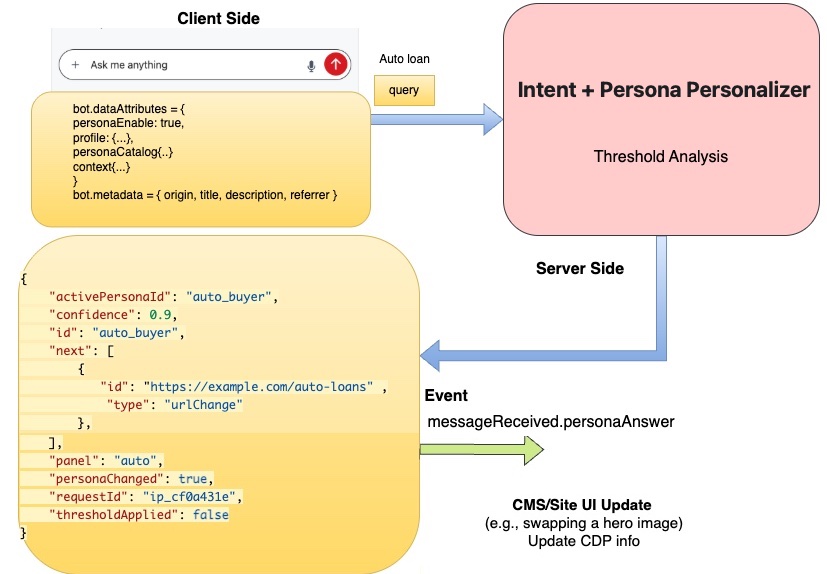
This document covers the event-driven approach where persona detection happens automatically when users interact with the ai12z bot. The bot analyzes user queries in real-time and returns persona information through the messageReceived event.
Looking for the API approach? If you need to detect personas independently (before users open the bot, or for server-side personalization), see Persona Detection API.
Need to configure the persona detection system? The ai12z portal provides an admin interface at AI Settings → Intent + Persona Personalization where you can configure prompts, models, and confidence thresholds. See Portal Admin - Intent + Persona Personalizer for details.
--- Feature flag: personaEnable (required to activate)
To prevent wasted calls (and wasted setup), this feature is OFF by default unless you explicitly set:
dataAttributes.personaEnable = true
If personaEnable is not true, the page will:
- not call
/intent_persona - not dispatch personalization events
- the bot behaves normally (standard welcome + normal RAG)
Recommended dataAttributes shape
Minimum recommended keys when enabling the feature:
personaEnable(boolean) — required to activateprofile(object) — CPD/customer profile data (optional but recommended)personaCatalog(array) — Required. Defines the available personas that the AI can detect and match users toinitialPersonaId(string) — initial guess from CPD/CMS (optional)activePersonaId(string) — current persona state (optional; client updates this)context(object) — page metadata (optional)
About personaCatalog
The personaCatalog is the core configuration that defines all personas your AI can detect. Each persona in the catalog represents a distinct user type or intent (e.g., "auto buyer", "homeowner", "investor") and includes a description that helps the AI understand when to match a user to that persona. Critically, each persona also contains a next array that defines what actions or content should be presented when that persona is detected—such as navigating to a specific URL, showing a form, displaying a CTA, or switching to a persona-specific panel. This catalog-driven approach allows you to create dynamic, personalized user experiences where the AI automatically tailors the interface based on real-time conversation analysis. The catalog is sent to the AI during persona detection and the matched persona's next actions are returned to your client application, enabling seamless coordination between AI intelligence and UI personalization.
Setting the ai12z dataAttributes
document.addEventListener("DOMContentLoaded", () => {
  const bot = document.querySelector("ai12z-bot")
  if (!bot) return

  bot.dataAttributes = {
    // ✅ Feature flag (required)
    personaEnable: true,

    // Optional: filter retrieval
    includeTags: [],
    excludeTags: ["blog"],

    // Optional/Recommended: Customer Profile Data (CPD)
    profile: {
      customerId: "123",
      age: 64,
      segment: "retirement",
    },

    // Rquired: Persona available to the model, with next actions returned as a web event to the browser
    personaCatalog: [
      {
        id: "auto_buyer",
        label: "Auto Buyer",
        description:
          "For auto financing—get prequalified, explore vehicle financing options, and browse next steps.",
        panel: "auto",
        next: [{ type: "urlChange", id: "https://example.com/auto-loans" }],
      },
      {
        id: "homeowner_mortgage",
        label: "Homeowner",
        description:
          "For home buying or mortgage needs—get prequalified, estimate payments, and explore the journey.",
        panel: "mortgage",
        next: [
          { type: "form", id: "mortgage_prequalification" },
          { type: "cta", id: "calculate_mortgage_payment" },
          { type: "heroImage", id: "home_buying_journey" },
        ],
      },
    ],

    // Optional: initial guess (CPD/CMS)
    initialPersonaId: "retirement",

    // Optional: current state (client updates after calling /intent_persona)
    activePersonaId: "retirement",

    // Optional: page context
    context: {
      pageType: "banking",
      locale: "en-US",
    },
  }
})
Note:
includeTags/excludeTagsare shown insidedataAttributeshere for convenience, but you can also setele.includeTagsandele.excludeTagsas separate properties like you do today. Either approach is fine—just be consistent.
Understanding Persona Catalog Structure
Each persona in the catalog includes:
Required Properties
- id (string): Unique identifier for the persona (e.g.,
auto_buyer,homeowner_mortgage) - label (string): Display name for the persona
- description (string): Describes who this persona is for and what they need
- panel (string): The bot welcome screen panel to display for this persona
- next (array): Actions to present based on this persona's intent
The panel Property
The panel property corresponds to specific panels in your bot's welcome screen configuration. When a persona is detected, the bot automatically switches to the relevant panel, providing contextually relevant content, CTAs, and information.
Example panels:
main- General landing/overviewauto- Auto financing informationmortgage- Home buying and mortgage contentloans- General loan productsinvesting- Investment and wealth management
The next Array: Action Types
The next array defines suggested actions the website should present to users based on their detected persona. Action types are completely flexible and limited only by your imagination and implementation. Example types below but you can extend.
Common Action Types:
// Call-to-Action Button
{ type: "cta", id: "get_prequalified" }

// Form or Calculator
{ type: "form", id: "mortgage_calculator" }

// Hero Image/Banner
{ type: "heroImage", id: "home_buying_journey" }

// URL Navigation (redirect to relevant page)
{ type: "urlChange", id: "https://example.com/auto-loans" }

// Video Content
{ type: "video", id: "retirement_planning_intro" }

// Chat Message (bot sends predefined message)
{ type: "chatMessage", id: "ask_about_rates" }

// Popup/Modal
{ type: "modal", id: "special_offer_mortgage" }

// Content Section Highlight
{ type: "highlight", id: "featured_checking_accounts" }

// Custom Widget
{ type: "widget", id: "rate_comparison_tool" }

// Analytics Event
{ type: "track", id: "persona_auto_buyer_detected" }
Your custom types:
// Anything you can imagine!
{ type: "startTour", id: "product_walkthrough" }
{ type: "showComparison", id: "plan_a_vs_plan_b" }
{ type: "loadRecommendations", id: "personalized_products" }
{ type: "expandSection", id: "faq_loans" }
{ type: "playAnimation", id: "hero_sequence" }
How to handle these in your code:
function handlePersonaActions(actions) {
  actions.forEach((action) => {
    switch (action.type) {
      case "cta":
        showCTA(action.id)
        break
      case "form":
        displayForm(action.id)
        break
      case "urlChange":
        window.location.href = action.id
        break
      case "heroImage":
        swapHeroImage(action.id)
        break
      case "video":
        loadVideo(action.id)
        break
      // Add your custom handlers
      case "yourCustomType":
        yourCustomFunction(action.id)
        break
    }
  })
}
How It Works
When personaEnable is set to true, the ai12z bot automatically:
- Captures user queries as they interact with the bot
- Analyzes intent and persona using the provided
personaCatalog - Returns results via the
messageReceivedevent - Includes suggested actions in the
nextarray for page personalization
You don't need to manually call any APIs—the bot handles persona detection automatically based on user interaction.
Response from messageReceived Event
When using the event-driven approach (bot's messageReceived event), the persona response is embedded in the event data:
bot.addEventListener("messageReceived", (event) => {
  const personaAnswer = event.detail.data.personaAnswer
  // personaAnswer contains the persona detection result
})
Response structure:
{
  "requestId": "ip_7c2f1a",
  "activePersonaId": "auto_buyer",
  "confidence": 0.91,
  "personaChanged": true,
  "panel": "auto",
  "next": [
    { "type": "cta", "id": "get_prequalified" },
    { "type": "cta", "id": "view_auto_financing_options" },
    { "type": "heroImage", "id": "vehicle_marketplace_showcase" },
    { "type": "urlChange", "id": "https://example.com/auto-loans" }
  ]
}
Note: if personaChanged: false, there is no
nextinformation
Response fields:
requestId: Unique identifier for this detection requestactivePersonaId: The detected persona IDconfidence: Confidence score (0.0 to 1.0) - only personas with ≥ 0.74 trigger changespersonaChanged: Boolean indicating if persona changed from previous statepanel: (optional) Bot panel to displaynext: (optional) Array of suggested actions based on personathresholdApplied: (optional) True if confidence was below threshold
Handling Persona Detection in Your Application
Listen for the messageReceived event to handle persona changes:
document.addEventListener("DOMContentLoaded", () => {
  const bot = document.querySelector("ai12z-bot")
  if (!bot) return

  // Listen for bot responses
  bot.addEventListener("messageReceived", (event) => {
    const data = event.detail.data

    // Check if persona information is included
    if (data && data.personaAnswer) {
      handlePersonaDetection(data.personaAnswer)
    }
  })
})

function handlePersonaDetection(personaAnswer) {
  console.log("Persona detected:", personaAnswer)

  // Only act if persona actually changed
  if (!personaAnswer.personaChanged) {
    console.log("Persona unchanged, skipping updates")
    return
  }

  const { activePersonaId, confidence, panel, next } = personaAnswer

  console.log(
    `New persona: ${activePersonaId} (${confidence * 100}% confident)`
  )

  // Update bot panel if specified
  if (panel) {
    switchBotPanel(panel)
  }

  // Handle suggested actions
  if (next && next.length > 0) {
    next.forEach((action) => {
      handlePersonaAction(action)
    })
  }

  // Update page content based on persona
  personalizePageContent(activePersonaId)
}

function handlePersonaAction(action) {
  switch (action.type) {
    case "urlChange":
      // Navigate to persona-specific page
      window.location.href = action.id
      break

    case "cta":
      // Show relevant call-to-action
      showCTA(action.id)
      break

    case "form":
      // Display form or calculator
      showForm(action.id)
      break

    case "heroImage":
      // Swap hero image
      updateHeroImage(action.id)
      break

    case "video":
      // Load video content
      loadVideo(action.id)
      break

    default:
      console.log("Custom action:", action.type, action.id)
    // Handle your custom action types here
  }
}

function personalizePageContent(personaId) {
  // Example: Update page elements based on persona
  const personaStyles = {
    auto_buyer: {
      heroImage: "/images/hero-auto.jpg",
      primaryCTA: "Get Pre-Qualified for Auto Loan",
    },
    homeowner_mortgage: {
      heroImage: "/images/hero-home.jpg",
      primaryCTA: "Calculate Your Mortgage",
    },
    investor: {
      heroImage: "/images/hero-invest.jpg",
      primaryCTA: "Explore Investment Options",
    },
  }

  const style = personaStyles[personaId]
  if (style) {
    // Update hero image
    document.querySelector(".hero-image").src = style.heroImage

    // Update CTA text
    document.querySelector(".primary-cta").textContent = style.primaryCTA
  }
}
Complete Working Example
Here's a full implementation showing bot setup and persona handling:
<!doctype html>
<html>
  <head>
    <title>Banking Site with Persona Detection</title>
    <script type="module" src="https://cdn.ai12z.net/@latest/ai12z.js"></script>
  </head>
  <body>
    <div class="hero">
      <img class="hero-image" src="/images/hero-default.jpg" alt="Hero" />
      <button class="primary-cta">Explore Our Services</button>
    </div>

    <ai12z-bot api-key="your-api-key" agent-id="your-agent-id"> </ai12z-bot>

    <script>
      document.addEventListener("DOMContentLoaded", () => {
        const bot = document.querySelector("ai12z-bot")
        if (!bot) return

        // Configure bot with persona detection
        bot.dataAttributes = {
          personaEnable: true,

          personaCatalog: [
            {
              id: "auto_buyer",
              label: "Auto Buyer",
              description:
                "For auto financing—get prequalified, explore options.",
              panel: "auto",
              next: [
                {
                  type: "urlChange",
                  id: "https://example.com/auto-loans",
                },
              ],
            },
            {
              id: "homeowner_mortgage",
              label: "Homeowner",
              description: "For home buying or mortgage needs.",
              panel: "mortgage",
              next: [
                { type: "form", id: "mortgage_calculator" },
                { type: "cta", id: "calculate_payment" },
                { type: "heroImage", id: "home_hero" },
              ],
            },
            {
              id: "investor",
              label: "Investor",
              description: "For investment and wealth management.",
              panel: "investing",
              next: [
                { type: "cta", id: "open_account" },
                { type: "video", id: "investment_intro" },
              ],
            },
          ],

          initialPersonaId: "general",
          activePersonaId: "general",

          profile: {
            customerId: "123",
            segment: "banking",
          },

          context: {
            pageType: "landing",
            locale: "en-US",
          },
        }

        // Listen for persona changes
        bot.addEventListener("messageReceived", (event) => {
          const personaAnswer = event.detail?.data?.personaAnswer
          if (!personaAnswer) return

          console.log("Persona response:", personaAnswer)

          // Only update if persona changed and confidence is high
          if (
            personaAnswer.personaChanged &&
            personaAnswer.confidence >= 0.74
          ) {
            applyPersonalization(personaAnswer)
          }
        })

        function applyPersonalization(personaAnswer) {
          const { activePersonaId, panel, next } = personaAnswer

          console.log(`Switching to persona: ${activePersonaId}`)

          // Handle background image change (if implemented)
          if (window.changeBackgroundImage) {
            changeBackgroundImage(activePersonaId)
          }

          // Handle bot panel change
          if (panel && window.customShowPanel) {
            customShowPanel(panel)
          }

          // Process suggested actions
          next?.forEach((action) => {
            if (action.type === "urlChange") {
              // Redirect to persona-specific page
              console.log("Navigating to:", action.id)
              window.location.href = action.id
            } else if (action.type === "heroImage") {
              // Update hero image
              const heroImages = {
                auto_hero: "/images/hero-auto.jpg",
                home_hero: "/images/hero-home.jpg",
              }
              const img = document.querySelector(".hero-image")
              if (img && heroImages[action.id]) {
                img.src = heroImages[action.id]
              }
            } else if (action.type === "cta") {
              // Update primary CTA
              const ctaTexts = {
                get_prequalified: "Get Pre-Qualified Now",
                calculate_payment: "Calculate Your Mortgage",
                open_account: "Open Investment Account",
              }
              const btn = document.querySelector(".primary-cta")
              if (btn && ctaTexts[action.id]) {
                btn.textContent = ctaTexts[action.id]
              }
            }
          })

          // Dispatch custom event for CMS integration
          window.dispatchEvent(
            new CustomEvent("ai12z.personalization", {
              detail: {
                personaId: activePersonaId,
                confidence: personaAnswer.confidence,
                actions: next,
              },
            })
          )
        }
      })
    </script>
  </body>
</html>
CMS Integration
Dispatch a custom event when persona changes to allow your CMS or other page components to react:
// Listen for persona changes across your application
window.addEventListener("ai12z.personalization", (event) => {
  const { personaId, confidence, actions } = event.detail

  console.log("Persona changed:", personaId)
  console.log("Confidence:", confidence)
  console.log("Suggested actions:", actions)

  // Your CMS-specific logic here
  updateCMSContent(personaId)
  trackPersonaChange(personaId, confidence)
})

function updateCMSContent(personaId) {
  // Example: Show/hide content blocks based on persona
  document.querySelectorAll("[data-persona]").forEach((element) => {
    const targetPersonas = element.dataset.persona.split(",")
    if (targetPersonas.includes(personaId)) {
      element.style.display = "block"
    } else {
      element.style.display = "none"
    }
  })
}
HTML markup for persona-targeted content:
<!-- Show only for auto_buyer persona -->
<div data-persona="auto_buyer" style="display:none;">
  <h2>Special Auto Loan Rates</h2>
  <p>Get pre-qualified in minutes!</p>
</div>

<!-- Show for multiple personas -->
<div data-persona="homeowner_mortgage,refinancer" style="display:none;">
  <h2>Home Financing Solutions</h2>
  <p>Compare mortgage and refinance options.</p>
</div>
Best Practices
1. Set Clear Persona Descriptions
Write descriptions that clearly differentiate personas:
// Good: Clear, distinct descriptions
{
  id: "auto_buyer",
  description: "For auto financing—get prequalified, explore vehicle financing options, and browse next steps."
}

// Avoid: Vague or overlapping descriptions
{
  id: "auto_buyer",
  description: "Looking for loans" // Too vague
}
2. Use Confidence Threshold
The system automatically applies a 0.74 (74%) confidence threshold. Only act on high-confidence detections:
if (personaAnswer.personaChanged && personaAnswer.confidence >= 0.74) {
  // Persona change is reliable - apply personalization
  applyPersonalization(personaAnswer)
} else {
  // Low confidence or no change - keep current state
  console.log("Persona detection uncertain, keeping current state")
}
3. Provide Fallback Experience
Always have a default/general persona for low-confidence scenarios:
const defaultPersona = "general"

function getActivePersona(personaAnswer) {
  if (personaAnswer.thresholdApplied) {
    return personaAnswer.activePersonaId || defaultPersona
  }
  return personaAnswer.activePersonaId || defaultPersona
}
4. Handle Panel Switching Gracefully
If using bot panels, ensure smooth transitions:
function switchBotPanel(panelId) {
  const bot = document.querySelector("ai12z-bot")
  const root = bot?.shadowRoot || document

  // Hide all panels
  const allPanels = root.querySelectorAll('[id^="ai12z-"][id$="-panel"]')
  allPanels.forEach((panel) => {
    panel.style.display = "none"
  })

  // Show target panel
  const targetPanel = root.querySelector(`#ai12z-${panelId}-panel`)
  if (targetPanel) {
    targetPanel.style.display = "block"
  } else {
    // Fallback to main panel
    const mainPanel = root.querySelector("#ai12z-main-panel")
    if (mainPanel) mainPanel.style.display = "block"
  }
}
5. Track Persona Changes for Analytics
function trackPersonaChange(personaId, confidence) {
  // Google Analytics example
  if (window.gtag) {
    gtag("event", "persona_detected", {
      persona_id: personaId,
      confidence: confidence,
      timestamp: new Date().toISOString(),
    })
  }

  // Adobe Analytics example
  if (window._satellite) {
    _satellite.track("persona_change", {
      persona: personaId,
      confidence: confidence,
    })
  }
}
Troubleshooting
Persona Not Detected
Problem: personaAnswer is undefined or null
Solutions:
- Verify
personaEnable: trueis set indataAttributes - Ensure
personaCatalogis provided and not empty - Check browser console for errors
- Verify API key is valid
Persona Doesn't Change
Problem: personaChanged is always false
Solutions:
- User queries may not be distinct enough to trigger change
- Confidence may be below threshold (< 0.74)
- Persona descriptions may be too similar
- Check
thresholdAppliedfield in response
Wrong Panel Displayed
Problem: Bot shows incorrect panel after persona detection
Solutions:
- Verify
panelproperty in persona catalog matches actual panel IDs - Check bot welcome screen configuration
- Use browser DevTools to inspect shadow DOM panel structure
- Ensure
customShowPanel()function is correctly implemented
Key Takeaways
- ✅ Enable the feature with
dataAttributes.personaEnable = true - ✅ Provide a catalog with clear persona descriptions
- ✅ Listen to messageReceived event for automatic persona detection
- ✅ Check personaChanged before applying personalization
- ✅ Trust the threshold - system only changes persona at ≥ 74% confidence
- ✅ Handle actions in the
nextarray for suggested page updates