Portal Admin - Intent + Persona Personalizer
This admin interface is where you control the Intent + Persona Personalization feature. It lets you enable or disable it, choose the model, and set the confidence threshold so persona detection is consistent. You can also adjust the system prompt to fine-tune how personas are detected and returned. This interface is located in AI Settings → Intent + Persona Personalization.
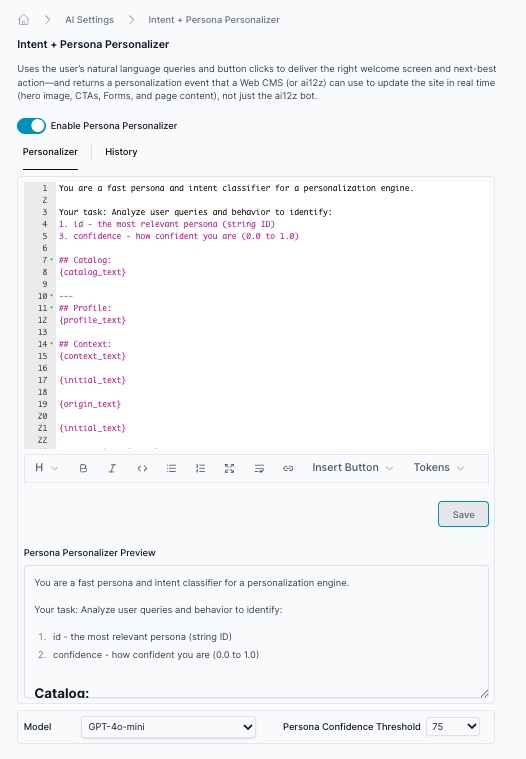
Accessing the Admin Interface
- Log in to the ai12z Portal
- Navigate to AI Settings in the left sidebar
- Select Intent + Persona Personalization
Admin Interface Overview
The portal admin interface allows you to configure the persona detection system without writing code. It provides two main tabs:
1. Personalizer Tab
The Personalizer tab is where you configure your persona detection prompt and system instructions.
Configuration Fields
System Instructions
Define how the AI should analyze user behavior:
You are a fast persona and intent classifier for a personalization engine.

Your task: Analyze user queries and behavior to identify:
1. id - the most relevant persona (string ID)
3. confidence - how confident you are (0.0 to 1.0)

## Catalog:
{catalog_text}

---
## Profile:
{profile_text}

## Context:
{context_text}

{initial_text}

{origin_text}

{initial_text}

User queries: {query}

{answer_text}


Guidelines:
- Return valid JSON only
- Base confidence on query clarity and behavior consistency
- If unsure, default to persona "general" with confidence 0

Return ONLY valid JSON:
{
  "id": "string",
  "confidence": 0.0
}
Prompt Template with Tokens
The prompt supports several token placeholders that get replaced with actual data:
{catalog_text}- Your defined persona catalog{profile_text}- User profile information{context_text}- Page context and metadata{initial_text}- Initial persona guess{origin_text}- Source URL{query}- User question{answer_text}- How AI answered the question
These tokens are automatically populated from your dataAttributes configuration when the bot calls the persona detection API.
Configuration Options
- Enable Persona Personalizer - Toggle to activate/deactivate the feature
- Model - Select the AI model (e.g., GPT-4o-mini)
- Persona Confidence Threshold - Set minimum confidence level (0-100), typically 70-75
2. History Tab
The History tab shows all past system prompts: