Persona Detection API
The Persona Detection API allows you to detect user personas and intent independently of the ai12z bot. Use this approach when users are interacting with your website outside the bot or when you need persona detection
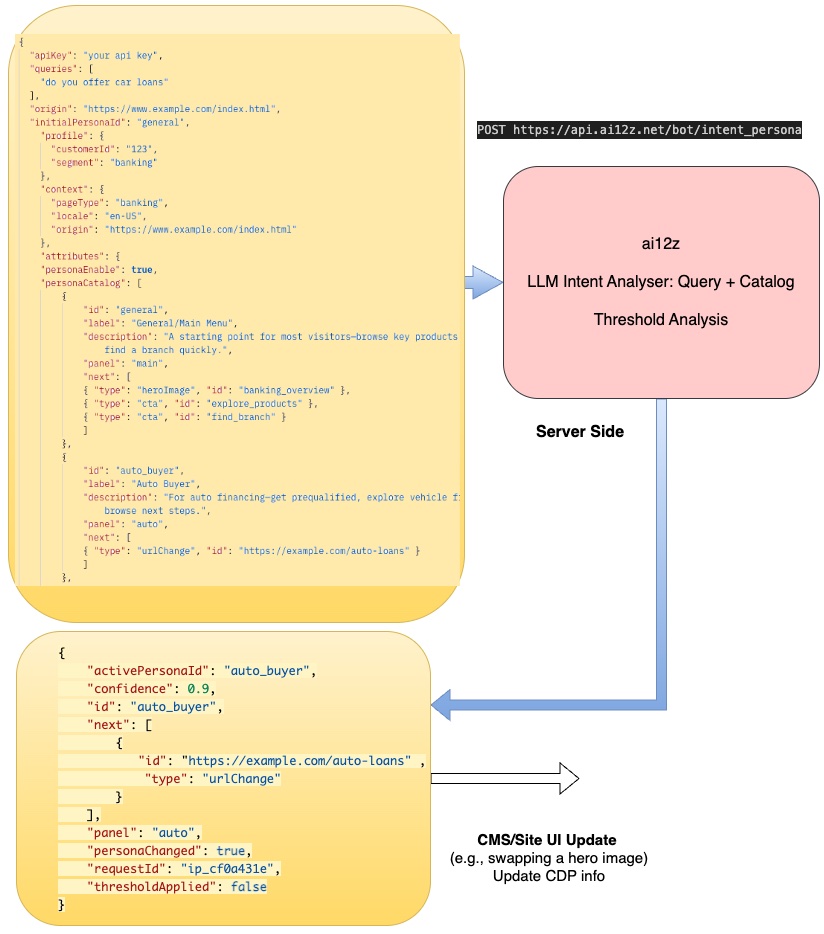
before the bot is opened.
Need to configure the persona detection system? The ai12z portal provides an admin interface at AI Settings → Intent + Persona Personalization where you can configure prompts, models, and confidence thresholds. See Portal Admin - Intent + Persona Personalizer for details.
When to Use This API
Use the API approach when:
- 🌐 Pre-bot personalization - Detect persona before user opens the bot
- 🖥️ Server-side personalization - Personalize content during page rendering
- 🔄 Custom workflows - Integrate persona detection into your own application logic
- 📊 Analytics systems - Track user intent across your site
- 🏗️ CMS integration - Magnolia, Drupal, or other CMS-driven personalization
- 🛍️ E-commerce flows - Personalize product recommendations outside chat
Use the event-driven approach when:
- 💬 Users are actively chatting with the ai12z bot
- ⚡ You want automatic, real-time persona detection based on bot queries
- 🤖 The bot handles all persona analysis automatically
👉 For event-driven persona detection, see Intent + Persona Personalizer
How It Works
- User interacts with your website (clicks, searches, navigates)
- Your code collects signals (search queries, button clicks, page views)
- You call the API with collected queries and user context
- API returns persona with confidence score and suggested actions
- You personalize the page based on the detected persona
Unlike the event-driven approach where the bot automatically detects persona during conversations, this API gives you full control over when and how persona detection occurs.
API Endpoint
POST https://api.ai12z.net/bot/intent_persona
Key Difference from Event-Driven Approach:
- Event-driven: Bot automatically sends queries to persona engine (no manual API calls needed)
- API approach: You manually collect user signals and call this endpoint when ready
Authentication
Include your API key in the request body (not in headers):
{
  "apiKey": "your-api-key-here"
}
Request Format
This API uses the same personaCatalog structure as the event-driven approach, but you control when and how to call it.
About personaCatalog
The personaCatalog is the core configuration that defines all personas your AI can detect. Each persona in the catalog represents a distinct user type or intent (e.g., "auto buyer", "homeowner", "investor") and includes a description that helps the AI understand when to match a user to that persona. Critically, each persona also contains a next array that defines what actions or content should be presented when that persona is detected—such as navigating to a specific URL, showing a form, displaying a CTA, or switching to a persona-specific panel. This catalog-driven approach allows you to create dynamic, personalized user experiences where the AI automatically tailors the interface based on real-time conversation analysis. The catalog is sent to the AI during persona detection and the matched persona's next actions are returned to your client application, enabling seamless coordination between AI intelligence and UI personalization.
Complete Request Example
Scenario: User searches your site for "car loans" without opening the bot. You want to personalize the page.
{
  "apiKey": "f3e358c42bd122a85620e4b60489d196dd1786bd7211114c48613810454774df",
  "queries": [
    "do you offer car loans",
    "what are the rates for auto financing"
  ],
  "clicks": ["cta_view_rates", "link_auto_loans"],
  "origin": "https://www.example.com/index.html",
  "attributes": {
    "personaEnable": true,
    "personaCatalog": [
      {
        "id": "auto_buyer",
        "label": "Auto Buyer",
        "description": "For auto financing—get prequalified, explore vehicle financing options, and browse next steps.",
        "panel": "auto",
        "next": [
          { "type": "urlChange", "id": "https://example.com/auto-loans" }
        ]
      },
      {
        "id": "homeowner_mortgage",
        "label": "Homeowner",
        "description": "For home buying or mortgage needs—get prequalified, estimate payments, and explore the journey.",
        "panel": "mortgage",
        "next": [
          { "type": "form", "id": "mortgage_prequalification" },
          { "type": "cta", "id": "calculate_mortgage_payment" },
          { "type": "heroImage", "id": "home_buying_journey" }
        ]
      },
      {
        "id": "investor",
        "label": "Investor",
        "description": "For investing goals—open an account, explore portfolio options, or connect with an advisor.",
        "panel": "investing",
        "next": [
          { "type": "cta", "id": "open_investment_account" },
          { "type": "heroImage", "id": "investment_portfolio_showcase" },
          { "type": "cta", "id": "talk_to_financial_advisor" }
        ]
      }
    ],
    "initialPersonaId": "general",
    "activePersonaId": "general",
    "profile": {
      "customerId": "123",
      "segment": "banking",
      "age": 35,
      "lifestage": "family"
    },
    "context": {
      "pageType": "banking",
      "locale": "en-US",
      "origin": "https://www.example.com/index.html"
    }
  }
}
Request Parameters
| Parameter | Type | Required | Description |
|---|---|---|---|
apiKey | string | Yes | Your ai12z API key |
queries | array | Yes | Array of recent user queries (1-5 recommended) |
clicks | array | No | Array of CTA/button IDs user clicked |
origin | string | No | Current page URL for context |
attributes | object | Yes | Configuration object (see below) |
Attributes Object
| Property | Type | Required | Description |
|---|---|---|---|
personaEnable | boolean | Yes | Must be true to activate persona detection |
personaCatalog | array | Yes | Array of persona definitions |
initialPersonaId | string | No | Initial persona guess (from CDP/CMS) |
activePersonaId | string | No | Currently active persona |
profile | object | No | Customer profile data (CDP) |
context | object | No | Page/session metadata |
Response Format
Success Response
{
  "requestId": "ip_7c2f1a",
  "activePersonaId": "auto_buyer",
  "confidence": 0.89,
  "personaChanged": true,
  "panel": "auto",
  "next": [{ "type": "urlChange", "id": "https://example.com/auto-loans" }],
  "thresholdApplied": false
}
Response Fields
| Field | Type | Description |
|---|---|---|
requestId | string | Unique identifier for this request |
activePersonaId | string | Detected persona ID |
confidence | number | Confidence score (0.0 to 1.0) |
personaChanged | boolean | Whether persona changed from activePersonaId in request |
panel | string | Bot panel to display (from persona catalog) |
next | array | Suggested actions based on persona |
thresholdApplied | boolean | True if confidence was below 0.74 threshold |
Low Confidence Response
When confidence is below the threshold (0.74), the API returns the current active persona without changing it:
{
  "requestId": "ip_8d3e2b",
  "activePersonaId": "general",
  "confidence": 0.62,
  "personaChanged": false,
  "thresholdApplied": true
}
Client-Side Integration
Use this when you want to detect persona before users interact with the bot, or based on website navigation patterns.
Use Case: Search Box Persona Detection
Detect persona as users search your website (not the bot):
// Track searches in your site's search box (not bot queries)
const searchBox = document.querySelector("#site-search")
let searchQueries = []

searchBox.addEventListener("submit", async (e) => {
  e.preventDefault()
  const query = e.target.querySelector("input").value

  searchQueries.push(query)
  if (searchQueries.length > 5) searchQueries.shift()

  // Execute the search
  performSearch(query)

  // Detect persona after 2+ searches
  if (searchQueries.length >= 2) {
    await detectPersona(searchQueries)
  }
})
Basic fetch API Implementation
async function detectPersona(queries, attributes) {
  try {
    const response = await fetch("https://api.ai12z.net/bot/intentpersona", {
      method: "POST",
      headers: {
        "Content-Type": "application/json",
      },
      body: JSON.stringify({
        apiKey: "your-api-key",
        queries: queries,
        origin: window.location.href,
        attributes: attributes,
      }),
    })

    if (!response.ok) {
      throw new Error(`HTTP error! status: ${response.status}`)
    }

    const result = await response.json()
    console.log("Detected persona:", result)

    // Handle the result
    handlePersonaDetection(result)

    return result
  } catch (error) {
    console.error("Persona detection failed:", error)
    return null
  }
}

function handlePersonaDetection(result) {
  if (!result.personaChanged) {
    console.log("Persona unchanged")
    return
  }

  console.log(`Persona changed to: ${result.activePersonaId}`)
  console.log(`Confidence: ${result.confidence}`)
  console.log(`Panel: ${result.panel}`)

  // Handle suggested actions
  result.next?.forEach((action) => {
    switch (action.type) {
      case "urlChange":
        // Navigate to new page
        window.location.href = action.id
        break
      case "cta":
        // Show CTA button
        showCTA(action.id)
        break
      case "form":
        // Display form
        showForm(action.id)
        break
      case "heroImage":
        // Swap hero image
        updateHeroImage(action.id)
        break
    }
  })
}
Complete Working Example: Site Search Integration
This example shows persona detection based on site search (not bot chat):
<!doctype html>
<html>
<head>
<title>Banking Website with Search-Based Persona Detection</title>
</head>
<body>
<h1>Banking Services</h1>
<!-- Site search box (not bot) -->
<form id="site-search">
<input type="text" name="q" placeholder="Search our site..." required />
<button type="submit">Search</button>
</form>
<div id="persona-banner" style="display:none;">
<p>
Based on your interests, we think you might be looking for
<span id="persona-type"></span>
</p>
</div>
<div id="search-results"></div>
<script>
const API_KEY = "your-api-key"
const API_URL = "https://api.ai12z.net/bot/intent_persona"
let searchQueries = []
let detectedPersona = null
const personaCatalog = [
{
id: "auto_buyer",
label: "Auto Buyer",
description: "For auto financing options and vehicle loans.",
panel: "auto",
next: [
{ type: "urlChange", id: "/auto-loans" },
{ type: "cta", id: "get_prequalified" },
],
},
{
id: "homeowner_mortgage",
label: "Homeowner",
description: "For home buying and mortgage needs.",
panel: "mortgage",
next: [
{ type: "urlChange", id: "/mortgages" },
{ type: "form", id: "mortgage_calculator" },
],
},
]
// Handle site search submissions
document
.getElementById("site-search")
.addEventListener("submit", async (e) => {
e.preventDefault()
const query = e.target.q.value.trim()
if (!query) return
// Add to query history
searchQueries.push(query)
if (searchQueries.length > 5) searchQueries.shift()
// Show search results (your existing search logic)
displaySearchResults(query)
// Detect persona after 2+ searches
if (searchQueries.length >= 2) {
await detectPersona()
}
})
async function detectPersona() {
try {
const response = await fetch(API_URL, {
method: "POST",
headers: { "Content-Type": "application/json" },
body: JSON.stringify({
apiKey: API_KEY,
queries: searchQueries,
origin: window.location.href,
attributes: {
personaEnable: true,
personaCatalog: personaCatalog,
initialPersonaId: "general",
activePersonaId: detectedPersona || "general",
profile: { customerId: "123" },
context: { pageType: "search" },
},
}),
})
if (!response.ok) return
const result = await response.json()
handlePersonaResult(result)
} catch (error) {
console.error("Persona detection failed:", error)
}
}
function handlePersonaResult(result) {
if (!result.personaChanged) return
detectedPersona = result.activePersonaId
// Show persona banner
document.getElementById("persona-banner").style.display = "block"
document.getElementById("persona-type").textContent =
result.activePersonaId.replace("_", " ")
// Handle actions
result.next?.forEach((action) => {
if (action.type === "urlChange") {
// Optionally redirect to persona-specific page
console.log("Suggested redirect:", action.id)
// Uncomment to auto-redirect:
// setTimeout(() => window.location.href = action.id, 2000);
}
})
// Track for analytics
trackPersona(result.activePersonaId, result.confidence)
}
function displaySearchResults(query) {
// Your existing search results display logic
document.getElementById("search-results").innerHTML =
``
}
function trackPersona(personaId, confidence) {
console.log(`Persona: ${personaId}, Confidence: ${confidence}`)
// Add your analytics tracking here
}
</script>
</body>
</html>
Key Points:
- ✅ Detects persona from site search, not bot chat
- ✅ Collects 2+ queries before calling API
- ✅ Optionally redirects to persona-specific pages
- ✅ Works before user ever opens the bot
Server-Side Integration
Use server-side detection for pre-rendering personalized content or SSR frameworks.
Node.js Example
const fetch = require("node-fetch")

async function detectPersona(queries, userProfile) {
  const response = await fetch("https://api.ai12z.net/bot/intent_persona", {
    method: "POST",
    headers: { "Content-Type": "application/json" },
    body: JSON.stringify({
      apiKey: process.env.AI12Z_API_KEY,
      queries: queries,
      attributes: {
        personaEnable: true,
        personaCatalog: getPersonaCatalog(),
        profile: userProfile,
        context: {
          pageType: "banking",
          locale: "en-US",
        },
      },
    }),
  })

  return await response.json()
}

// Use in route handler
app.post("/api/personalize", async (req, res) => {
  const { queries, userId } = req.body
  const userProfile = await getUserProfile(userId)

  const persona = await detectPersona(queries, userProfile)

  // Store in session/database
  await saveUserPersona(userId, persona.activePersonaId)

  res.json({
    persona: persona.activePersonaId,
    recommendations: getRecommendations(persona),
  })
})
Python Example
import requests
import os

def detect_persona(queries, user_profile):
    url = "https://api.ai12z.net/bot/intent_persona"

    payload = {
        "apiKey": os.getenv("AI12Z_API_KEY"),
        "queries": queries,
        "attributes": {
            "personaEnable": True,
            "personaCatalog": get_persona_catalog(),
            "profile": user_profile,
            "context": {
                "pageType": "banking",
                "locale": "en-US"
            }
        }
    }

    response = requests.post(url, json=payload)
    response.raise_for_status()

    return response.json()

# Usage example
result = detect_persona(
    queries=["do you offer car loans", "what are auto loan rates"],
    user_profile={"customerId": "123", "segment": "banking"}
)

print(f"Detected persona: {result['activePersonaId']}")
print(f"Confidence: {result['confidence']}")
Best Practices
1. Query Collection
- Collect 2-5 queries before calling the API for better accuracy
- Include recent queries only (last 5 minutes recommended)
- Clean and normalize queries before sending
2. Rate Limiting
- Implement cooldown periods (10-15 seconds minimum between calls)
- Don't call on every keystroke - wait for complete queries
- Cache results to avoid redundant calls
let lastCallTime = 0
const COOLDOWN = 12000 // 12 seconds

async function detectPersonaWithCooldown(queries, attributes) {
  const now = Date.now()
  if (now - lastCallTime < COOLDOWN) {
    console.log("Cooldown active, skipping call")
    return null
  }

  lastCallTime = now
  return await detectPersona(queries, attributes)
}
3. Error Handling
- Always implement try-catch for network errors
- Fallback to default persona on errors
- Log errors for monitoring
async function safeDetectPersona(queries, attributes) {
  try {
    const result = await detectPersona(queries, attributes)
    return result
  } catch (error) {
    console.error("Persona detection failed:", error)
    // Fallback to default
    return {
      activePersonaId: attributes.initialPersonaId || "general",
      confidence: 0,
      personaChanged: false,
    }
  }
}
4. Privacy & Security
- Never send PII (Personally Identifiable Information) in queries
- Use customer IDs instead of names/emails in profile data
- Consider encrypting sensitive profile data
- Comply with GDPR/CCPA requirements
5. Performance Optimization
- Call API server-side when possible for faster responses
- Cache persona results in session storage
- Use CDN for API endpoints (production)
- Implement request debouncing
Common Integration Patterns
Pattern 1: Progressive Enhancement
Start with a default experience, then enhance based on detected persona:
// Initial page load - default content
showDefaultContent()

// After user interaction - detect and personalize
userQueries.length >= 2 && detectPersona().then(applyPersonalization)
Pattern 2: Real-Time Adaptation
Continuously adapt as user explores:
let personaScore = {}

async function adaptivePersona(query) {
  queryHistory.push(query)

  if (queryHistory.length >= 2 && queryHistory.length % 2 === 0) {
    const result = await detectPersona()

    // Track persona consistency
    personaScore[result.activePersonaId] =
      (personaScore[result.activePersonaId] || 0) + result.confidence

    // Only change if consistently detected
    if (personaScore[result.activePersonaId] > 1.5) {
      applyPersonalization(result)
    }
  }
}
Pattern 3: Server-Side Prerendering
Detect persona server-side and pre-render personalized content:
// Express.js example
app.get("/landing/:persona?", async (req, res) => {
  let persona = req.params.persona || "general"

  // If no persona in URL, try to detect from query params
  if (!req.params.persona && req.query.q) {
    const result = await detectPersona([req.query.q], getUserProfile(req))
    persona = result.activePersonaId
  }

  const content = await getPersonalizedContent(persona)
  res.render("landing", { persona, content })
})
Troubleshooting
Issue: Low Confidence Scores
Symptoms: API always returns confidence below 0.74
Solutions:
- Ensure
personaCatalogincludes clear, distinct descriptions - Collect more queries (3-5 recommended)
- Verify queries are substantive (not just "hi", "hello")
- Check that personas cover the expected user intents
Issue: Wrong Persona Detected
Symptoms: API detects incorrect persona consistently
Solutions:
- Review persona descriptions for overlap/ambiguity
- Add more distinct keywords to descriptions
- Include
contextdata (page type, user segment) - Pass richer
profiledata from CDP
Issue: API Timeout/Errors
Symptoms: Requests fail or timeout
Solutions:
- Check API key validity
- Verify network connectivity
- Implement retry logic with exponential backoff
- Reduce payload size (trim long queries)
Comparison: API vs Event-Driven Approach
| Feature | API Approach (this page) | Event-Driven (persona.md) |
|---|---|---|
| When to use | User interacts with website (not bot) | User chats with ai12z bot |
| Trigger | Manual API call when ready | Automatic on bot messages |
| Use cases | Search, navigation, pre-bot personalization | Real-time chat analysis |
| Implementation | You call /intent_persona endpoint | Listen to messageReceived event |
| Control | Full control over timing | Automatic by bot |
| Query source | Site search, clicks, navigation | Bot conversation queries |
| Best for | Pre-rendering, SSR, CMS personalization | In-chat personalization |
Example scenarios:
- Use API: User searches "auto loans" in your site search box → personalize page before they open bot
- Use Event-driven: User opens bot and asks "do you offer car loans?" → bot automatically detects persona
Both approaches use the same personaCatalog and return the same response structure—the only difference is when and how detection occurs.
Related Documentation
- Event-Driven Persona Detection - Automatic detection during bot conversations
- AI-Driven URL Navigation - Implementing
urlChangeactions - Bot Configuration - Panel setup
Note: The Persona Detection API requires ai12z platform version 2.0 or higher and an active subscription with persona detection enabled. Choose the API approach when you need persona detection before or outside of bot interactions.