HubSpot Contact Integration
Create and update contacts in HubSpot CRM through your ai12z agent. This integration allows users to submit contact information directly through conversational interactions, with the system automatically creating or updating contact records regardless of previous form submissions.
🎯 Use Cases
- Lead Generation: Capture visitor information during chat conversations
- Contact Updates: Update existing contact records with new information
- Sales Qualification: Collect prospect details for sales follow-up
- Newsletter Signups: Add contacts to marketing lists
- Event Registration: Capture attendee information
- Support Tickets: Create contacts when users request assistance
🛠️ Step 1: Set Up HubSpot API Access
Prerequisites
- Active HubSpot account (Free, Starter, or higher)
- HubSpot Private App with appropriate scopes
Create HubSpot Private App
- In HubSpot, go to Settings → Integrations → Private Apps
- Click Create a private app
- Configure:
- Name: "ai12z Contact Integration"
- Description: "Contact creation and updates from ai12z agent"
- In Scopes tab, select:
crm.objects.contacts.readcrm.objects.contacts.writecrm.schemas.contacts.read(if using custom properties)
- Click Create app and copy the Access Token
🛠️ Step 2: Configure the Integration in ai12z
Create New Integration
-
Open your Agent → Integrations → Custom Integrations
-
Click Create Integration
-
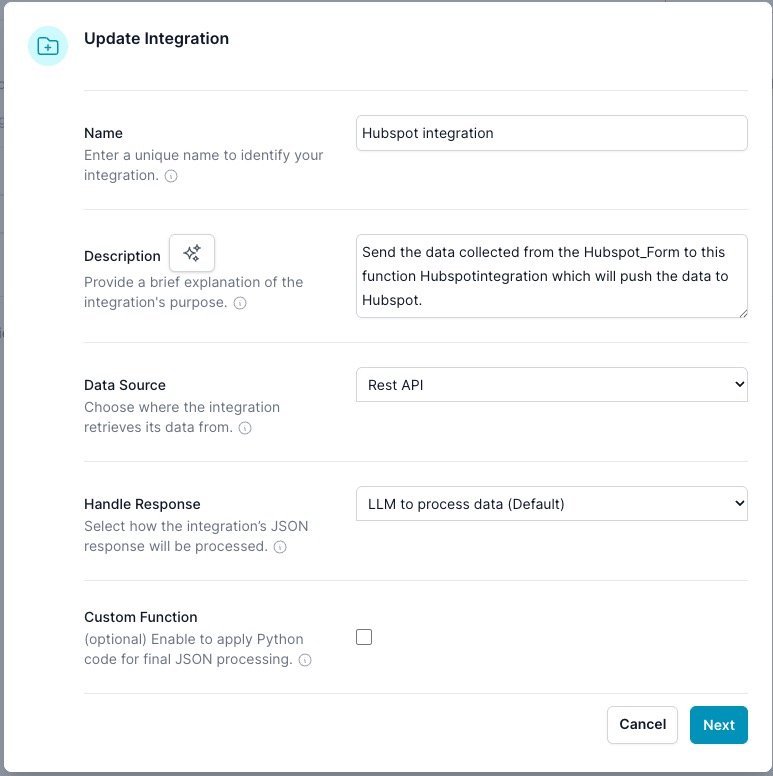
Configure basic settings:
- Name: "HubSpot Contact Creation"
- Description: "Creates or updates contacts in HubSpot CRM with user-provided information"
REST API Configuration
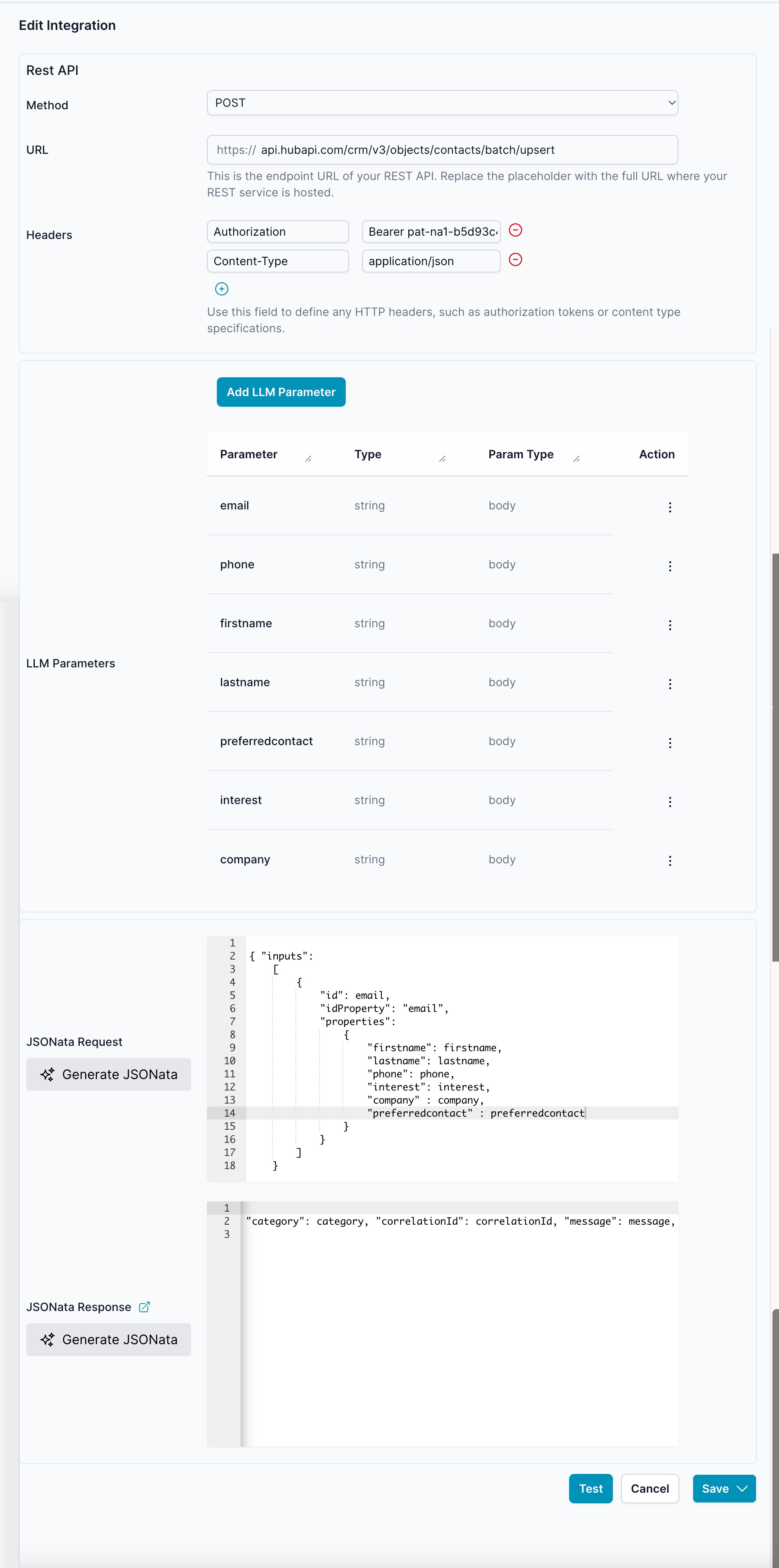
- Method:
POST - URL:
https://api.hubapi.com/crm/v3/objects/contacts/batch/upsert - Headers:
Authorization:Bearer YOUR_HUBSPOT_ACCESS_TOKENContent-Type:application/json
🛠️ Step 3: Configure LLM Parameters
Set up the parameters that the AI will collect from users:
| Parameter | Type | Param Type | Description |
|---|---|---|---|
email | string | body | Contact's email address (required) |
firstname | string | body | Contact's first name |
lastname | string | body | Contact's last name |
phone | string | body | Contact's phone number |
company | string | body | Contact's company name |
interest | string | body | Area of interest or inquiry topic |
preferredcontact | string | body | Preferred contact method |
LLM Parameter Instructions
Add this guidance for the AI to understand when and how to use the integration:
Use this integration when a user provides contact information or expresses interest in being contacted.

Collect at minimum:
- Email address (required)
- First name and last name
- Company (if applicable)

Optional fields to gather:
- Phone number
- Specific areas of interest
- Preferred contact method

Example user prompts that trigger this integration:
- "I'd like to speak with someone about your services"
- "Can someone contact me about pricing?"
- "Sign me up for your newsletter"
- "I want to schedule a demo"

Always confirm the information with the user before submitting.
🛠️ Step 4: JSONata Request Configuration
Use this JSONata expression to format the request payload:
{
  "inputs": [
    {
      "id": email,
      "idProperty": "email",
      "properties": {
        "firstname": firstname,
        "lastname": lastname,
        "phone": phone,
        "company": company,
        "interest": interest,
        "preferredcontact": preferredcontact
      }
    }
  ]
}
Why Batch Upsert?
The /batch/upsert endpoint automatically:
- Creates new contacts if email doesn't exist
- Updates existing contacts if email is found
- Handles duplicate prevention
- Processes multiple contacts in single request (future scaling)
🛠️ Step 5: Response Handling
JSONata Response Processing
Configure response handling to provide user feedback:
{
  "category": "success",
  "correlationId": results[0].id,
  "message": "Thank you! Your information has been saved and someone from our team will contact you soon."
}
Error Handling
Add error response mapping for common scenarios:
{
  "category": $exists(errors) ? "error" : "success",
  "message": $exists(errors) ?
    "There was an issue saving your information. Please try again or contact us directly." :
    "Thank you! Your contact information has been successfully saved."
}
🛠️ Step 6: Test the Integration
Test in Agent
- Open Test Drive in your agent
- Try these test scenarios:
New Contact Creation:
User: "I'd like someone to contact me about your services"
Agent: "I'd be happy to help connect you with our team. Could you provide your email and name?"
User: "My email is john.doe@company.com, I'm John Doe from Acme Corp"
Existing Contact Update:
User: "Update my contact info - my new phone number is 555-0123"
Agent: "I can help update your information. What's the email address on your account?"
User: "It's jane.smith@example.com"
Verify in HubSpot
- Go to HubSpot Contacts → Contacts
- Search for the test email address
- Verify contact was created/updated with correct information
- Check contact timeline for integration activity
📊 Advanced Configuration
Custom Properties
To use HubSpot custom properties:
- Add custom property names to LLM Parameters
- Include in JSONata request under
properties - Ensure Private App has
crm.schemas.contacts.readscope
List Assignment
Add contacts to specific lists by including listMemberships:
{
  "inputs": [
    {
      "id": email,
      "idProperty": "email",
      "properties": { /* contact properties */ },
      "associations": [
        {
          "to": { "id": "LIST_ID" },
          "types": [{ "associationCategory": "HUBSPOT_DEFINED", "associationTypeId": 2 }]
        }
      ]
    }
  ]
}
Lead Scoring
Trigger lead scoring by setting lifecycle stage:
"properties": {
  "firstname": firstname,
  "lastname": lastname,
  "lifecyclestage": "lead",
  "lead_source": "ai12z_chatbot"
}
🔧 Troubleshooting
Common Issues
Error: "Property 'email' is required"
- Ensure email parameter is marked as required
- Validate email format in user input
- Check JSONata maps email field correctly
Error: "Unauthorized" (401)
- Verify HubSpot access token is current
- Confirm Private App has necessary scopes
- Check token wasn't regenerated in HubSpot
Error: "Property doesn't exist"
- Verify custom property names match HubSpot exactly
- Check property is available for contacts object
- Ensure Private App has schema read permissions
Contacts not appearing in HubSpot
- Check integration logs for API responses
- Verify HubSpot account has contact storage available
- Confirm email format is valid
Testing Tools
Postman Collection: Test HubSpot API directly
curl -X POST \
  https://api.hubapi.com/crm/v3/objects/contacts/batch/upsert \
  -H 'Authorization: Bearer YOUR_TOKEN' \
  -H 'Content-Type: application/json' \
  -d '{
    "inputs": [{
      "id": "test@example.com",
      "idProperty": "email",
      "properties": {
        "firstname": "Test",
        "lastname": "User"
      }
    }]
  }'
🎯 Best Practices
Data Collection
- Always collect email as the primary identifier
- Validate phone number formats when provided
- Confirm information before submitting to HubSpot
- Respect user privacy and data collection preferences
Integration Performance
- Use batch endpoints for multiple contacts
- Implement retry logic for failed requests
- Cache frequently used list IDs and property names
- Monitor rate limits (100 requests per 10 seconds)
User Experience
- Provide clear confirmation when contact is saved
- Offer alternative contact methods if integration fails
- Allow users to update their information easily
- Respect opt-out requests immediately
📈 Analytics & Monitoring
Track integration success through:
- HubSpot Reports: Contact creation by source
- ai12z Logs: Integration call success rates
- User Feedback: Confirmation response rates
- CRM Pipeline: Leads generated from chatbot