Filtered Content Responses
Customize the message shown to users when a message is blocked by content safety rules, and optionally get an email alert every time it happens.
- Go to Organization Settings → About Organization
- Click the edit icon next to Filtered Content Response
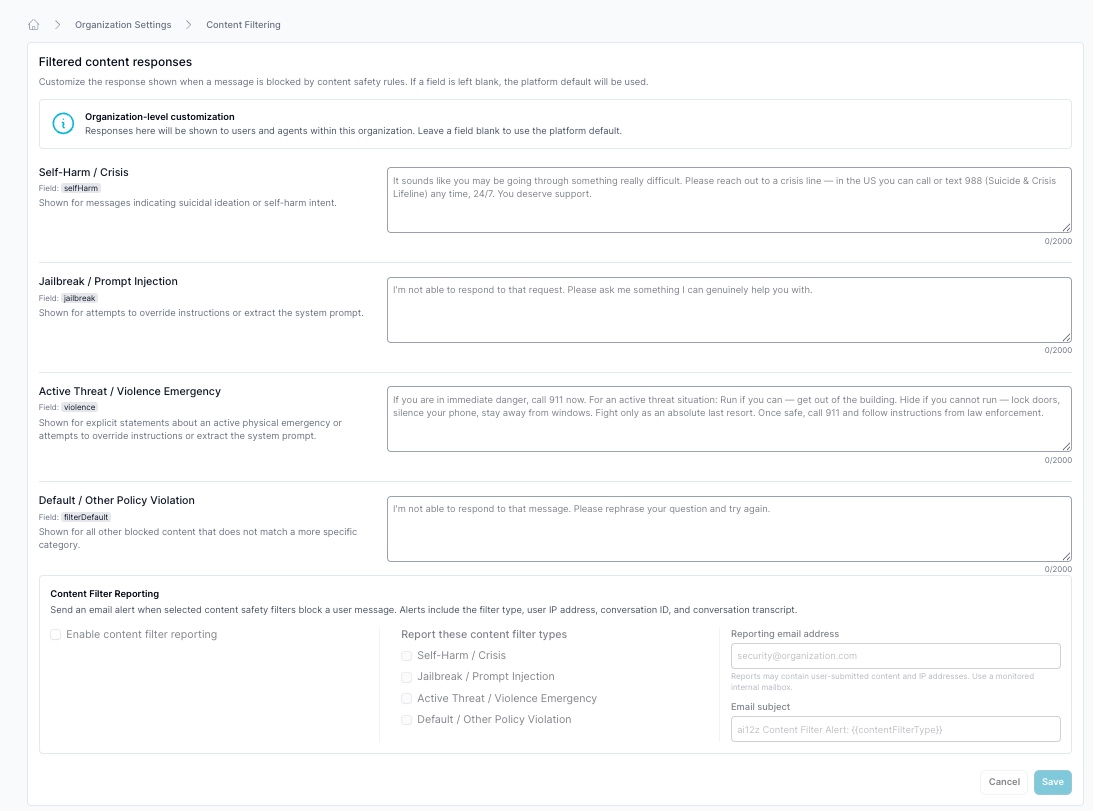
Custom Response Messages
These are organization-level overrides, leave any field blank to fall back to the platform default. Whatever you set here is shown to users and agents across every project in the organization, not per-agent.
| Category | Field | Shown For |
|---|---|---|
| Self-Harm / Crisis | selfHarm | Messages indicating suicidal ideation or self-harm intent |
| Jailbreak / Prompt Injection | jailbreak | Attempts to override instructions or extract the system prompt |
| Active Threat / Violence Emergency | violence | Explicit statements about an active physical emergency |
| Default / Other Policy Violation | filterDefault | Any other blocked content that doesn't match a more specific category |
Each field allows up to 2,000 characters. For example, a Self-Harm / Crisis response might read: "It sounds like you may be going through something really difficult. Please reach out to a crisis line, in the US you can call or text 988 (Suicide & Crisis Lifeline) any time, 24/7. You deserve support."
Content Filter Reporting
Below the response messages, Content Filter Reporting sends an email alert whenever a selected filter blocks a message:
- Toggle Enable content filter reporting
- Under Report these content filter types, check which categories should trigger an alert: Self-Harm / Crisis, Jailbreak / Prompt Injection, Active Threat / Violence Emergency, and/or Default / Other Policy Violation
- Enter a Reporting email address
- Optionally customize the Email subject, the default is
ai12z Content Filter Alert: {{contentFilterType}}, where{{contentFilterType}}is replaced with whichever category triggered the alert
Each alert includes the filter type, the user's IP address, the conversation ID, and the full conversation transcript. Point the reporting email address at a monitored internal mailbox, not a shared or unmonitored inbox, this is user-submitted content and PII, not just a notification.
Related Documentation
- Settings: Where this lives inside Organization Settings, alongside email templates and Staff Access
- Security Checklist: Prompt injection, reCAPTCHA, and session-limit defenses to pair with content filtering
- Testing Checklist: Pre-Launch Security: Where this fits in a pre-launch review