How to Use Tags for Content Filtering in ai12z
To restrict or customize content in ai12z, you can use tags during ingestion or set up multiple agents based on user access levels. Below are the recommended approaches:
1. Using Meta Tags
When ingesting content from a URL, ensure the webpage includes a <meta> tag with the name "tags". For example:
<meta name="tags" content="bronze, silver, gold" />
Example: The tag “bronze” can be used to indicate content accessible to all visitors. ai12z will automatically apply these tags to the vector documents associated with the URL.
2. Filtering Based on Tags in the Web Control
You can filter which content the bot uses by specifying tag filters when initializing the ai12z web control in JavaScript:
document.addEventListener("DOMContentLoaded", function () {
  const ele = document.querySelector("ai12z-bot")
  if (ele) {
    ele.excludeTags = ["gold"] // Exclude documents tagged "gold"
    ele.includeTags = [] // Include all documents except excluded
  }
})
Customize the excludeTags and includeTags arrays as needed to control what content is shown to users.
For details, see the ai12z Bot Control documentation.
Example of a Portal
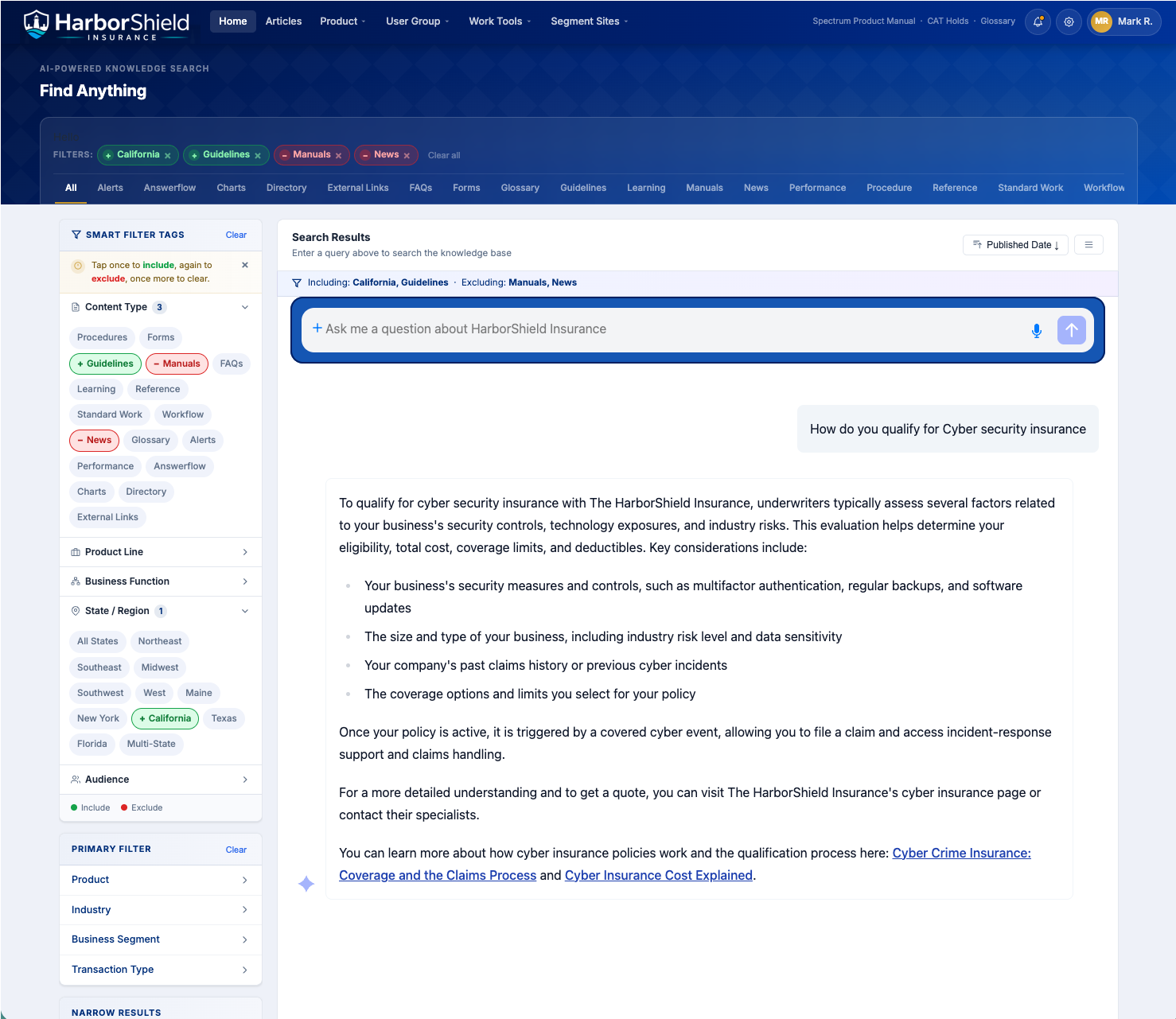
Anytime a tag is clicked or double clicked you update the ai12z control includeTag excludeTag
This internal knowledge portal uses the search result control to bring together AI-powered answers and structured knowledge discovery in one experience.
Users can ask natural language questions, just like they would with an AI assistant, while also narrowing results with smart filters. These filters can include or exclude specific tags, such as content type, region, audience, product area, business function, or other categories defined by the organization.
When content is ingested into the vector database, each piece of content can include its associated tags as metadata. The search result control passes the selected filters and tags into the retrieval process, so the vector database can return the most relevant matching content for the LLM to use in its response.
This creates a powerful combination. AI RAG search helps users ask questions and get relevant answers from trusted content, while faceted search gives them precise control over the scope of the results.
For example, a user can include performance-related content, limit results to a specific region, focus on content for a specific audience, and exclude manuals or other content types that are not relevant to the task.
The result is a smarter internal search experience. Users get the flexibility of conversational AI, the accuracy of curated knowledge, and the control of structured filters, all working together inside the portal.
3. Alternative Approach: Separate Agents per User Group
Alternatively, you can create separate agents for each user group (e.g., Bronze, Silver, Gold). Each agent ingests only the content relevant to its group. When loading the bot, select or apply the appropriate agent key based on the user’s access level. This ensures users only see content intended for their group.