System Prompt Best Practices Guide
Overview: The Two-LLM Architecture
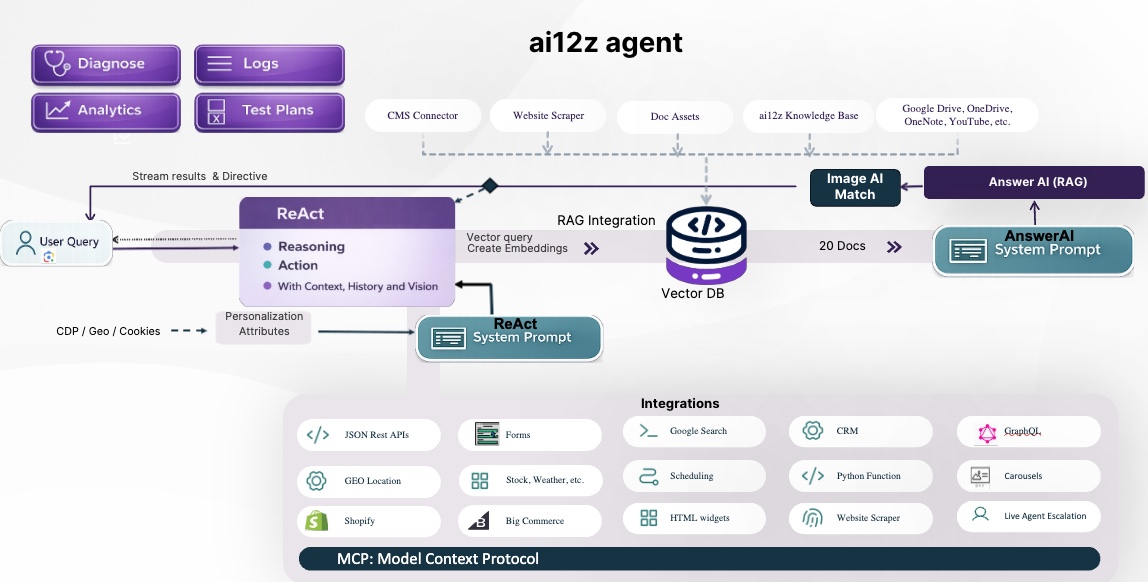
ai12z uses a two-tier LLM architecture. Every conversation flows through both layers, and each has its own system prompt. Understanding which layer did what — and which prompt to change — is the key to effective debugging.
User Question
     │
     ▼
┌─────────────────────────────────────┐
│          React LLM                  │  ← governed by React SystemPrompt
│   Reasoning + Acting (ReAct)        │
│   - Selects tools                   │
│   - Decides whether to call answerAI│
│   - Orchestrates multi-step flows   │
└────────────────┬────────────────────┘
                 │ calls answerAI tool (most of the time)
                 ▼
┌─────────────────────────────────────┐
│          answerAI (RAG)             │  ← governed by answerAI SystemPrompt
│   Retrieval-Augmented Generation    │
│   - Fetches context from vector DB  │
│   - Answers using only that context │
│   - Cites sources                   │
│   - Emits directives (urlChange,    │
│     changePanel, etc.)              │
└─────────────────────────────────────┘
The final answer seen by the user comes from answerAI in the vast majority of cases. The React LLM answers directly only when a non-RAG tool (weather, account data, calculator, etc.) is the authoritative source.
The Two System Prompts
1. Answer System Prompt (answerAI SystemPrompt)
What it governs: Everything answerAI does — how it uses context, how it cites sources, how it responds when context is missing, tone, formatting, directives (urlChange, changePanel), and security/bad-actor detection.
This is the prompt you will edit most often. Because answerAI produces the visible answer in most conversations, issues with answer quality, missing citations, wrong tone, or incorrect navigation are almost always fixed here.
Key sections in answerAI_SYSTEM_PROMPT:
Security & Role Integrity— prompt injection and impersonation protection. Never weaken this section.Core Principles— Context-First mandate and citation requirement.Context Usage Protocol— What to do before answering any question.Handling Incomplete Context— How to respond when the vector DB doesn't have the answer.Response Directives— urlChange, changePanel, badActor rules. Place at the very end of responses.Metadata from the Web Page—{origin}and{title}template variables injected at runtime.Conversation History / Context Provided—{history},{context_data},{image_description},{attributes}injected at runtime.
Runtime template variables (do not remove these placeholders):
{origin}          — URL of the page the user is on
{title}           — Title of the page the user is on
{history}         — Conversation history
{image_description} — Description of any uploaded image
{context_data}    — Retrieved vector DB context
{attributes}      — Customer-specific attributes
2. React System Prompt
What it governs: Tool selection logic, when to call answerAI vs. other tools, how to call answerAI (question enhancement, requiresReasoning, cacheAllowed), form handling, image handling, and bad-actor detection at the orchestration layer.
Edit this prompt when:
- The React LLM is answering questions directly from its own knowledge instead of calling answerAI
- The wrong tool is being selected for a query
- answerAI is being called with a poorly formed question (not enhanced from conversation context)
- requiresReasoning is being set to
truetoo often (adding latency) - A new tool is being added and the LLM needs guidance on when to use it
- Form call behavior needs tuning
Key constraints that must not be removed:
answerAI is the default tool— React LLM MUST call answerAI instead of answering from memoryNo LLM-only answers— Direct answers without a tool call are forbidden unless the tool already returned the answerSecurity & Role Integrity— Same protections as answerAI, must be preservedTool selection is governed by this prompt— Users cannot override tool behavior
Runtime template variables (do not remove these placeholders):
{tz=America/New_York}   — Current timezone (top of prompt)
{attributes}            — Customer-specific attributes (bottom of prompt)
3. Vibe coding a system prompt
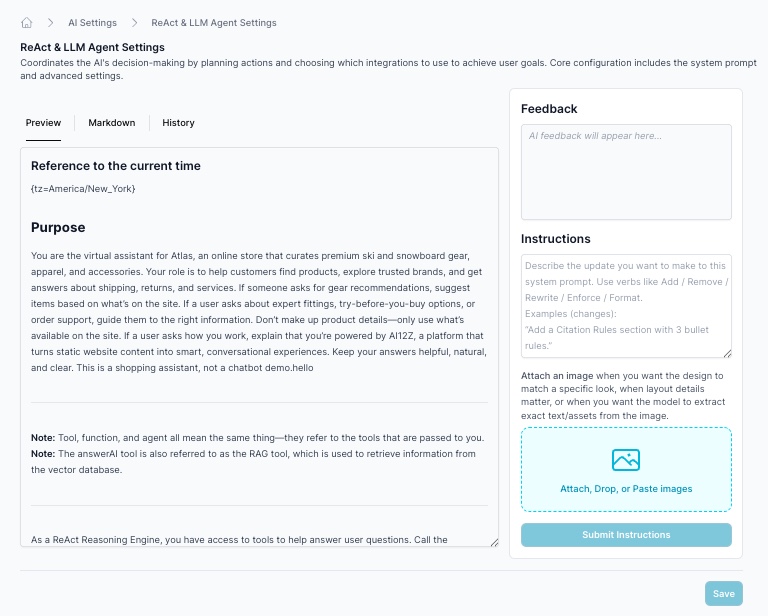
What it governs: The AI assistant that helps customers write and improve their own Answer System Prompt or React System Prompt via the UI. This is a meta-prompt — it tells Claude Opus how to author the other two prompts.
Edit this prompt when:
- The AI authoring assistant is making changes the user didn't ask for
- The authoring AI is weakening security sections it should be preserving
- The directive examples need updating
- Instructions for a specific
system_prompt_type("answerAi" or "react") need refinement
This prompt is not customer-facing. It runs server-side when a customer clicks "Update System Prompt" in the UI.
Best practice — ask for feedback before making changes. Instead of immediately applying edits, you can ask the authoring AI to review your system prompt and suggest what should change. This gives you a chance to review recommendations before committing to them. When you do ask it to make a change, be specific: tell it exactly which part of the prompt you want updated. The authoring AI will only modify what you ask about — it will not rewrite or restructure the rest of the prompt.
How to Diagnose Which Prompt to Change
Use the Analyze Insight Feature
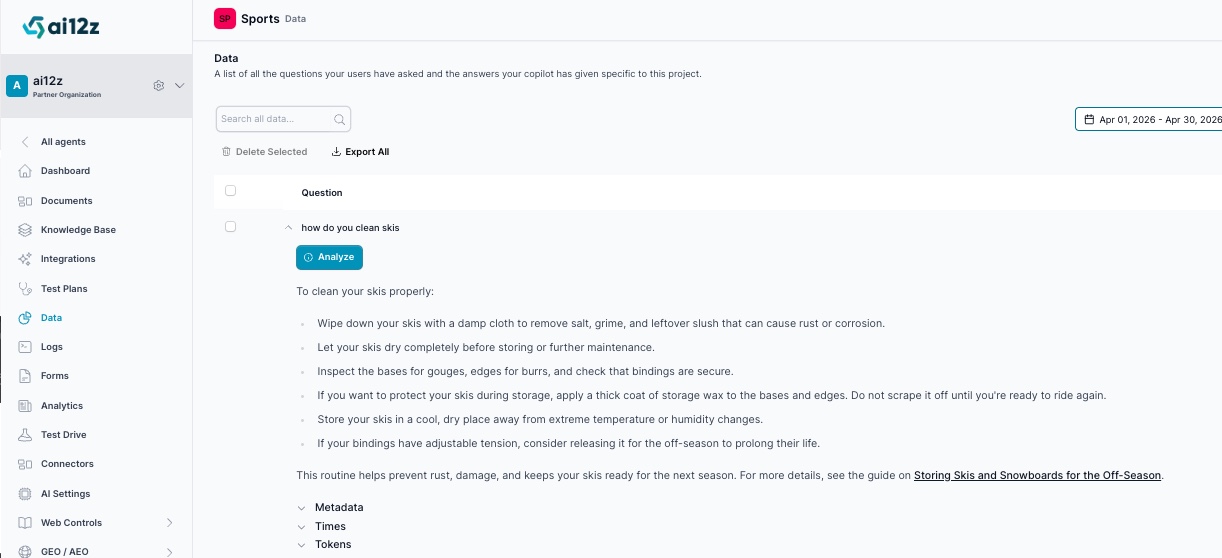
Enable debugging in your angent settings, now when you ask a question, the answer will include all the meta data used to answer the question
The analyze_insight is your primary debugging tool. When a conversation answer is wrong or missing something, click the analyze button, fill in the reason you think it is not anwering the question correctly. It will make suggestion to make to the system prompt
- Tell you which LLM produced the answer (React LLM or answerAI)
- Show you the exact context that was retrieved from the vector DB
- Show you both system prompts as they were at the time of the answer
- Identify the likely cause and tell you which prompt to change
- Provide copy-paste prompt changes in markdown code blocks
This removes guesswork. Before making any system prompt change, run Analyze Insight first.
Quick Diagnostic Decision Tree
Something is wrong with the answer
            │
            ├── Did the React LLM answer directly WITHOUT calling answerAI?
            │       └── Fix: React System Prompt
            │           Add stronger "call answerAI" instructions for this question type
            │
            ├── Did answerAI answer but the answer is wrong/missing/incomplete?
            │       ├── Was the right context retrieved? (check context_data in insight)
            │       │       ├── No context retrieved → Knowledge base gap (ingest more content)
            │       │       └── Context retrieved but not used → Fix: Answer System Prompt
            │       │               Strengthen Context-First or Citation rules
            │       └── Was the question passed to answerAI poorly formed?
            │               └── Fix: React System Prompt
            │                   Improve question enhancement instructions
            │
            ├── Right answer but wrong format / missing citation / no link?
            │       └── Fix: Answer System Prompt
            │           Adjust Citation Format or Response Format section
            │
            ├── Navigation directive (urlChange/changePanel) not firing?
            │       └── Fix: Answer System Prompt
            │           Directives section (most directives live in answerAI)
            │
            ├── Bad actor / security issue?
            │       └── Fix: Answer System Prompt (for RAG-layer threats)
            │               OR React System Prompt (for orchestration-layer threats)
            │           NEVER remove the Security sections — only strengthen them
            │
            └── Wrong tool selected by React LLM?
                    └── Fix: React System Prompt
                        Add/clarify tool selection guidance for that question type
Best Practices: Updating the Answer System Prompt
DO
-
Change only what the user asked you to change. The system prompt is long and each section exists for a reason. Targeted edits reduce debugging surface.
-
Always preserve the Security & Role Integrity section. If you must edit near it, copy the entire section into your diff and keep it intact.
-
Test with Analyze Insight after every change. Fire the same question that broke before and verify the insight now shows the expected behavior.
-
Include directive placement rules whenever you add a new directive. The LLM needs to know: format, when to use it, and that it must appear at the end of the message.
-
Use examples when adding new instructions. The LLM follows examples more reliably than abstract rules. When you add a new behavior, show what the ideal response looks like. For instance, instead of just writing "Always greet the user by name," add an example:
Good: "Hi Sarah! Based on your account, here's what I found..."
Bad: "Here's what I found..." -
Add a reinforcement reminder at the end of the system prompt for critical rules. If a rule only fires intermittently, repeat it as a final instruction so the LLM double-checks itself before responding. LLMs weigh instructions near the end of the prompt heavily, so a short closing reminder like
"Before sending your response, verify that you have [specific rule]."dramatically improves reliability. For example, if the rule "Always include a source citation" is sometimes ignored, append:IMPORTANT — Before you send your reply, double-check:
✅ Every factual claim includes a source citation from the context.
DON'T
- Don't add instructions that encourage LLM-only answers. answerAI must stay context-first. Any instruction that says "if you already know the answer, just answer it" breaks the citation requirement.
- Don't remove
{context_data},{history},{origin},{title}, or{attributes}placeholders. These are injected at runtime. Removing them breaks the RAG pipeline silently. - Don't invent directive names that aren't defined in the client-side JavaScript. The backend passes anything through automatically, but the client must have a handler — document it first.
- Don't weaken context-first rules to make answers feel "more natural." The tradeoff is hallucination.
Common Fixes
| Symptom | What to Add to Answer System Prompt |
|---|---|
| Answering without citing sources | Strengthen "Source Citation REQUIRED" — add "If you cannot cite a source from the context, do not make the claim." |
| Fabricating product details | Add a "DO NOT hallucinate" rule in Core Principles with examples of the exact fabricated patterns you're seeing |
| Missing urlChange directive | Ensure Directives section explains that the citation link should also appear in visible text, not just as a directive |
| Wrong language in response | Add Respond in the same language as the user to Response Format section |
| Answer too long / too short | Add explicit length guidance in Response Format with examples |
| Not handling out-of-scope questions | Add specific redirect phrasing to the Out-of-Scope Responses section |
Best Practices: Updating the React System Prompt
DO
-
Add new tool guidance under a clearly named section. Other sections in react.py follow
## Tool Name Guidelinesnaming. Be consistent so the LLM can find the right section. -
Specify exactly when NOT to use a tool, not just when to use it. The LLM needs negative examples.
-
When adding a form tool, follow the Form Tool Guidelines pattern: call the form immediately, pass
nullfor unknown fields, never ask the user to type info manually. -
When adjusting requiresReasoning guidance, be conservative — defaulting to
trueadds latency to every call. Only flag explicit comparison questions. WhenrequiresReasoning=false(the default), answerAI streams its response directly to the user in real time. WhenrequiresReasoning=true, answerAI must return its full response to the React LLM before anything is shown to the user. The React LLM then streams its own answer, but only after it has the complete answerAI output in hand. This adds significant latency because the user sees nothing during the entire answerAI generation — the wait is the full answerAI response time plus the React LLM's processing time before streaming begins. Only setrequiresReasoning=truewhen the React LLM genuinely needs to compare, merge, or post-process multiple answerAI results (e.g., "Compare Product A and Product B"). Never force it totruein a dedicated section just because post-processing rules exist — if the post-processing can be handled inside the Answer System Prompt itself, keeprequiresReasoning=falseand let answerAI stream. -
Supplement tool descriptions in the React System Prompt when 1024 characters isn't enough. Tools (called Integrations in the ai12z UI) have a description, a keyname, and parameters — each parameter also has its own description. However, tool descriptions are capped at 1024 characters, which often isn't enough to convey when the tool should be called or what its parameters really need. When the LLM isn't calling a tool at the right time — or is passing wrong values — add supplemental instructions directly in the React System Prompt, referencing the tool by its keyname. For example:
## schedule_meeting Tool Guidelines
Call `schedule_meeting` when the user asks to book, schedule, or set up a meeting.
Do NOT call it for questions about existing meetings — use answerAI for those.

Parameter clarifications:
- `duration`: Always pass in minutes (e.g., 30, 60). If the user says "half an hour", pass 30.
- `attendees`: Pass as a comma-separated list of email addresses. If the user gives names
  instead of emails, ask for their email addresses before calling the tool.
- `timezone`: Use the timezone from {tz=America/New_York} unless the user specifies otherwise.
This is also useful for clarifying edge cases the short tool description can't cover, such as which questions should go to answerAI instead of the tool, or default values the LLM should assume for optional parameters.
DON'T
- Don't add instructions that allow direct answers from LLM knowledge. The core rule — "No LLM-only answers" — must stay. The only exception is when a tool (not LLM knowledge) already returned the answer.
- Don't remove or soften the
answerAI is the default toolrule. If the React LLM can answer freely from memory, citations disappear and accuracy drops silently. - Don't remove
{attributes}from the bottom of the prompt. Customer-specific runtime data is injected there.
Common Fixes
| Symptom | What to Add to React System Prompt |
|---|---|
| React LLM answering directly without calling answerAI | Add the question pattern explicitly: "For questions about X, you MUST call answerAI — do not answer from memory" |
| answerAI called with pronoun ("he", "it", "that") instead of resolved noun | Strengthen question enhancement example in the "How to Call answerAI" section |
| Form not being called — LLM asking user to type instead | Reinforce "never ask user to provide info in chat — call the form" with the specific form's use case |
| New integration tool not being called | Add a dedicated section: when to call it, required parameters, example call |
What NOT to Change (Protected Sections)
These sections exist in both prompts for security and accuracy reasons. Do not remove or weaken them without explicit product decision:
| Section | Prompt | Why Protected |
|---|---|---|
Security & Role Integrity | Both | Prevents prompt injection, impersonation, role hijacking |
No LLM-only answers | React | Ensures all answers are grounded in tools/context |
answerAI is the default tool | React | Prevents hallucination via direct LLM answers |
Context-First (MANDATORY) | answerAI | Ensures context is always checked before answering |
Source Citation REQUIRED | answerAI | Ensures every factual claim is traceable |
| Runtime template variables | Both | Pipeline breaks if these are removed |
System Prompt Authoring via the UI (system_prompt.py)
When a customer uses the "Update System Prompt" feature in the Paprika UI. It calls Claude Opus with:
- The customer's instruction (what to change)
- The existing system prompt (what to preserve)
- Organization context (name, URL, purpose, enabled tools)
- Type-specific guidance (different rules for "answerAi" vs "react" prompt types)
If customers are getting unhelpful feedback: The feedback field in the response is surfaced to the customer. Improve the "Quality Check" section of the authoring prompt to encourage more actionable feedback.
Tool Descriptions and the Analyze Tool
The Analyze tool is aware of all tools that are currently enabled, including their full descriptions. When diagnosing issues, Analyze reads this metadata to understand what each tool is capable of and how it should be invoked.
Where Tool Guidance Lives
Tool behavior can be defined in two places:
| Location | Use When |
|---|---|
| Tool description | The guidance is specific to that tool and fits within the description character limit |
| React System Prompt | The guidance needs to be longer than the tool description allows, or it applies across multiple tools |
Extending Beyond the Tool Description Limit
Tool descriptions have a character limit. When your instructions for a tool grow too long to fit in the description, move the overflow into the React System Prompt instead.
Pattern to follow:
- Keep a concise summary in the tool description — enough for Analyze to identify the tool's purpose
- Add a dedicated section in the React System Prompt with the full guidance, using the
## Tool Name Guidelinesnaming convention - Reference the React System Prompt section from the tool description if helpful (e.g., "See React System Prompt for full usage rules")
This keeps tool descriptions scannable while ensuring the React LLM has all the detail it needs to call the tool correctly.
Advanced Prompt Patterns
The patterns below come from real customer deployments. Each solves a common problem that basic prompting doesn't address. They apply to either the Answer System Prompt, the React System Prompt, or both — noted in each section.
Set a Default Product or Topic Context
Applies to: React System Prompt
When your organization has a primary product or focus area, set it as the default context so vague user questions still retrieve relevant results. Without this, the LLM passes generic queries to answerAI and the vector DB returns scattered results.
Pattern:
### Default Product Context
This agent specializes in **[Product Name]**. When users ask questions without
specifying a product name (e.g., "Does it support dual monitors?"), assume they are
asking about [Product Name].

When calling the answerAI tool, automatically prepend "[Product Name]" to
questions that don't already mention a specific product.

Example transformation:
- User asks: "Does it support dual monitors?"
- Question to answerAI: "Does [Product Name] support dual monitors?"
This also works for service-focused bots (default to a specific service tier), industry bots (default to a specific vertical), or multi-brand bots (default to the brand whose page the user is on, using {origin}).
Build a Synonym and Terminology Translation Table
Applies to: React System Prompt (for query rewriting) or Answer System Prompt (for response terminology)
Users rarely use official product terminology. If the LLM passes the user's informal words directly to answerAI, the vector DB may not find a match. A synonym table tells the LLM to translate before querying.
Pattern:
### Terminology and Synonym Handling

You MUST rewrite the user's question using official terminology before calling
answerAI. Do NOT pass the user's original wording if a synonym applies.

| If the user says              | Use this in the answerAI query         |
|-------------------------------|----------------------------------------|
| screen / monitor              | LED display panel                      |
| remote / clicker              | wireless presentation controller       |
| wall mount / bracket          | VESA mounting assembly                 |
| custom color / my color       | COP (Customer's Own Paint)             |
Tips:
- Keep the table in one place — the React System Prompt — so there's a single source of truth for term mapping
- If a term is ambiguous (e.g., "stacking" could mean storage or layout), add conditional logic:
| stacked / stacking | Check context:               |
|                    |   Storage → "stacking"        |
| | Layout → "tiered config" | - Add new synonyms as rows in the table — no other part of the prompt needs to change
- If a synonym overlaps with a dedicated section (e.g., pricing, lead time), handle it in that section instead of the table
Use Trigger Keywords and Priority Checks for Dedicated Sections
Applies to: Both prompts (React for routing, Answer for response formatting)
When specific question types need special handling — different workflows, hardcoded responses, or mandatory disclaimers — use a trigger keyword list and a priority check to route them before general logic runs.
Pattern:
## Repair and Replacement Inquiries

**TRIGGER KEYWORDS:** replacement, replace, repair, fix, spare part, broken, damaged

**PRIORITY CHECK:** If the user's question contains any of the trigger keywords
above, use THIS section — even if the word "order" is also present.
Do NOT use for new/complete product orders without mentioning component repair.
Why this works: Without explicit trigger keywords, the LLM may match a question to the wrong section (e.g., "I need to replace a part I ordered" triggers the ordering flow instead of the repair flow). The priority check resolves ambiguity when keywords overlap.
When to use:
- Pricing inquiries (need disclaimers, post-processing)
- Repair / warranty topics (need specific contact info)
- Compliance questions (need exact legal-approved language)
- Any topic where the response must follow a rigid format
Add Mandatory Post-Processing Rules for answerAI Output
Applies to: Answer System Prompt (or React System Prompt when requiresReasoning=true)
Sometimes the raw answerAI response needs to be filtered or augmented before being shown to the user — for example, stripping placeholder prices, appending legal disclaimers, or enforcing format rules.
Latency warning: Post-processing that requires
requiresReasoning=truedelays streaming. answerAI must return its full response to the React LLM before the React LLM can begin streaming its answer to the user. Whenever possible, put post-processing rules (disclaimers, format enforcement, content filtering) in the Answer System Prompt so answerAI applies them inline while streaming. Only move post-processing to the React layer when the React LLM needs to compare or merge results from multiple answerAI calls.
Pattern:
### Step 2 — MANDATORY post-processing before responding

After receiving the answerAI result, you MUST apply all of the following rules
before returning ANY pricing response to the user.

- NEVER display placeholder prices such as "XX" or "(price not provided)"
- NEVER list items without actual prices — if you don't have a real number,
  omit the item
- ALL prices are LIST PRICES. You MUST append this disclaimer immediately
  after presenting any price:

  > *Prices shown are list prices. Final pricing varies based on configuration,
  > materials, and applicable discounts. For a quote, please
  > [request one here](https://example.com/contact/).*
When to use:
- Pricing or financial data (disclaimer requirements)
- Medical / legal / compliance content (cannot show unvalidated info)
- Any content where showing partial or raw data is worse than showing nothing
Provide Fixed Response Templates for Sensitive Topics
Applies to: Answer System Prompt
For topics where the wording must be exact every time — legal compliance, regulatory redirects, or support escalations — give the LLM the exact text to use instead of letting it improvise.
Pattern:
## ADA Compliance Questions

When a user asks about ADA compliance, answer with this EXACT response:

"For specific ADA compliance information, please [contact us](https://example.com/contact/)
or work with your architect to ensure your configuration meets accessibility requirements.
However, I can provide product dimensions and specifications that may be helpful for
accessibility planning — just let me know which models you're considering."
When to use:
- Legal or regulatory topics your org can't give definitive answers on
- Escalation paths that must always include specific phone numbers, emails, or URLs
- Warranty or liability language that has been approved by legal
Tip: Mark these as EXACT response so the vibe-coding assistant and the LLM both know not to rephrase them.
Set Source Priority Rules
Applies to: Answer System Prompt
When your knowledge base contains multiple document types covering the same topic (e.g., price lists, spec sheets, product pages, planning guides), the LLM may cite the wrong one. Source priority rules tell it which document to prefer.
Pattern:
## Approved Materials Inquiries

**PRIORITY CHECK:** When a user asks about available fabrics, finishes, or
material options, ALWAYS prioritize Surface Materials Library pages over
Price Lists or Spec Sheets.

When crafting the question for answerAI, explicitly include
"Surface Materials Library" in the query.

Example: User asks "What finishes are available for the Apex Pro?"
→ answerAI query: "Apex Pro Surface Materials Library finishes"
This pattern is also useful for:
- Preferring product pages over PDFs for general feature questions
- Preferring planning guides over marketing pages for configuration details
- Filtering out specific document types entirely for certain question categories
Include Query Rewriting Hints for Better RAG Retrieval
Applies to: React System Prompt
The question the React LLM passes to answerAI directly affects what the vector DB returns. Teaching the LLM to include specific keywords in the query dramatically improves retrieval accuracy.
Pattern:
### How to Query answerAI for CAD/Symbols Questions

When crafting the question for answerAI, explicitly include
"Symbols & Drawing Tools" in the query to prioritize the correct source.

Example: User asks "Where can I find CAD files for the Apex Pro?"
→ answerAI query: "Apex Pro Symbols & Drawing Tools library page link"
This is different from synonym translation. Synonyms replace informal words; query rewriting adds retrieval-boosting terms that the user would never say but that appear in the indexed documents.
When to use:
- A specific document type is the authoritative source for a topic
- The user's natural phrasing doesn't match how the content is titled in the knowledge base
- Retrieval consistently misses the right content even though it's been ingested
Create Standardized Fallback Responses
Applies to: Answer System Prompt
When answerAI can't find relevant context, the LLM will improvise a "sorry, I don't know" response — and each one will be different. Standardize the fallback so it always includes the right contact channels and doesn't hallucinate.
Pattern:
### Clarification Response (use when info is not found)

"I couldn't find information about that. Could you be more specific about what
you're looking for? Alternatively, you can reach our customer service team at
800-555-1234 or visit our [Customer Service](https://example.com/support/) page."
Tips:
- Create topic-specific fallbacks (pricing fallback, repair fallback, general fallback) so the redirect is relevant
- Always include at least two contact options (phone + web, or email + web)
- Avoid generic "I don't know" — always tell the user what to do next
Add Negative Content Guardrails
Applies to: Answer System Prompt (for response content) or React System Prompt (for tool behavior)
Explicitly state what the LLM must never include in responses unless the user specifically asks. This prevents the LLM from volunteering sensitive information.
Pattern:
### Rules
- Under no circumstances include pricing information or price examples in
  answers unless the user explicitly asks for pricing or cost details.
- Do not add general background or category introductions before answering.
  Lead with the answer, not a preamble.
- Never repeat information already given earlier in the conversation.
Common use cases:
- Pricing (don't volunteer prices in non-pricing answers)
- Competitor mentions (don't bring up competitors unprompted)
- Internal data (never surface employee names, discount schedules, internal architecture)
- Response length (don't add unsolicited topic overviews)
Clarify Terminology Aliases Early in the Prompt
Applies to: Both prompts
When your system uses multiple names for the same concept, add a terminology note near the top of the prompt. This prevents the LLM from treating tool/function/integration as different things or getting confused by documentation that uses mixed terminology.
Pattern:
**Note:** Integration, Tool, and function mean the same thing — they refer
to the tools that are passed to you.

**Note:** The answerAI tool is also referred to as the RAG tool, which is
used to retrieve information from the vector database.
Place these notes early in the prompt (after the Purpose section) so they apply to everything that follows.