Subscription
The Subscription page is where you select and manage your ai12z plan, choose your AI model, and estimate usage with the Plan Calculator.
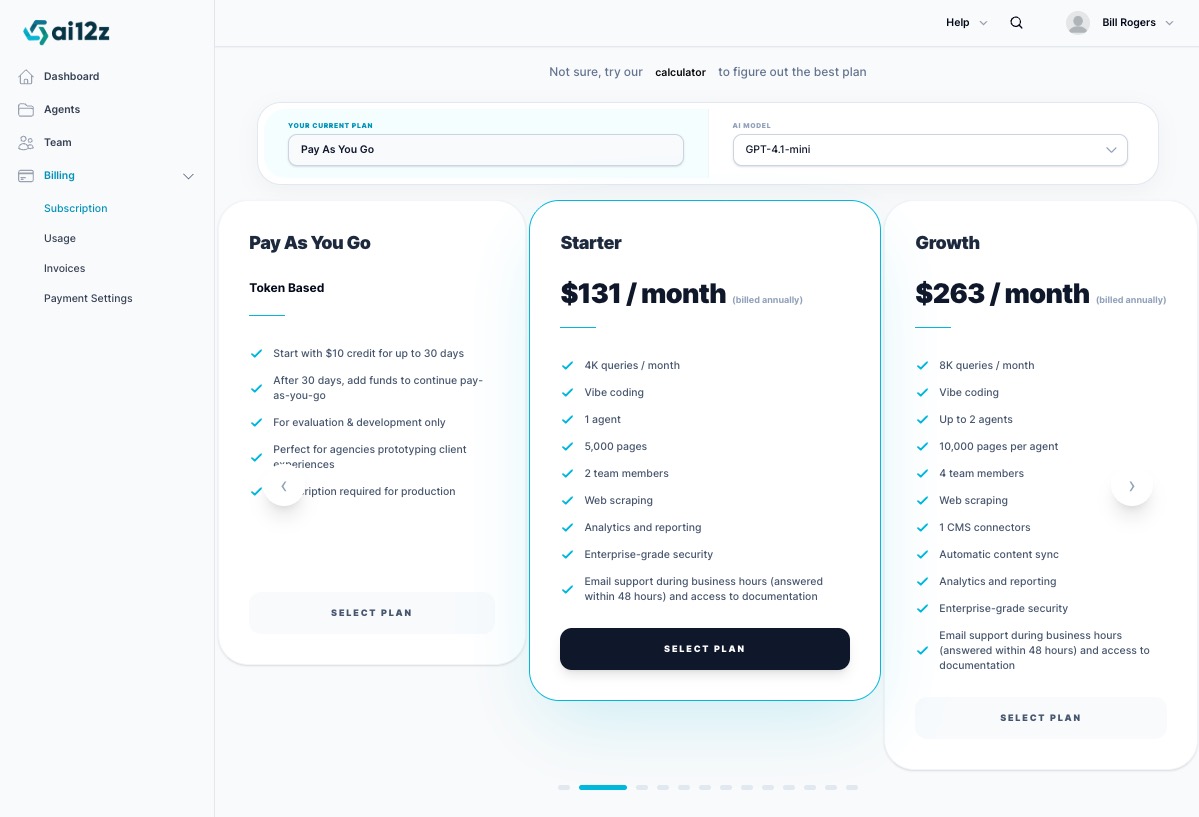
The Pay As You Go plan is for trial and development only. Any bot running on the Pay As You Go plan will display a watermark at the bottom indicating it is in development mode. You must upgrade to a paid subscription before going live with a production site.
Your Current Plan & AI Model
At the top of the Subscription page you'll see two controls:
- Your Current Plan — Displays the plan you are currently on
- AI Model — A dropdown to select which AI model powers your agents
Choosing an AI Model
ai12z supports a wide range of models including:
- GPT-4.1, GPT-4.1-mini, GPT-4.1-nano
- GPT-4o, GPT-4o-mini
- GPT-5, GPT-5-mini, GPT-5-nano
- Gemini 2.5 Pro, Gemini 2.5 Flash, Gemini 2.5 Flash Lite, Gemini 3 Pro
- Claude Opus 4, Claude Opus 4.5, Claude Sonnet 4, Claude Sonnet 4.5
- Amazon Nova Micro, Nova Lite, Nova Pro, Nova Premier
- Llama 4 Maverick, Llama 4 Scout
Our most popular and recommended model is GPT-4.1-mini. It delivers an excellent balance of response quality, speed, and cost efficiency for most use cases. If you are unsure which model to choose, start here.
Changing to a more expensive model will affect your token consumption. If you are on a subscription plan, the remaining balance from your current billing period is applied toward the upgraded cost.
Plans
ai12z offers several plan tiers to fit teams of all sizes. You can scroll through available plans on the Subscription page.
Pay As You Go — Token Based
| Feature | Detail |
|---|---|
| Pricing | Token-based, pay for what you use |
| Trial credit | $10 included for up to 30 days |
| After 30 days | Add funds to continue |
| Intended use | Evaluation and development only |
Important notes:
- Pay As You Go is intended for agencies and developers prototyping and evaluating ai12z
- A paid subscription is required for production use
- Bots on this plan display a development watermark
- For partners: The $10 trial credit applies to the parent organization. Sub-organizations under a partner account can use the shared credit, but adding a new sub-organization does not grant additional credit
Starter — $131 / month (billed annually)
| Feature | Detail |
|---|---|
| Queries / month | 4,000 |
| Vibe coding | ✓ |
| Agents | 1 |
| Vector docs | 5,000 |
| Team members | 2 |
| Web scraping | ✓ |
| Analytics and reporting | ✓ |
| Enterprise-grade security | ✓ |
| Support | Email during business hours (48-hour response) + documentation access |
Growth — $263 / month (billed annually)
| Feature | Detail |
|---|---|
| Queries / month | 8,000 |
| Vibe coding | ✓ |
| Agents | Up to 2 |
| Vector docs | 20,000 |
| Team members | 4 |
| Web scraping | ✓ |
| CMS connectors | 1 |
| Automatic content sync | ✓ |
| Analytics and reporting | ✓ |
| Enterprise-grade security | ✓ |
| Support | Email during business hours (48-hour response) + documentation access |
Additional plans — Business, Business+, Professional, Professional Plus, and Enterprise — are available for higher query volumes (20,000 to 400,000+ per month) and advanced features like Personalization, Directives, HIPAA, SSO, and Custom integrations.
Plan Calculator
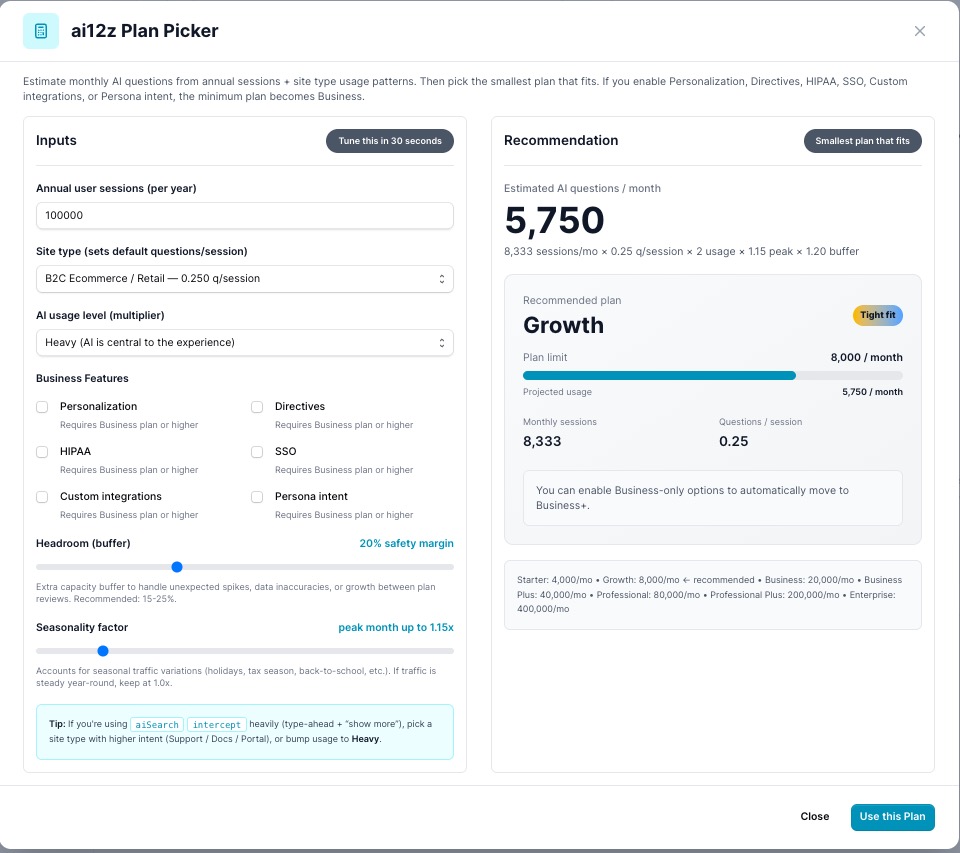
Not sure which plan is right for you? Click the calculator link at the top of the Subscription page to open the ai12z Plan Picker.
The calculator estimates your monthly AI query volume based on your actual traffic and usage patterns, then recommends the smallest plan that fits.
How to Use the Calculator
1. Enter your annual user sessions
Enter your total annual user sessions. You can find this number in Google Analytics or your site analytics platform under Sessions or Users per year.
2. Select your site type
The site type sets a default questions-per-session estimate based on typical usage patterns for that type of site:
| Site Type | Default q/session |
|---|---|
| B2C Ecommerce / Retail | 0.25 |
| Support / Docs / Portal | Higher |
| And more... | Varies |
3. Select your AI usage level
- Light — AI is used occasionally
- Moderate — AI assists but is not the primary experience
- Heavy — AI is central to the experience
4. Select Business Features (if applicable)
Enabling any of the following features requires the Business plan or higher:
- Personalization
- Directives
- HIPAA
- SSO
- Custom integrations
- Persona intent
5. Adjust Headroom (buffer)
The headroom slider adds a safety margin above your estimated usage to handle unexpected spikes, data inaccuracies, or growth between plan reviews. Recommended: 15–25% (default: 20%).
6. Adjust Seasonality factor
If your traffic peaks during certain times of year (holidays, tax season, back-to-school, etc.), increase this value to account for peak months. If traffic is steady year-round, keep it at 1.0x.
Reading the Recommendation
The right panel shows:
- Estimated AI questions / month — Your projected monthly query volume
- Recommended plan — The smallest plan that covers your projected usage
- Plan limit — The query cap for that plan
- Projected usage — Your estimate vs. plan limit (shown as a progress bar)
Click Use this Plan to go directly to that plan on the Subscription page, or Close to return without selecting.
Tip: If you use
aiSearchorinterceptheavily (type-ahead or "show more" features), select a site type with higher intent (Support / Docs / Portal) or bump usage to Heavy to avoid underestimating your query volume.
Purchase Subscription
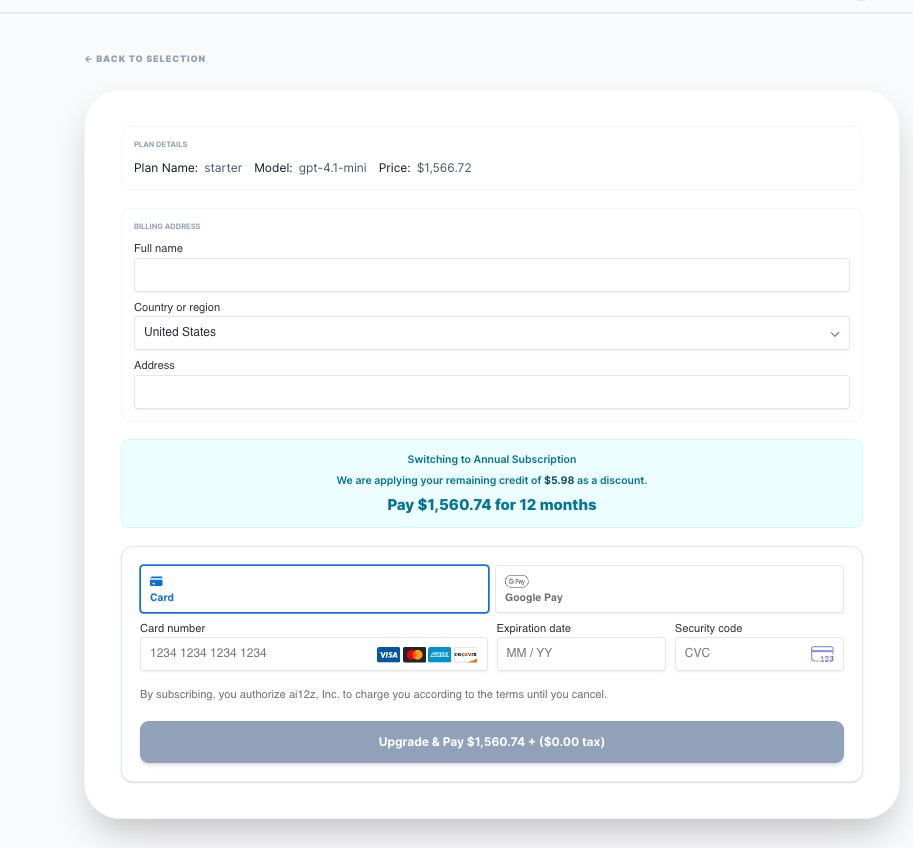
After selecting a plan, you are taken to the purchase screen to confirm your subscription and complete payment.
Plan Details
At the top of the screen, a summary shows the plan you are purchasing:
- Plan Name — The selected plan (e.g., Starter, Growth)
- Model — The AI model associated with this subscription (e.g., gpt-4.1-mini)
- Price — The full annual price for the plan
Billing Address
Enter your billing information:
- Full name — Name as it appears on your payment method
- Country or region — Defaults to United States; select your country from the dropdown
- Address — Your billing street address
Prorated Credit Applied
If you have an existing balance or remaining credit from a previous plan, ai12z automatically applies it as a discount on your new subscription. A highlighted notice will show:
"We are applying your remaining credit of $X.XX as a discount."
The final amount due reflects your plan price minus any applied credit. You are only charged the difference.
Payment Method
Choose how you'd like to pay:
- Card — Enter your card number, expiration date (MM/YY), and security code (CVC). Visa, Mastercard, American Express, and Discover are accepted.
- Google Pay — Select the Google Pay tab to pay using your saved Google Pay method.
Completing the Purchase
Once your billing address and payment details are filled in, click Upgrade & Pay to complete the subscription. The button displays the final amount due plus applicable tax.
By subscribing, you authorize ai12z, Inc. to charge your payment method according to the plan terms until you cancel.
After payment, your new plan is active immediately and your agents will operate under the updated query limits and model selection.
Upgrading your Plan or Modal
You can upgrade to a larger plan or a more powerful AI model at any time.
- Prorated credit — When you upgrade, the remaining balance from your current billing period is calculated and applied toward the cost of the new plan. You are only charged the difference.
- Model upgrades — Switching to a more expensive AI model follows the same proration logic — your remaining balance is applied to the new cost.
To upgrade, select the desired plan on the Subscription page and click Select Plan.
Partner: Managing Subscriptions Across Organizations
As a partner, the Subscription page includes an Organization selector that lets you manage plans for each of your sub-organizations independently.

Use the Organization dropdown to select which organization you want to view or assign a subscription to. The AI Model dropdown sets the model for that organization's subscription.
Funding Options for Sub-Organizations
| Scenario | How it works |
|---|---|
| Parent funds sub-org development | Keep the parent organization on Pay As You Go. Sub-organizations share the parent's trial credit while prototyping or in development. No separate payment method is needed. |
| Sub-org billed separately | Apply a Pay As You Go balance or paid subscription directly to a sub-organization using a different credit card. This is useful when a client or sub-org manages their own billing. |
| Sub-org on a paid subscription | Select the sub-organization from the dropdown, choose a plan, and complete the purchase. The subscription is assigned to that sub-organization and only applies to their usage. |
Sub-organizations cannot access Payment or Invoices — all billing is managed from the parent organization account.
Frequently Asked Questions
What's a token?
A token can be understood as a part of a word used in language processing. For English, one token roughly equals four characters or three-quarters of a word. To give you an idea, 1,000 tokens are about the same as 750 words.
How is pricing calculated for completions?
Completions are when the agent answers a question or completes a workflow step. The pricing is based on your subscription selection. If you are in development mode, you can use a pay-as-you-go model where the number of tokens used in both the question (input) and the agent's response (output) is counted. This ensures you are charged fairly for actual usage.
How long is the trial period?
The trial period is 30 days.
How long does implementation take?
Implementation timelines vary based on deployment complexity. Many organizations can launch a focused AI search or digital assistant experience within hours or days. More advanced deployments involving multiple business units, integrations, governance requirements, or custom AI experiences may require a phased rollout approach.
Can I pay monthly with an ai12z subscription?
ai12z subscriptions are purchased as annual subscriptions and paid up front for the year. We do not bill month to month.
Why is the pricing shown as a monthly amount?
The monthly amount is shown to make it easier to compare plan costs, but subscriptions are invoiced and paid annually.
Can I use a purchase order?
Yes. ai12z supports payment by purchase order. Once the purchase order is processed and payment is received, services can go live.
When does my ai12z service start?
Service begins after payment is received. For purchase orders, this means the subscription is activated once the invoice has been paid.
What happens if we cancel before the end of the year?
The subscription is for a full annual term. If a customer stops using the service before the end of the year, there is no monthly credit or refund for the unused portion of the annual subscription.
Do you offer month-to-month billing?
No. ai12z does not currently offer month-to-month subscription billing. Subscriptions are annual and paid up front.
What is a vector doc?
A vector doc is a piece of content that has been ingested into ai12z and converted into a searchable AI-ready format. This allows the agent to retrieve relevant information when answering user questions.
Examples of vector docs include:
- Web pages
- PDF content
- Help articles
- Knowledge base articles
- Product pages
- Documentation pages
- Other ingested content sources
Does one web page equal one vector doc?
Not always. Depending on the size and structure of the content, a single page or file may be split into multiple vector documents so the AI can accurately retrieve the most relevant sections.
Why do vector docs matter?
Vector docs determine how much content can be indexed and searched by the ai12z agent. For example, if a plan includes 5K vector docs, that means up to 5,000 AI-searchable content units can be stored and used by the agent.
Does the vector doc limit apply per agent or per organization?
The vector doc limit applies to the entire organization, not to individual agents. All agents within your organization share the same pool. You can view your total vector doc usage across the organization in Organization Settings.
Does the agent count include development agents?
Yes. The agent count includes all agents — production, staging, testing, and development.
If my plan includes 1 agent, can I also have a separate development agent?
A separate development agent counts as an additional agent. If your plan includes 1 agent, it covers one total agent environment. To add a development, staging, or testing agent, you would need to upgrade by adding an additional agent or moving to a larger package.
Why do I see "Production requires a paid subscription" on my bot?
This message appears when the agent is not licensed for production use. This usually means the agent is currently in Pay As You Go development mode or is part of a free 30-day trial.
Can I use the bot while in Pay As You Go?
Yes. Pay As You Go allows you to build, configure, test, and evaluate the agent in development mode. It is not intended for production use.
Can I use the bot during the free 30-day trial?
Yes. The free trial allows you to test ai12z before purchasing a paid subscription. During the trial, the agent is not considered a paid production agent.
Related
- Usage — Monitor your monthly query consumption
- Invoices — View and download past invoices
- Payment Settings — Manage your payment method