Content Transform — Ingestion-Time Python Transforming for Web Pages or URL ingestion
Table of Contents
- Overview
- The Transform Tab
- Testing a Transform
- Architecture
- How the Transform Works
- Configuration
- Available Runtime Environment
- Example 1 — Simple Transform
- Example 2 — JSON-LD Event Transform (Advanced)
- End-to-End Workflow: JSON-LD Event Carousel
- Agent 1: JSON-LD Data Agent
- Agent 2: Main Agent with Integration
- Carousel Template
- Reference: Node.js Crawlee Equivalent
Overview
The web pages loader (web_pages_loader.py) supports an optional ingestion-transform that runs a Python script against every page's content and metadata
before it is stored in the vector database. The Transform uses the ai12z RestrictedPython
The same engine that powers Python integrations across the platform.
This transform enables per-client customisation of how crawled or bulk-uploaded content is transformed before vectorisation. The primary use case is JSON-LD processing: cleaning structured data from web pages, synthesising descriptions via LLM, and preparing content for downstream carousel rendering.
Key capabilities:
- Rewrite
contentto a structured summary derived from JSON-LD - Clean and normalise
metadatafields (title, description, tags, image links) - Synthesise descriptions using an LLM call (
llm_query) - Skip pages that lack useful structured data
- Transform expired events by date
The Transform Tab
When setting up a website ingestion (Sitemap Extraction or URL ingestion), the Transform tab lets you attach a Python transform to the crawl. Transforms are shared, reusable documents — the same transform can be attached to multiple ingestions.
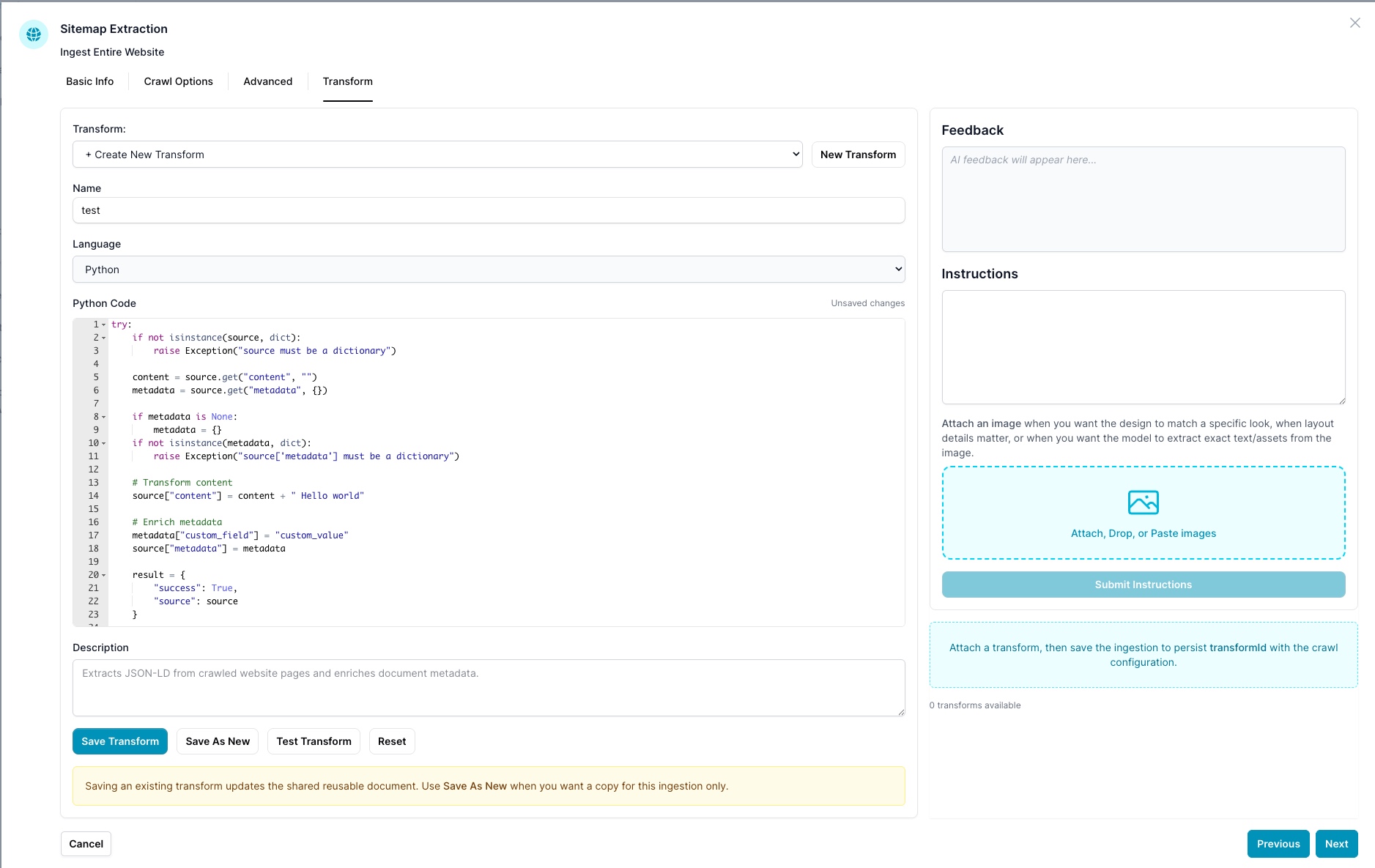
Creating and Selecting a Transform
- Use the Transform dropdown to select an existing transform or choose + Create New Transform.
- Click New Transform to start from a blank template.
- Give it a Name and optionally a Description, then choose Python as the language.
Saving
| Button | Behavior |
|---|---|
| Save Transform | Updates the shared transform document — affects every ingestion using it |
| Save As New | Creates a copy scoped to this ingestion only |
| Reset | Reverts to the last saved state |
Saving an existing transform updates the shared reusable document. Use Save As New when you want a copy for this ingestion only.
After attaching a transform, save the ingestion to persist the transformId with the crawl configuration.
Vibe Coding — AI-Assisted Transform Writing
The right-hand Instructions panel lets you describe what you want the transform to do in plain English. The AI writes the Python code for you.
- Type your instructions in the Instructions text area — for example: "Extract the first JSON-LD Event object from metadata.jsonld, skip pages with no events, and rewrite content as: event name + description + venue."
- Optionally attach a screenshot or JSON sample to the image drop zone to give the AI extra context.
- Click Submit Instructions — the AI generates and inserts the Python code directly into the editor.
- Review the generated code, adjust as needed, then Save Transform.
This is the fastest way to build a transform without writing Python from scratch.
Testing a Transform
Click Test Transform to open the test modal.
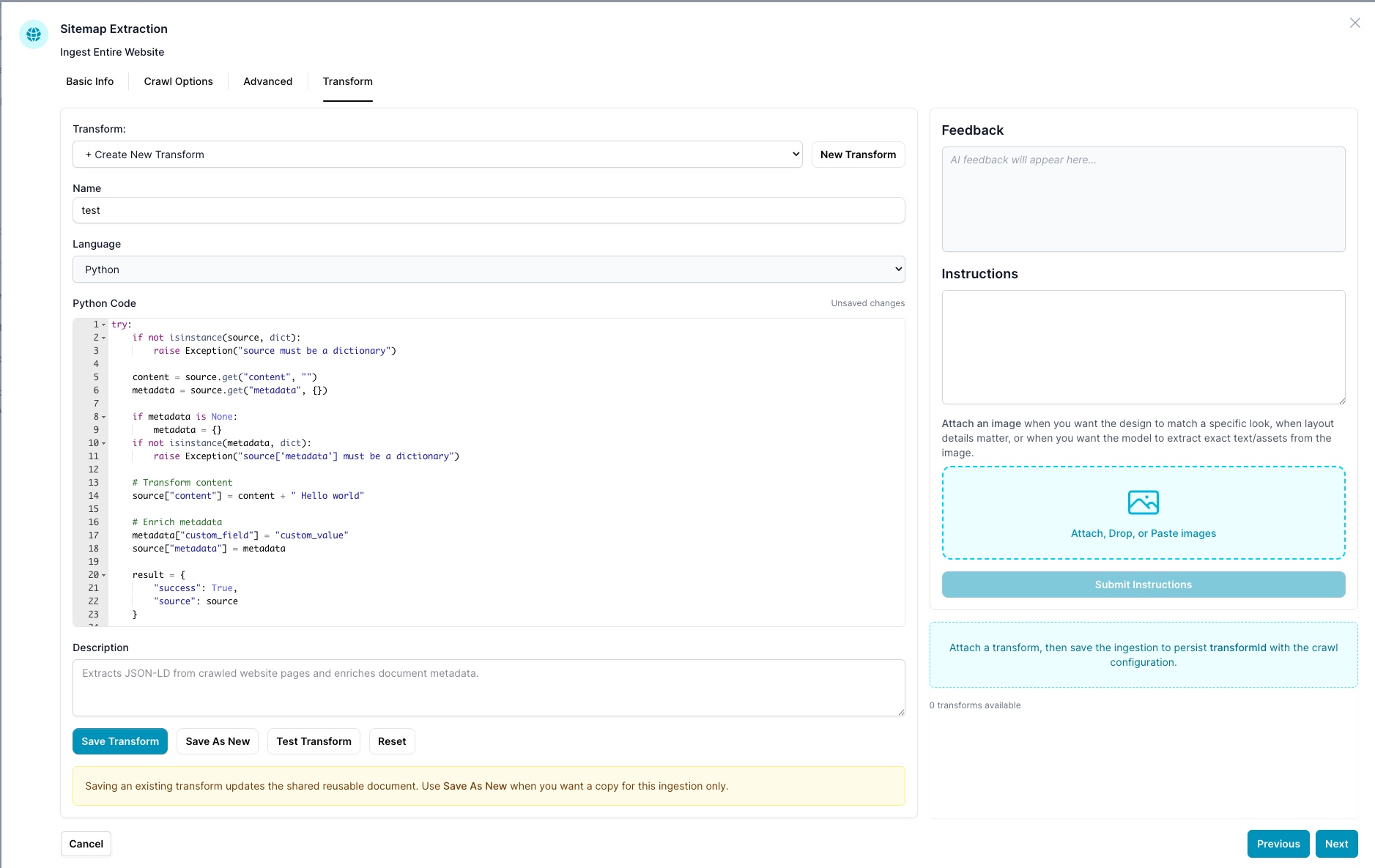
Test Transform Modal
The modal lets you run your transform against a sample source object before attaching it to a live ingestion.
| Area | Description |
|---|---|
| Example Source JSON | Paste or edit the input { content, metadata } object the transform will receive |
| Load Sample | Inserts a representative sample with content, metadata.url, metadata.title, and metadata.jsonld |
| Run Test | Executes the transform against the source JSON |
| Result JSON | Shows the transformed output returned by your script |
| Feedback / Errors | Displays runtime errors or any log_message() output from your script |
| Duration / Documents Tested | Shows how long the transform took and how many documents were processed |
Tip: Use Load Sample first to see the exact structure your code receives, then edit it to match a real page from your target site before running.
Architecture
The system uses a two-agent pattern for rich JSON-LD experiences like event carousels:
                                  ┌──────────────────────────┐
                                  │      ai12z Ingestion     │
                                  │                          │
                                  │                          │
                                  │  Crawls site, extracts   │
                                  │  JSON-LD + page content  │
                                  │  → bulk-upload.json      │
                                  └────────────┬─────────────┘
                                               │
                                               ▼
┌──────────────────────────────────────────────────────────────────────┐
│                    Agent 1: JSON-LD Data Agent                       │
│                                                                      │
│  Ingests bulk-upload.json via web_pages_loader.py                    │
│                                                                      │
│  ┌────────────────────────────────────────────────────────────────┐  │
│  │  TransformPython (runs per page at ingestion time)                │  │
│  │                                                                │  │
│  │  • Extracts Event JSON-LD from metadata                        │  │
│  │  • Builds clean location, image, attendance mode               │  │
│  │  • Optionally calls LLM to synthesise description + eventType  │  │
│  │  • Rewrites content for better vector embeddings               │  │
│  │  • Skips pages with no valid JSON-LD                           │  │
│  └────────────────────────────────────────────────────────────────┘  │
│                                                                      │
│  Vector DB stores:                                                   │
│    content  = structured text (name + description + location + …)    │
│    jsonld   = [{ cleaned event object }]                             │
│    title    = event name                                             │
│    tags     = ["Concerts", "Dance", …]                               │
└────────────────────────────┬─────────────────────────────────────────┘
                             │
                             │  POST /bot/search (returnContent: true)
                             │
┌────────────────────────────▼─────────────────────────────────────────┐
│                  Agent 2: Main Conversational Agent                   │
│                                                                      │
│  Integration: REST API → Agent 1's /bot/search                       │
│                                                                      │
│  Python code (runs at query time):                                   │
│    • Parses JSON-LD from returned docs                               │
│    • Transforms out past events                                         │
│    • Sorts by earliest upcoming date                                 │
│    • Uses LLM to rank/match events to user query                     │
│    • Returns items[] + ids[] for carousel rendering                  │
│                                                                      │
│  Carousel template renders event cards with:                         │
│    image, name, location, date, format badges, description, CTA      │
└──────────────────────────────────────────────────────────────────────┘
How the Transform Works
In web_pages_loader.py, just before a page is appended to the ingestion batch, the
loader checks the document setting TransformEndpoint. When truthy, it:
- Reads the Python code from
settings.TransformPython - Executes it via
RestrictedPython.python_code()withsource = {"content": ..., "metadata": ...} - Inspects the result:
- Success:
{"status": "success", "result": {"success": True, "source": {"content": ..., "metadata": ...}}}→ uses the transformed content and metadata - Failure / skip:
result.successisFalseorNone→ the page is skipped (not ingested)
- Success:
- Logs a warning for skipped pages
The Transform is applied in both code paths:
- Sitemap / jsonLinks path — pages scraped directly from URLs
- Pre-crawled content path — pages already stored in the link collection (e.g. from ai12z Crawlee bulk upload)
Configuration
| Document Setting | Type | Description |
|---|---|---|
TransformEndpoint | any truthy value | Enables the Transform when set (e.g. true, a URL, or any non-empty string) |
TransformPython | string | The Python code to execute per page. Uses the RestrictedPython sandbox. |
If TransformEndpoint is empty or absent the Transform is disabled and the loader behaves
exactly as before.
Available Runtime Environment
The Transform Python code runs inside RestrictedPython with access to:
Variables
| Variable | Type | Description |
|---|---|---|
source | dict | {"content": "page text…", "metadata": {…}} — the page being processed |
project | dict | The ai12z project object |
llm | dict | LLM parameters (may be {} during ingestion) |
result | — | Must be set by the script before it exits |
Built-in Modules & Functions
| Name | Description |
|---|---|
json | JSON parsing and serialisation |
datetime, timedelta, timezone | Date/time handling |
re | Regular expressions |
math | Math functions |
log_message(msg) | Logs an info message visible in the ai12z project logs |
llm_query(project, prompt, system_message, model_name, temperature, top_p) | Call an LLM — returns {"answer": "…"} |
BeautifulSoup | HTML parsing |
json.loads(), json.dumps() | JSON operations |
| Standard builtins | len, isinstance, enumerate, sorted, range, list, dict, str, int, float, etc. |
Result Contract
The script must set a global result variable:
# On success — return transformed content + metadata
result = {
    "success": True,
    "source": {
        "content": "new content string",
        "metadata": { ... }
    }
}

# On failure / skip — page will not be ingested
result = {
    "success": False,
    "error": "reason for skipping"
}
The loader reads result from Transformed["result"] (the RestrictedPython wrapper adds
{"status": "success", "result": <your result>}).
Example 1 — Simple Transform
A minimal Transform that appends text to content and adds a field to metadata. Useful as a starting template.
try:
    if not isinstance(source, dict):
        raise Exception("source must be a dictionary")

    content = source.get("content", "")
    metadata = source.get("metadata", {})

    if metadata is None:
        metadata = {}
    if not isinstance(metadata, dict):
        raise Exception("source['metadata'] must be a dictionary")

    # Transform content
    source["content"] = content + " Hello world"

    # Enrich metadata
    metadata["custom_field"] = "custom_value"
    source["metadata"] = metadata

    result = {
        "success": True,
        "source": source
    }

except Exception as e:
    log_message("Simple Transform error: " + str(e))
    result = {
        "success": False,
        "error": str(e)
    }
Example 2 — JSON-LD Event Transform (Advanced)
This is the production Transform for JSON-LD event ingestion. It replaces the equivalent processing done by the Node.js Crawlee post-processor, but runs at ingestion time inside the ai12z platform.
What it does:
- Extracts Event JSON-LD objects from
metadata.jsonld - Builds clean location with address and geo coordinates
- Normalises image URLs (fixes protocol-relative
//prefixes) - Maps attendance mode (
online/offline/mixed) - Transforms out events with all dates in the past
- Optionally calls the LLM to synthesise a description and classify the event type
- Rewrites
contentto a structured text block for better vector embeddings - Updates
metadatawith clean title, description, tags, and image links - Skips pages that have no valid Event JSON-LD
try:
    content = source.get("content", "")
    metadata = source.get("metadata", {})
    jsonld_items = metadata.get("jsonld", [])

    if not jsonld_items or not isinstance(jsonld_items, list):
        log_message("No JSON-LD found, skipping page: " + str(metadata.get("url", "")))
        result = {"success": False, "error": "No JSON-LD data"}
    else:
        now = datetime.now(timezone.utc)
        processed_events = []

        for item in jsonld_items:
            # --- Build clean location -----------------------------------
            location = None
            if item.get("location"):
                loc = item["location"]
                location = {"name": loc.get("name", "")}
                if loc.get("address"):
                    a = loc["address"]
                    location["address"] = {
                        "name": a.get("name", ""),
                        "streetAddress": a.get("streetAddress", ""),
                        "addressLocality": a.get("addressLocality", ""),
                        "addressRegion": a.get("addressRegion", ""),
                        "postalCode": a.get("postalCode", ""),
                        "addressCountry": a.get("addressCountry", ""),
                    }
                if loc.get("geo"):
                    location["geo"] = {
                        "latitude": loc["geo"].get("latitude"),
                        "longitude": loc["geo"].get("longitude"),
                    }

            # --- Build clean image URL ----------------------------------
            image = None
            raw_image = item.get("image")
            if raw_image:
                if isinstance(raw_image, dict):
                    img_url = raw_image.get("contentUrl") or raw_image.get("url") or ""
                else:
                    img_url = str(raw_image)
                if img_url:
                    image = "https:" + img_url if img_url.startswith("//") else img_url

            # --- Map attendance mode ------------------------------------
            events_list = item.get("events", [])
            future_events = []
            for evt in events_list:
                evt_type = "offline"
                mode_str = str(evt.get("eventAttendanceMode", "")).lower()
                if "online" in mode_str:
                    evt_type = "online"
                elif "mixed" in mode_str:
                    evt_type = "mixed"
                else:
                    evt_type = evt.get("type", "offline")

                # --- Transform past events ---------------------------------
                start_date_str = evt.get("startDate", "")
                include_event = True
                if start_date_str:
                    try:
                        event_date = datetime.fromisoformat(
                            start_date_str.replace("Z", "+00:00")
                        )
                        if event_date.tzinfo is None:
                            event_date = event_date.replace(tzinfo=timezone.utc)
                        if event_date < now:
                            include_event = False
                    except Exception as date_err:
                        log_message("Date parse error: " + str(date_err))

                if include_event:
                    future_events.append({
                        "identifier": evt.get("identifier", ""),
                        "startDate": start_date_str,
                        "type": evt_type,
                    })

            if len(future_events) == 0:
                log_message("All dates past, skipping: " + str(item.get("name", "")))
                continue

            # --- Build clean event object -------------------------------
            clean_event = {
                "name": item.get("name", ""),
                "url": item.get("url", metadata.get("url", "")),
                "events": future_events,
            }
            if image:
                clean_event["image"] = image
            if location:
                clean_event["location"] = location
            if item.get("description"):
                clean_event["description"] = item["description"]
            if item.get("eventType"):
                clean_event["eventType"] = item["eventType"]

            processed_events.append(clean_event)

        if len(processed_events) == 0:
            result = {"success": False, "error": "No future events found"}
        else:
            event = processed_events[0]

            # --- Optional: LLM description synthesis --------------------
            # Uncomment the block below to synthesise descriptions via LLM.
            # This adds ~1-2s per page but produces high-quality summaries.
            #
            if not event.get("description") and content:
                llm_resp = llm_query(
                    project=project,
                    prompt=(
                        'Event: ' + str(event.get("name", "")) +
                        '\n\nPage content:\n' + content[:12000] +
                        '\n\nReturn a JSON object with:\n'
                        '1. "description": clear event description, 300 words max\n'
                        '2. "eventType": comma-delimited from: Concerts, Dance, '
                        'Jewish Interest, Kids & Family Events, Literary Readings, '
                        'Musical Theater. Use "" if unsure.\n\n'
                        'Return ONLY valid JSON, no markdown.'
                    ),
                    system_message="You are a concise content summarizer for events.",
                    model_name="gpt-4.1-nano",
                    temperature=0.3,
                    top_p=1.0,
                )
                if isinstance(llm_resp, dict) and llm_resp.get("answer"):
                    try:
                        synth = json.loads(llm_resp["answer"])
                        event["description"] = synth.get("description", "")
                        event["eventType"] = synth.get("eventType", "")
                    except Exception:
                        event["description"] = str(llm_resp["answer"])[:500]

            # --- Build structured content for embeddings ----------------
            parts = []
            parts.append(event.get("name", ""))
            if event.get("description"):
                parts.append(event["description"])
            if event.get("eventType"):
                parts.append("Category: " + event["eventType"])
            loc = event.get("location")
            if loc:
                if loc.get("name"):
                    parts.append("Venue: " + loc["name"])
                addr = loc.get("address", {})
                if addr.get("addressLocality"):
                    parts.append("Location: " + addr["addressLocality"] +
                                 ", " + addr.get("addressRegion", ""))
            new_content = "\n\n".join(Transform(None, parts))

            # --- Update metadata ----------------------------------------
            metadata["title"] = event.get("name", metadata.get("title", ""))
            desc = event.get("description", "")
            metadata["description"] = desc[:300] if desc else ""
            event_type = event.get("eventType", "")
            if event_type:
                metadata["tags"] = [t.strip() for t in event_type.split(",") if t.strip()]
            if event.get("image"):
                metadata["img_links"] = [event["image"]]
            metadata["jsonld"] = processed_events

            source["content"] = new_content
            source["metadata"] = metadata

            result = {"success": True, "source": source}

except Exception as e:
    log_message("JSON-LD Transform error: " + str(e))
    result = {"success": False, "error": str(e)}
End-to-End Workflow: JSON-LD Event Carousel
This section documents the complete pipeline from crawling a website to rendering an interactive event carousel in the chat widget.
Step 1 — Crawl the Website
1st options: Use ai12z portal for website or URL ingestion the tab to set up filting. This is most common option
2nd option is to use
The ai12z Crawlee application crawls the target site, extracts JSON-LD (Contact ai12z for crawlee)
and page content, then produces bulk-upload.json:
{
  "type": "ai12zCrawlee",
  "data": [
    {
      "content": "This is event content , this  can be removed",
      "title": " Disney's 101 Dalmatians Kids ",
      "url": "https://www.92ny.org/event/disney-s-101-dalmatians-kids",
      "imageLinks": [],
      "jsonld": [
        {
          "name": " Disney's 101 Dalmatians Kids ",
          "url": "https://www.92ny.org/event/disney-s-101-dalmatians-kids",
          "image": "https://example.com/dalmatians.jpg",
          "location": {
            "name": "92nd Street Y - Buttenwieser Hall",
            "address": {
              "name": "92nd Street Y, New York",
              "streetAddress": "1395 Lexington Ave",
              "addressLocality": "New York",
              "addressRegion": "NY",
              "postalCode": "10128",
              "addressCountry": "US"
            },
            "geo": { "latitude": 40.782993, "longitude": -73.952739 }
          },
          "events": [
            {
              "identifier": "210099",
              "startDate": "2026-06-06T11:00:00-04:00",
              "type": "offline"
            }
          ],
          "description": "Join us for a live performance of Disney's 101 Dalmatians Kids…",
          "eventType": "Kids & Family Events"
        }
      ]
    }
  ]
}
Step 2 — Ingest into Agent 1 (JSON-LD Data Agent)
Lets forcus on Normal ingestion with Transforms
If TransformEndpoint is enabled and TransformPython contains the advanced Transform from Example 2, each page is transformed:
- Raw page text → structured summary (event name + description + venue + location)
- Metadata enriched with clean title, description, tags, image links
- JSON-LD cleaned: past events removed, location/image normalised
- Pages without valid JSON-LD silently skipped
The vector database stores the cleaned content and the full JSON-LD in metadata.jsonld.
The JSON-LD is appended to content during embedding, making vector search semantically
accurate against event names, descriptions, venues, and categories.
Step 3 — Agent 2 Queries Agent 1 via Integration
The Main Conversational Agent has a REST API integration pointing to Agent 1:
REST API Configuration:
| Field | Value |
|---|---|
| Method | POST |
| URL | https://api.ai12z.net/bot/search |
| Headers | Content-Type: application/json |
JSONata Request:
{
  "query": query,
  "conversationId": "",
  "apiKey": "<agent-1-api-key>",
  "numDocs": 20,
  "score": 0.4,
  "returnContent": true
}
The returnContent: true flag ensures the response includes the full page content with
embedded JSON-LD markers (JSON-LD / JSON-LD END).
Step 4 — Agent 2 Python Processes the Response
Agent 2's Python integration code parses the search results, extracts JSON-LD, Transforms, sorts, and uses an LLM to rank events against the user's query:
def extract_events_from_docs(source, llm):
    """
    Extract JSON-LD event data from search results and prepare for carousel.

    Flow:
      1. Parse JSON-LD from each doc's content (between markers)
      2. Transform out events with all dates in the past
      3. Sort by earliest upcoming date
      4. Use LLM to rank/match events to user's query
      5. Return items[] and ids[] for carousel rendering
    """
    try:
        docs = source.get("docs", [])
        items = []
        now = datetime.now(timezone.utc)

        for doc in docs:
            content = doc.get("content", "")

            # Find JSON-LD section between markers
            start_marker = "JSON-LD\n"
            end_marker = "\nJSON-LD END"
            start_idx = content.find(start_marker)
            end_idx = content.find(end_marker)

            if start_idx == -1 or end_idx == -1:
                continue

            json_str = content[start_idx + len(start_marker):end_idx].strip()

            try:
                json_ld_array = json.loads(json_str)

                for event_obj in json_ld_array:
                    events_list = event_obj.get("events", [])
                    future_events = []

                    for evt in events_list:
                        start_date_str = evt.get("startDate", "")
                        if start_date_str:
                            try:
                                event_date = datetime.fromisoformat(
                                    start_date_str.replace("Z", "+00:00")
                                )
                                if event_date.tzinfo is None:
                                    event_date = event_date.replace(tzinfo=timezone.utc)
                                if event_date >= now:
                                    future_events.append(evt)
                            except Exception:
                                future_events.append(evt)

                    if len(future_events) > 0:
                        event_copy = dict(event_obj)
                        event_copy["events"] = future_events
                        items.append(event_copy)

            except Exception as json_err:
                log_message("JSON parse error: " + str(json_err))
                continue

        # Sort by earliest upcoming date
        def get_earliest_date(item):
            dates = []
            for evt in item.get("events", []):
                try:
                    d = datetime.fromisoformat(
                        evt.get("startDate", "").replace("Z", "+00:00")
                    )
                    if d.tzinfo is None:
                        d = d.replace(tzinfo=timezone.utc)
                    dates.append(d)
                except Exception:
                    pass
            return min(dates) if dates else datetime.max.replace(tzinfo=timezone.utc)

        items = sorted(items, key=get_earliest_date)

        # Add IDs for LLM ranking
        for idx in range(len(items)):
            items[idx]["id"] = idx

        # Use LLM to match events to user query
        user_query = llm.get("query", "")
        selected_ids = []

        if user_query and len(items) > 0:
            items_summary = []
            for item in items:
                desc = item.get("description", "")[:300]
                items_summary.append({
                    "id": item["id"],
                    "name": item.get("name", ""),
                    "eventType": item.get("eventType", ""),
                    "description": desc,
                })

            prompt = (
                'User is searching for events with this query: "'
                + str(user_query)
                + '"\n\nHere are the available events:\n'
                + json.dumps(items_summary, indent=2)
                + '\n\nReturn a JSON object with an "ids" field containing '
                "an array of event IDs that are relevant to the user's query, "
                "ordered by relevance (most relevant first). "
                "Always return at least 1 ID.\n\n"
                'Example: {"ids": [3, 7, 1]}'
            )

            system_message = (
                "You are an event matching assistant. Analyze user queries and "
                "match them to relevant events. Always return at least 1 event ID. "
                "Return only a valid JSON object with an 'ids' array."
            )

            try:
                llm_response = llm_query(
                    project=project,
                    prompt=prompt,
                    system_message=system_message,
                    model_name="gpt-4.1-mini",
                    temperature=0.0,
                    top_p=1.0,
                )

                llm_answer = ""
                if isinstance(llm_response, dict):
                    llm_answer = llm_response.get("answer", "")
                elif isinstance(llm_response, str):
                    llm_answer = llm_response

                if llm_answer:
                    try:
                        response_json = json.loads(str(llm_answer).strip())
                        if "ids" in response_json:
                            for id_val in response_json["ids"]:
                                selected_ids.append(int(id_val))
                    except Exception:
                        pass

                # Reorder items by LLM ranking
                if selected_ids:
                    id_to_item = {item["id"]: item for item in items}
                    Transformed_items = [
                        id_to_item[sid] for sid in selected_ids if sid in id_to_item
                    ]
                    if Transformed_items:
                        items = Transformed_items

            except Exception as llm_err:
                log_message("LLM ranking failed: " + str(llm_err))

        if not selected_ids and items:
            selected_ids = [items[0]["id"]]

        new_source = {
            "items": items,
            "ids": selected_ids,
            "carousel": source.get("carousel", {
                "type": "custom",
                "itemsPerPage": 1,
                "buttonText": None,
            }),
            "error": source.get("error", False),
        }

        return {"success": True, "source": new_source}

    except Exception as e:
        log_message("ERROR: " + str(e))
        return {"success": False, "error": str(e)}


result = extract_events_from_docs(source, llm)
Agent 1: JSON-LD Data Agent
Purpose: A dedicated vector store for JSON-LD structured data. It does not answer questions directly — it serves as a searchable data layer for Agent 2.
Ingestion configuration:
| Setting | Value |
|---|---|
| Type | ai12zCrawlee (bulk upload) |
TransformEndpoint | true (enables the Transform) |
TransformPython | The advanced Transform from Example 2 |
What gets stored in the vector DB per page:
| Field | Source |
|---|---|
content | Structured text: event name + description + venue + city |
metadata.title | Event name from JSON-LD |
metadata.description | First 300 chars of event description |
metadata.tags | Event type categories (e.g. ["Concerts", "Dance"]) |
metadata.jsonld | Array of cleaned event objects with future dates only |
metadata.img_links | Event hero image URL |
metadata.url | Original event page URL |
How JSON-LD is embedded: During vectorisation, the jsonld content is appended to
the page content between JSON-LD / JSON-LD END markers. This means vector search
matches against event names, descriptions, venues, and categories — not just raw page text.
Agent 2: Main Agent with Integration
Purpose: The user-facing conversational agent. It queries Agent 1 for structured event data and renders results as interactive carousels.
Integration setup:
- Rest API tab — POST to
https://api.ai12z.net/bot/search - JSONata Request tab — sends the user's query with
returnContent: true - Python tab — the
extract_events_from_docsfunction (Step 4 above) - Carousel tab — the Handlebars template (below)
Query-time flow:
User: "What concerts are coming up?"
  │
  ▼
Agent 2 receives query
  │
  ├─── POST /bot/search to Agent 1
  │      query: "What concerts are coming up?"
  │      numDocs: 20, score: 0.4, returnContent: true
  │
  ◄─── Agent 1 returns matching docs with JSON-LD in content
  │
  ├─── Python: parse JSON-LD, Transform past events, sort by date
  │
  ├─── Python: LLM ranks events by relevance to "concerts"
  │
  ├─── Returns items[] + ids[] to carousel template
  │
  ▼
Carousel renders event cards with images, dates, venues, CTAs
Carousel Template
The Handlebars template used in Agent 2's Carousel tab to render event cards:
Reference: Node.js Crawlee Equivalent
The ingestion Transform (Example 2) replaces the following processing that was previously done in the Node.js Crawlee post-processor:
| Node.js Function | Python Transform Equivalent |
|---|---|
buildCleanLocation() | Location extraction block — copies name, address, geo |
buildCleanImageUrl() | Image URL normalisation — fixes // prefix |
mapAttendanceMode() | Attendance mode mapping — online / offline / mixed |
synthesizeDescription() | Optional llm_query() call (commented out by default) |
Date Transforming in main() | datetime.fromisoformat() comparison against now |
| Content wrapping | Structured text assembly from JSON-LD fields |
The key difference is that the Python Transform runs inside the ai12z platform at ingestion time, eliminating the need for Azure OpenAI API keys in the crawl environment and ensuring consistent processing regardless of which tool uploads the data.