Keyword Visibility
Find out why AI assistants aren't recommending you, and fix it.
Keyword Visibility expands your target keywords into the natural-language questions real people actually ask, then tests your own chatbot's answers against those questions: scoring each one, flagging comparison and amplification gaps, and comparing short-form vs. conversational query performance. Every weak answer comes back with a specific, actionable improvement plan.
The Discovery Problem It Solves
Your content might be great, but if AI assistants can't find clear, extractable answers when users ask questions, you're invisible. AI prompts average 5× longer than traditional search queries: a bot may answer "pricing" well but fail on "what does it actually cost per month for a small team that needs Slack and HubSpot integrations?" Keyword Visibility tests both forms and shows you exactly where the gap is.
This isn't only a first-look audit: it's how you verify a content edit actually worked. Because it runs against a saved, reusable Keyword List, the natural workflow is: run it once to find the gap, update the source content in your CMS, then re-run the same list and check whether the score, the Strong/Weak counts, or the Format Delta actually moved. That before/after comparison is the only way to know a content change improved AI answer quality rather than just changed it.
What It Does
- Expands each keyword in your selected Keyword List(s) into multiple natural-language questions spanning different buyer-intent stages (evaluation, consideration, awareness, decision), plus one longer conversational-form variant per keyword
- Asks your own ai12z chatbot every expanded question and scores each answer
- Scores every answer on 5 GEO dimensions that combine into a single composite score
- Computes a Format Delta: the score difference between short-form and conversational queries, revealing depth gaps
- Identifies Comparison Query Coverage gaps: does your content actually name competitors when a question invites a comparison, or does it hedge?
- Identifies Amplification Gaps: per question, which external platforms (YouTube, Reddit, G2/Capterra) have no matching content, since AI citation consensus favors answers that exist in more than one place
- Generates a detailed PDF with per-question scorecards, the full answer text, and a dedicated format-comparison section
- Provides exact, specific recommendations for every weak answer
How to Generate a Report
🛠️ Step 1: Navigate to Keyword Visibility
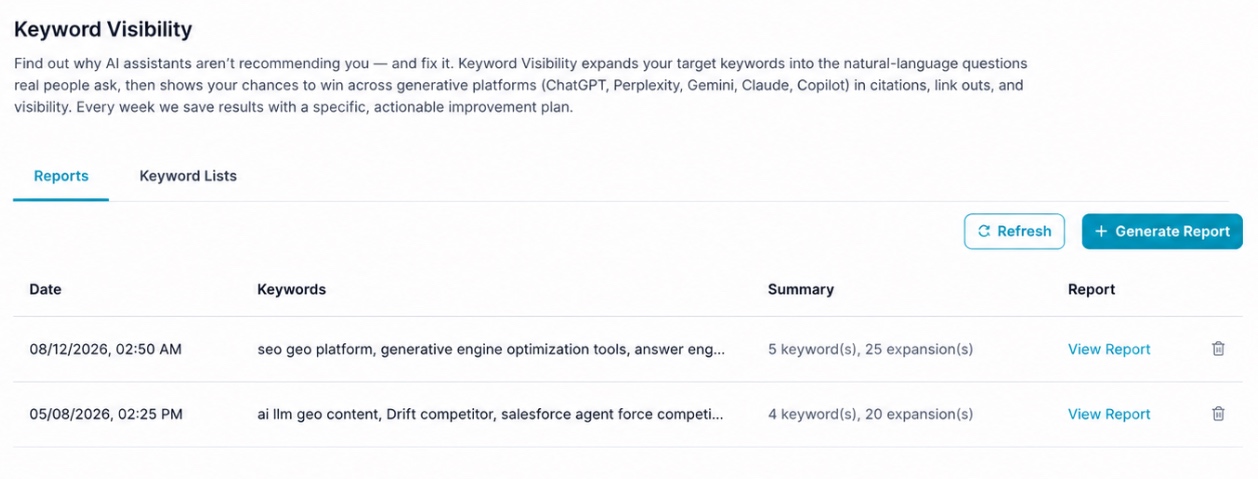
From the ai12z GEO portal, select Keyword Visibility from the navigation menu. You'll land on the Reports tab; Keyword Lists is the second tab (see below).
🛠️ Step 2: Click + Generate Report
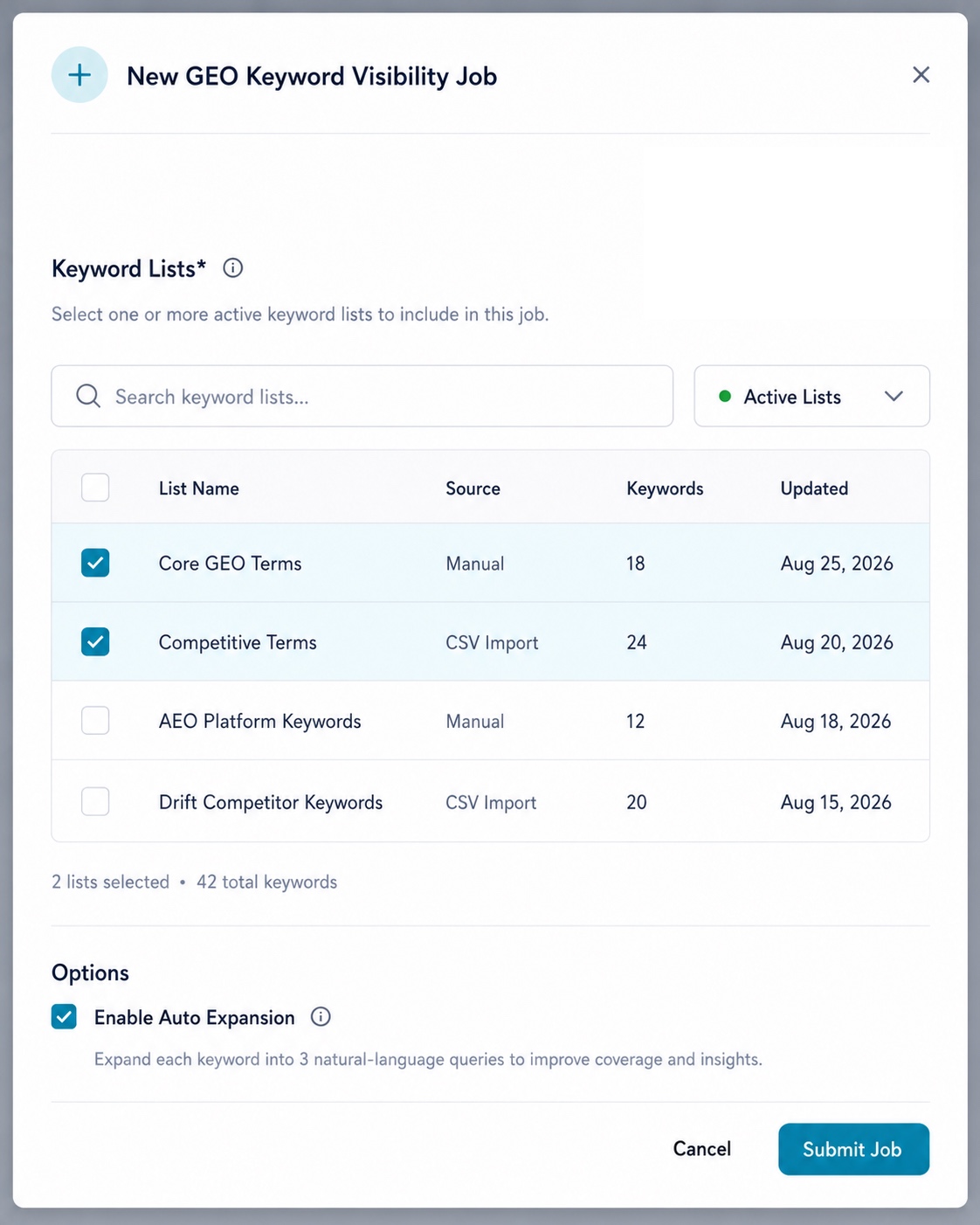
Keyword Lists* (required): search and select one or more saved lists to supply the keywords for this run. The picker shows each list's name, source, keyword count, and last-updated date, with a live counter ("2 lists selected · 42 total keywords") as you check boxes. See Keyword Lists below for how these are built.
Options:
| Option | Effect |
|---|---|
| Enable Auto Expansion | When on, each keyword is expanded into multiple natural-language queries before scoring. Leave this on unless you're re-testing a list of literal, already-expanded questions. |
🛠️ Step 3: Submit and Wait
Click Submit Job. The analysis runs asynchronously. Click Refresh to check for completion.
🛠️ Step 4: View Your Report
Once complete, click View Report to see the full analysis.
Keyword Lists
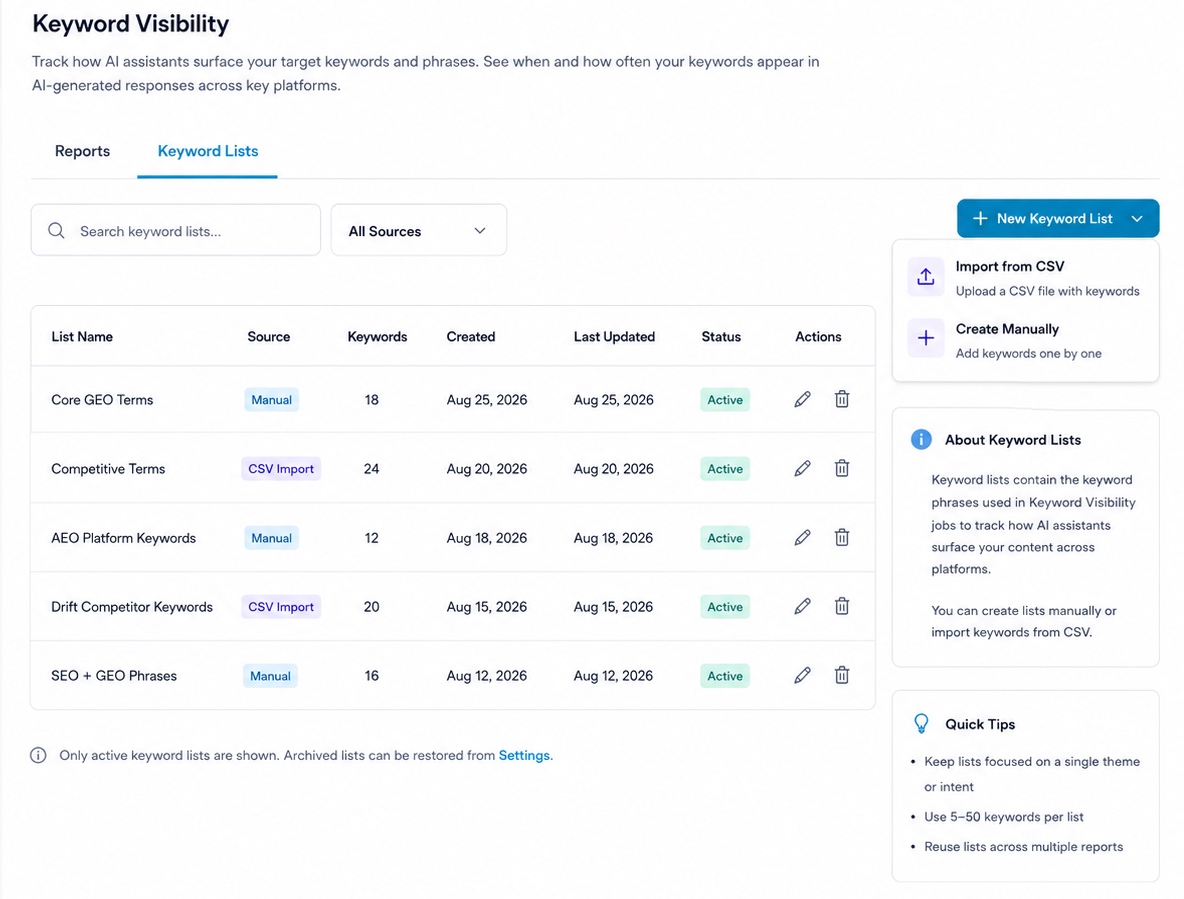
Like Citation Monitor, Keyword Visibility runs against saved, reusable Keyword Lists rather than a one-off textbox of keywords, which is what makes re-testing after a content fix possible. Switch to the Keyword Lists tab to manage them.
| Column | Description |
|---|---|
| List Name | The saved list's name |
| Source | Manual or CSV Import |
| Keywords | How many keywords the list contains |
| Created / Last Updated | Timestamps for the list |
| Status | Active: only active lists appear in the job picker; archived lists can be restored from Settings |
Use + New Keyword List to either Import from CSV or Create Manually.
Quick tips shown in the product: keep each list focused on a single theme or intent, use 5–50 keywords per list, and reuse lists across multiple report runs: the same list run monthly is what lets you measure whether a content fix actually moved the score.
Create a Keyword List Manually
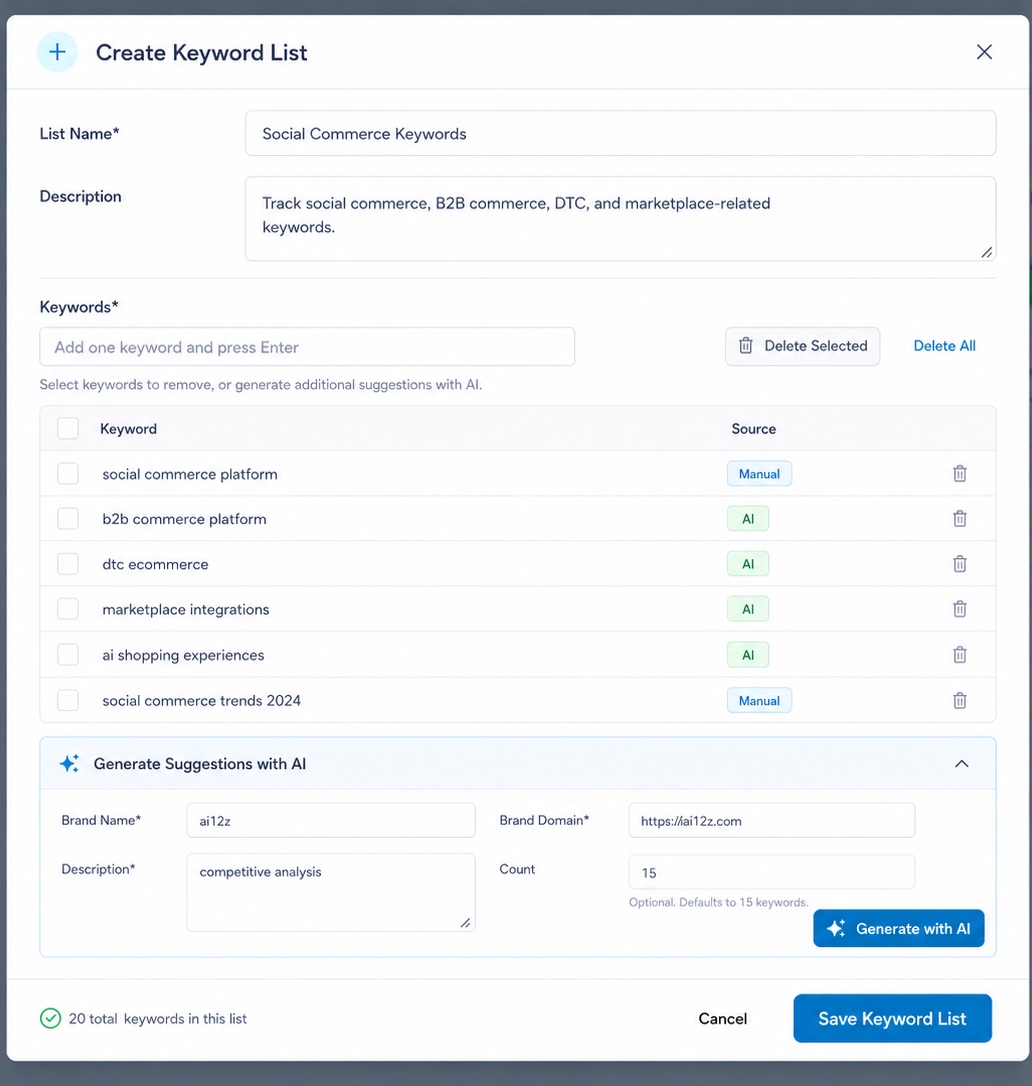
Give the list a Name and optional Description, then add keywords one at a time (type one and press Enter). Each keyword shows its Source: Manual for ones you typed, AI for ones generated by the assistant.
Generate Suggestions with AI expands the list without you having to brainstorm every term yourself: provide your Brand Name, Brand Domain, a short Description of the context (e.g. "competitive analysis"), and optionally a Count (defaults to 15), then click Generate with AI. This calls the same keyword-generation capability used to bootstrap a brand-new list from scratch, useful when you don't yet know what to track.
Import a Keyword List from CSV
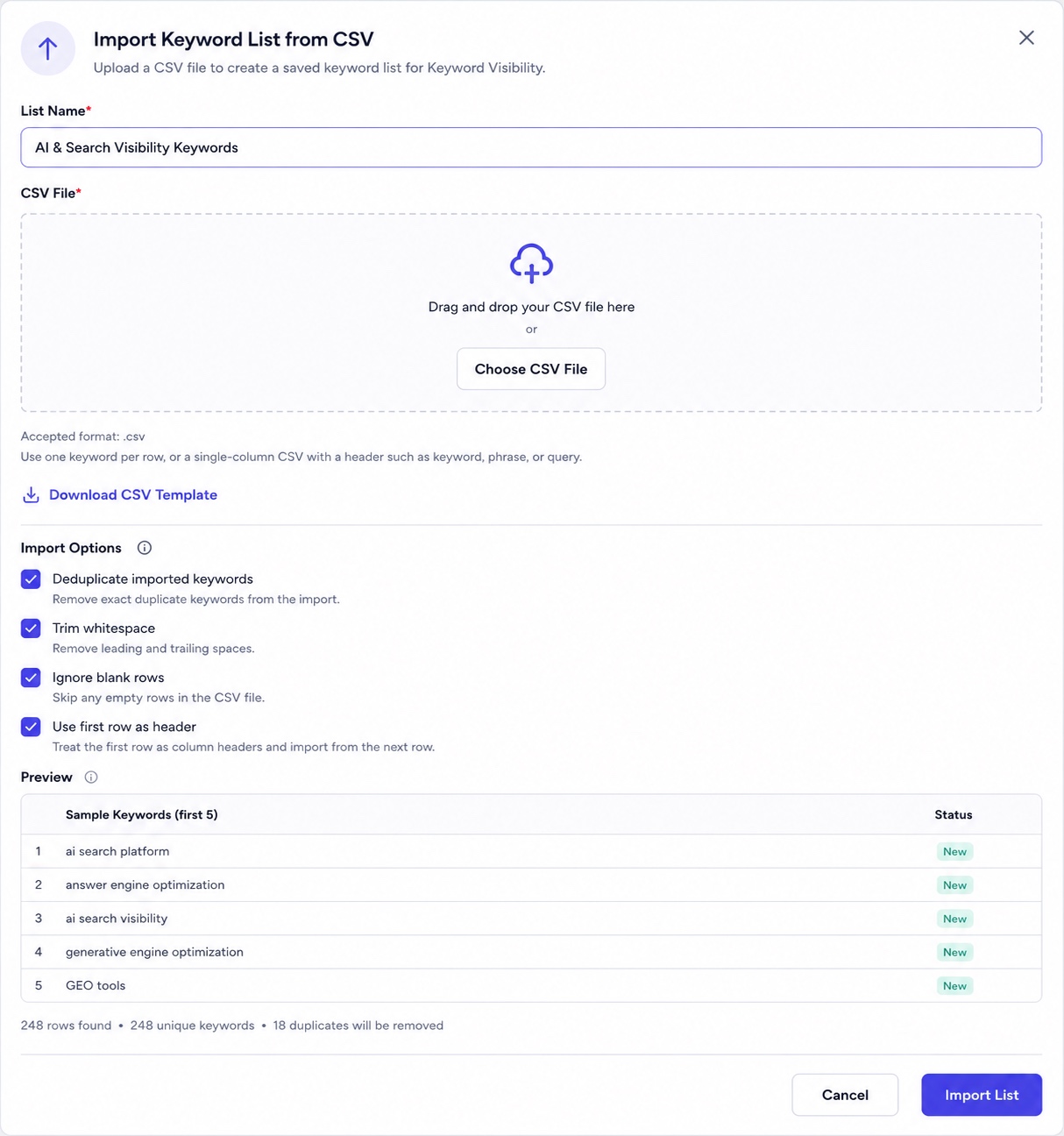
Upload a .csv with one keyword per row, or a single-column file with a header like keyword, phrase, or query, a Download CSV Template link is provided if you need the exact format. Before importing, you can toggle:
- Deduplicate imported keywords: remove exact duplicates from the file
- Trim whitespace: strip leading/trailing spaces
- Ignore blank rows: skip empty rows
- Use first row as header: treat row 1 as column headers rather than a keyword
The Preview shows the first 5 detected keywords and their status (e.g. New), plus a summary line (for example, "248 rows found · 248 unique keywords · 18 duplicates will be removed"), so you know exactly what you're about to commit before clicking Import List.
Where to Source Your Keywords
CSV Import isn't just for hand-curated lists: it's the mechanism for pulling in keywords from anywhere outside ai12z. Good sources beyond your own guesses or the AI-generated suggestions:
- Google Search Console / Google Analytics: export the actual search queries and organic landing-page keywords already bringing people to your site, and import that as a list. This tests AI answer quality for terms you already have real-world demand evidence for, not just terms you assume matter.
- Your site's old search logs: if the site previously had (or still has) its own on-site search box, its query logs are a direct record of what visitors typed while looking for something on your content. Export and import those the same way.
- Q&A Analysis's Query Frequency Histogram or Citation Phrase Suggestions, if a report already exists, the same real-conversation data source Citation Monitor draws from for its own lists.
Any of these beats a purely manual or AI-brainstormed list, because the terms are things people demonstrably already searched for: Keyword Visibility then tells you whether your content actually answers them well.
Scoring Dimensions
Each answer is scored across five dimensions that combine into a single composite GEO Score:
| Dimension | Weight | What It Measures |
|---|---|---|
| Relevance | 25% | Does the answer directly address the question? |
| Product Mention | 20% | Is your product/service properly positioned? |
| Clarity | 20% | Is the answer concise and jargon-free? |
| Authority | 15% | Does it include specifics, data, or expert framing? |
| Citeability | 20% | Can AI assistants extract and attribute the answer? |
GEO Score = Relevance × 0.25 + Product Mention × 0.20 + Clarity × 0.20 + Authority × 0.15 + Citeability × 0.20
Answers are bucketed as Strong (≥75), Moderate (55–74), or Weak (under 55): the Executive Summary reports counts for Strong and Weak, with everything in between implicitly Moderate.
What's Inside the PDF
| Section | Covers |
|---|---|
| Executive Summary | Average GEO score, keyword/question counts, Strong/Weak counts, and a Top Gaps callout |
| 01 · Seed Keywords | The literal keyword phrases audited, shown as tags, plus the Top Gaps summary |
| 02 · Expanded Questions | Every natural-language question generated per seed keyword, each tagged with its buyer-intent stage |
| 03 · Scored Answers | Every question with its score, the specific gap identified, a recommendation, and the full answer text your bot actually gave |
| 04 · Answer Amplification & Comparison Coverage | Comparison Query Coverage (do you name competitors when asked to compare?) and Amplification Gaps (which platforms, such as YouTube, Reddit, and G2/Capterra, have no matching content per question) |
| 05 · Conversational Query Format Testing | Short-form vs. conversational average scores, the Format Delta, and a per-question breakdown |
Key Outputs
- Average GEO Score (0–100): Overall performance across all generated questions (short-form + conversational)
- Strong / Moderate / Weak Breakdown: Count of answers scoring ≥75, 55–74, and under 55
- Seed Keywords: The literal terms audited, shown as tags
- Expanded Questions Table: Every generated question per keyword, tagged with its buyer-intent stage (evaluation / consideration / awareness / decision)
- Per-Question Scorecards: Each question with its score, gap analysis, specific recommendation, and the full answer text
- Comparison Query Coverage: Whether comparison-inviting questions actually get a named-competitor answer
- Amplification Gaps: Per-question breakdown of which platforms (YouTube, Reddit, G2/Capterra) have no matching content
- Format Delta (Conversational vs. Short-Form): Overall averages for each format, the delta, and a per-question comparison with its own gap/recommendation
- Top Gaps Summary: The 3 most common weaknesses across all answers
- PDF Report: Comprehensive audit with every section above
Interpreting the Format Delta
| Delta | Meaning |
|---|---|
| > +5 | Content handles depth well: conversational queries score higher than short ones |
| −5 to +5 | Consistent: content performs similarly in both formats |
| < −5 | Depth gap: short queries answered well, but longer context-rich questions expose content gaps |
Understanding the Report Table
| Column | Description |
|---|---|
| Date | When the report was generated |
| Keywords | The keyword phrases that were analyzed |
| Summary | Number of keywords and expansions processed (e.g. "5 keyword(s), 25 expansion(s)") |
| Report | Link to view the full report |
Perfect For
- SEO teams measuring AI visibility
- Content teams improving answer quality, and re-testing the same Keyword List after a CMS content update to confirm it actually helped
- Product marketing ensuring competitive positioning
- Knowledge base managers optimizing documentation
Example Report Walkthrough
A real audit of 3 seed keywords ("What is your pricing," "Do you support PDF ingestion," and "Do you have a connector for Magnolia") expanded into 18 total questions and produced an Average GEO Score of 83 (Moderate), with 13 Strong and 0 Weak answers.
Top Gaps, called out in the Executive Summary and repeated in Section 01, were: inconsistent pricing figures across different answers ($99/$199 vs. $131/$263, the same pricing inconsistency independently flagged by both Citation Monitor and Q&A Analysis for this project), hedging language on capabilities like real-time indexing and table extraction rather than direct yes/no answers, and no competitor comparisons or feature matrices even when a question explicitly invited one.
Expanded Questions showed each seed keyword generating several short-form questions across different intents: for example, "What is your pricing" expanded into "How much does ai12z GEO cost?" (evaluation), "What pricing plans does ai12z offer for enterprise customers?" (evaluation), "Does ai12z GEO have a free trial or free tier?" (evaluation), "How does ai12z pricing compare to other GEO and AI search platforms?" (consideration), and "Is ai12z pricing based on usage, users, or a flat subscription?" (evaluation), plus one longer conversational variant tested separately in Section 05. (The job modal's own tooltip describes auto-expansion as generating "3" queries per keyword, the real report shown here generated more, so treat that number as a simplified description rather than a hard limit.)
Scored Answers ranged from a low of 65 (the pricing-comparison question, penalized because the answer avoided naming any competitor) up to 90 (a conversational Magnolia question that clearly explained the connector and its benefits). A representative gap: the bot answered "Can ai12z GEO index Magnolia content in real time?" with hedging language despite the underlying platform actually supporting near-real-time sync via Magnolia webhooks; the recommendation was blunt: "Give a direct answer: 'Yes, via Magnolia webhooks (6.2.22+), content is synced near real-time.'"
Comparison Query Coverage scored just 30/100 on the one question that explicitly asked for a comparison: the answer avoided naming any of the real competitors (Profound, AthenaHQ, Peec AI, and others) it should have addressed. Note this is a narrower, separate score from that same question's overall 65 in Section 03: one measures overall answer quality, the other measures specifically whether the comparison itself was actually answered.
Amplification Gaps flagged nearly every question with the same pattern: no YouTube demo or tutorial video, and no Reddit community discussion, for topics like pricing, PDF ingestion, or the Magnolia connector. The Top Amplification Recommendations summarized it plainly: publish YouTube walkthroughs for the three core topics, seed Reddit community discussion, and get GEO features listed in G2/Capterra comparison entries.
Conversational Query Format Testing showed a Short-Form Average of 82 against a Conversational Average of 89: a Format Delta of +7.0, meaning conversational answers actually outperformed short-form ones. The report's own insight: longer questions let the bot synthesize multiple facets (tiers, features, usage) into one narrative, while short, direct questions sometimes triggered hedging instead of a committed answer.
Related Documentation
- Citation Monitor: Confirm whether the same pricing/competitor gaps found here are also costing you external AI citations
- Q&A Analysis: See what your customers are actually asking before deciding which keywords to track
- Consolidated Action Plan: Where Keyword Visibility's gaps roll up alongside every other report's findings
- GEO Suite Dashboard: See the Keyword Visibility Snapshot alongside every other GEO metric in one view