Site-Wide Sweep
Find every weak page across your entire site, before AI crawlers do.
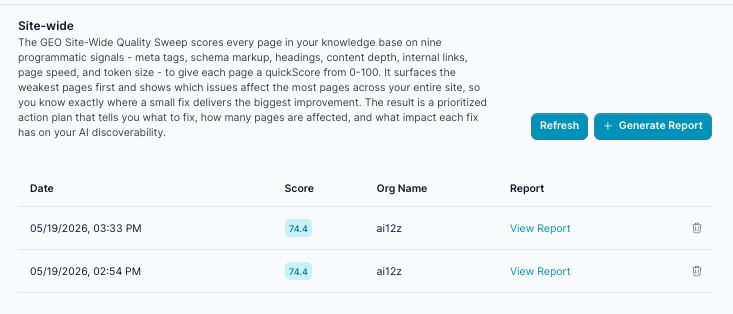
While URL Analysis audits a single page in depth, the Site-Wide Sweep scans your entire indexed site at once (using signals already collected at ingestion time) to find every thin, slow, or structurally weak page dragging down your GEO performance. It surfaces the weakest pages first, shows which issues affect the most pages across your entire site, and produces a prioritized action plan: what to fix, how many pages are affected, and what impact each fix has on your AI discoverability.
What It Does
- Reads quality signals collected automatically for every page when your site was crawled: no additional HTTP requests, no AI tokens consumed during the sweep
- Computes a quickScore (0–100) for each page from 9 programmatic signals: meta title, meta description, structured data, word count, H1 presence, H2 structure, internal links, token budget, and page speed
- Surfaces a geoScore (0–100) per page: an AI-assessed content quality score evaluated at ingest time, measuring how clear, authoritative, and citable the page content is
- Skips geoScore entirely for very thin pages (under roughly 80 words) rather than scoring them 0: these show up as
—in the report instead of a misleadingly low number - Identifies the bottom 20% weakest pages (minimum 10, maximum 100) for priority attention
- Builds an issue frequency table showing which problems affect the most pages across your site, ranked by pages affected
- Generates 5 plain-English priority actions: the specific fixes that would improve the most pages at once
- Supports Include List and Exclude List path filters: by default the sweep analyzes all indexed content for the project; use these only to scope the sweep to specific sections or leave out staging/private paths
How to Generate a Report
🛠️ Step 1: Navigate to Site-Wide Sweep
From the ai12z GEO portal, select Site-Wide Sweep from the navigation menu.
🛠️ Step 2: Click + Generate Report
Click the + Generate Report button in the top-right corner.
🛠️ Step 3: Configure the Sweep (Optional)
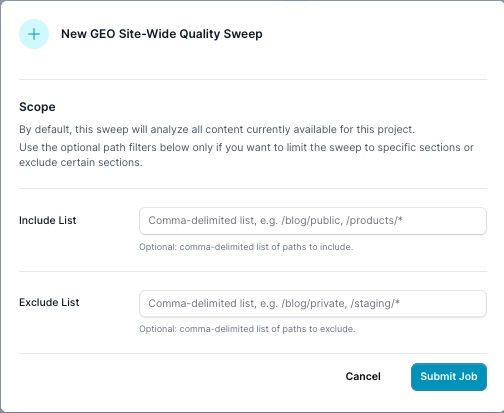
By default, a sweep analyzes all content currently available for the project: you don't need to configure anything to run one. The two fields below are optional path filters, useful when you only want to check (or skip) specific sections:
| Field | Description |
|---|---|
| Include List | Optional. Comma-delimited list of paths to limit the sweep to (e.g. /blog/public, /products/*) |
| Exclude List | Optional. Comma-delimited list of paths to leave out of the sweep (e.g. /blog/private, /staging/*) |
Your site must have been crawled and indexed by ai12z at least once before running a sweep.
🛠️ Step 4: Submit and Wait
Click Submit Job. The sweep reads MongoDB directly and completes in seconds regardless of site size. Click Refresh to check for completion.
🛠️ Step 5: View Your Report
Once complete, click View Report to download the full site health PDF. Unlike Q&A Analysis or URL Analysis, there's no separate HTML/summary column here, just the report list and the PDF.
The Two-Score System
Each indexed page carries two complementary scores that together give richer triage than either alone:
| Score | Type | What It Measures |
|---|---|---|
| quickScore | Programmatic (no AI) | Structural signals: meta tags, headings, word count, internal links, schema, token budget, page speed |
| geoScore | AI-assessed | Content quality: clarity, authority, and AI citeability of the page content |
A page can score well on structure but have thin, vague content (high quickScore, low geoScore), or have rich content behind weak metadata (low quickScore, high geoScore). Pages under roughly 80 words don't get a geoScore at all: they show as — rather than a 0, since there usually isn't enough content to fairly judge.
quickScore Methodology
| Signal | Points | Threshold |
|---|---|---|
| Meta title present | 15 | Title tag exists and is non-empty |
| Meta description present | 15 | Description tag exists and is non-empty |
| Structured data (JSON-LD) | 10 | At least one schema type detected |
| Word count | 10 | ≥ 300 words |
| H1 present | 10 | At least one H1 tag |
| H2 structure | 10 | Two or more H2s |
| Internal links | 10 | Three or more internal links |
| Token budget | 10 | Content fits within AI agent context window |
| Page speed rating | 10 | Rated fast (< 1 second) at ingestion time |
Score Distribution Bands
The Site Health Scorecard buckets every page into one of four bands:
| Band | quickScore Range |
|---|---|
| Critical | 0–25 |
| Weak | 26–50 |
| Moderate | 51–75 |
| Strong | 76–100 |
The "Pages Needing Attention" count on the cover page is narrower than the full remediation list: it only counts pages in the Critical + Weak bands. Section 4 ("Pages Needing Attention") is broader: it lists the full bottom 20% by rank (minimum 10, maximum 100 pages), which typically includes a mix of Weak and lower-Moderate pages, not just the ones failing outright.
PDF Report Sections
| Section | Contents |
|---|---|
| 1 · Site Health Scorecard | Total pages indexed, average quickScore, score distribution across the four bands, per-signal issue counts (no schema, missing meta description, thin content, slow pages), and Avg Content GEO across scored pages |
| 2 · Issue Frequency Across Site | Each issue type ranked by number of pages affected, with percentage of site affected |
| 3 · Priority Actions | 5 plain-English actions targeting the most common issues first, each naming the exact page count and share of site affected |
| 4 · Pages Needing Attention | Ranked table (weakest first) of the bottom 20% of pages, showing URL, quickScore, geoScore, page speed, and the specific issues detected on that page |
Cost & Speed
- ~$0 AI cost to run: the sweep job consumes no AI tokens; all scoring is programmatic reads from MongoDB
- geoScore ingest cost: ~$0.00003/page (scored asynchronously at crawl time); 1,000 pages ≈ $0.03
- Seconds to run: reads MongoDB directly, not the web
- Re-runnable at zero cost: regenerate as often as needed after content fixes
Key Outputs
- Site Health Scorecard: Total pages, average quickScore, score distribution across Critical/Weak/Moderate/Strong bands, per-signal issue counts, and Avg Content GEO
- Issue Frequency Table: Each issue type ranked by pages affected, with percentage of site affected
- 5 Priority Actions: Plain-English recommendations targeting the highest-impact improvements first, each quantified by page count
- Weakest Pages Table: The full bottom 20% of pages (up to 100), each with quickScore, geoScore (or
—if too thin to score), speed rating, and issue tags - PDF Report: Downloadable site health document
Understanding the Report Table
| Column | Description |
|---|---|
| Date | When the sweep was run |
| Score | Average quickScore across all pages included in the sweep |
| Org Name | The organization this sweep was run against (relevant for accounts managing multiple orgs/clients) |
| Report | Link to download the PDF |
Perfect For
- Content managers who need to know which pages to fix first, site-wide, not one at a time
- Developers auditing a newly indexed site before launch
- SEO specialists who need a fast triage pass before running deep URL Analysis on priority pages
- Marketing teams doing quarterly content audits across large sites
- Agencies running sweeps across multiple client orgs from one dashboard
Example Report Walkthrough
A real sweep of a 447-page site produced an average quickScore of 74.4 (solidly in the Moderate band), with 413 of the 447 pages receiving a geoScore (the remaining 34 were too thin to score) at an Average Content GEO of 70.6.
Site Health Scorecard broke the 447 pages into bands: 0 Critical, 1 Weak, 275 Moderate, 171 Strong: meaning the "Pages Needing Attention" count on the cover read just 1, even though far more pages had real, fixable issues.
Issue Frequency Across Site is where those issues actually surfaced:
| Issue | Pages Affected | % of Site |
|---|---|---|
| Images missing dimensions | 219 | 49.0% |
| Slow page load (>3s) | 199 | 44.5% |
| No schema markup | 176 | 39.4% |
| Too few H2 headings | 165 | 36.9% |
| Thin content (under 300 words) | 102 | 22.8% |
| No internal links | 95 | 21.3% |
| Missing meta title | 1 | 0.2% |
| Missing H1 | 1 | 0.2% |
Priority Actions turned that table directly into a to-do list: fix images missing dimensions on 219 pages, optimize the 199 pages loading slower than 3 seconds, add JSON-LD schema to 176 pages, fix heading structure on 165 pages, and expand 102 thin pages past 300 words, five actions, each one moving dozens to hundreds of pages at once.
Pages Needing Attention then listed the actual weakest pages, worst first, for example:
| URL | Score | GEO | Speed | Issues |
|---|---|---|---|---|
www.arkanedigital.com/contact | 40 | — | slow (3.5s) | No schema, Thin content, Few H2s, Slow |
ai12z.com/.../ai12z-platform-release-webinar | 55 | 42 | fast | No schema, Thin content, Few H2s, Few internal links, Low GEO |
docs.ai12z.net/docs/videos/video-agents | 60 | 42 | slow (7.4s) | Thin content, Few H2s, Slow, Low GEO |
ai12z.com/2026/04/21/ai12z-introduces-ai-discoverability | 65 | 85 | fast | No schema, Few H2s, Few internal links |
That last row is a good example of why the two-score system matters: a quickScore of 65 (dragged down by missing schema and thin internal linking) sits right next to a strong geoScore of 85: the content itself is good, but the structural signals around it are what's holding the page back from full AI citation eligibility.
Related Documentation
- URL Analysis: Deep-dive any page this sweep flags with the full 19-section audit
- Q&A Analysis: Cross-reference which weak pages actually match topics your customers are asking about
- AI Visibility Suite Overview: How Site-Wide Sweep fits alongside the rest of the AI Visibility Suite