Q&A Analysis
Turn your chatbot conversations into a strategic content plan, and into the data engine that feeds the rest of the AI Visibility Suite.
Q&A Analysis examines every question your customers ask your ai12z chatbot to discover what content you need to create, what topics matter most, and where your knowledge gaps exist. It is the only GEO report built entirely from your own real customer conversations rather than a simulated audit, which makes it the natural starting point for a GEO program and the report everything else in the suite refers back to.
Three things make it more than a one-time content audit:
- It's designed to be run on a recurring cadence (monthly or quarterly), and every completed run is kept permanently in your report history, so two runs can later be diffed with GEO Trend Comparison to show whether you're actually improving.
- It surfaces the exact phrases your customers type, not guessed keywords, via a query frequency histogram, and lets you push the highest-value phrases straight into Citation Monitor with one click, so you can measure whether ChatGPT, Gemini, Claude, and Bing are citing you for the questions people actually ask.
- It grades its own answers. Every conversation already carries a 1–100 quality score computed at the moment it happened, so the report can tell you not just what people ask, but how well your bot is currently answering them.
What It Does
- Analyzes conversation transcripts from your ai12z chatbot across any date range
- Computes a Query Frequency Histogram: an exact-match frequency count of every question your users typed, independent of clustering, with the top 100 queries ranked by volume plus long-tail stats (unique query count, single-occurrence rate, P50/P75/P90/P95/P99 frequency breakpoints)
- Clusters questions into up to 50 themes by volume, each cluster labeled with a readable name, sample verbatim questions, related keywords, volume, and its own GEO score
- Tags each theme cluster as competitive or not (
isCompetitive), so comparison-shopping questions are never buried inside an unrelated topic - Converts each FAQ cluster into AEO-optimized H2 headings with 40–60 word answer-first paragraphs, ready to publish
- Scores content gaps with a priority matrix (frequency × AEO opportunity × competitor coverage)
- Generates a complete FAQ draft in Markdown, ready to hand directly to your content team
- Generates a recommended content sitemap draft based on actual user intent and question volume
- Identifies multilingual opportunities from non-English queries, with per-language volume and localization recommendations
- Detects "I don't know" (IDK) answers: flags questions your chatbot couldn't answer, splits them into
Uncertain / Not Sure(content exists but wasn't retrieved or synthesized confidently, a chunking/structure fix) vs.No Information Available(the content doesn't exist yet, a content-creation fix), groups them by theme, and calculates your unanswered question rate - Detects competitive intent: identifies questions asking "vs", "alternative to", "better than", "switch from", or naming competitors directly; extracts competitor names and reports an overall competitive rate plus a per-competitor question breakdown
- Surfaces answer quality scores per theme: every Q&A pair already carries a 1–100 quality score, scored automatically at conversation time. The report computes an average quality score per topic cluster and produces a Poorly Answered Themes section for every cluster averaging below 50, each with the specific content issue and a concrete fix recommendation
- Flags ambiguous and off-topic queries separately from content gaps: these are UX/guardrail problems (scope creep, inconsistent refusals, directive tokens leaking into answers) that better content alone won't fix
- Surfaces Citation Phrase Suggestions: the top 20 most-asked normalized queries evaluated as candidates for Citation Monitor, with already-tracked phrases flagged so you never test the same query twice
- Produces a comprehensive, board-ready PDF report with an executive summary and prioritized actions
Built to Run on a Cadence, Not Just Once
A single Q&A Analysis run tells you what's wrong today. Running it every month (or every quarter) on the same cadence is what turns it into a program: each report is scoped to a start and end date, and every completed report stays in your list indefinitely: nothing is overwritten when you run a new one.
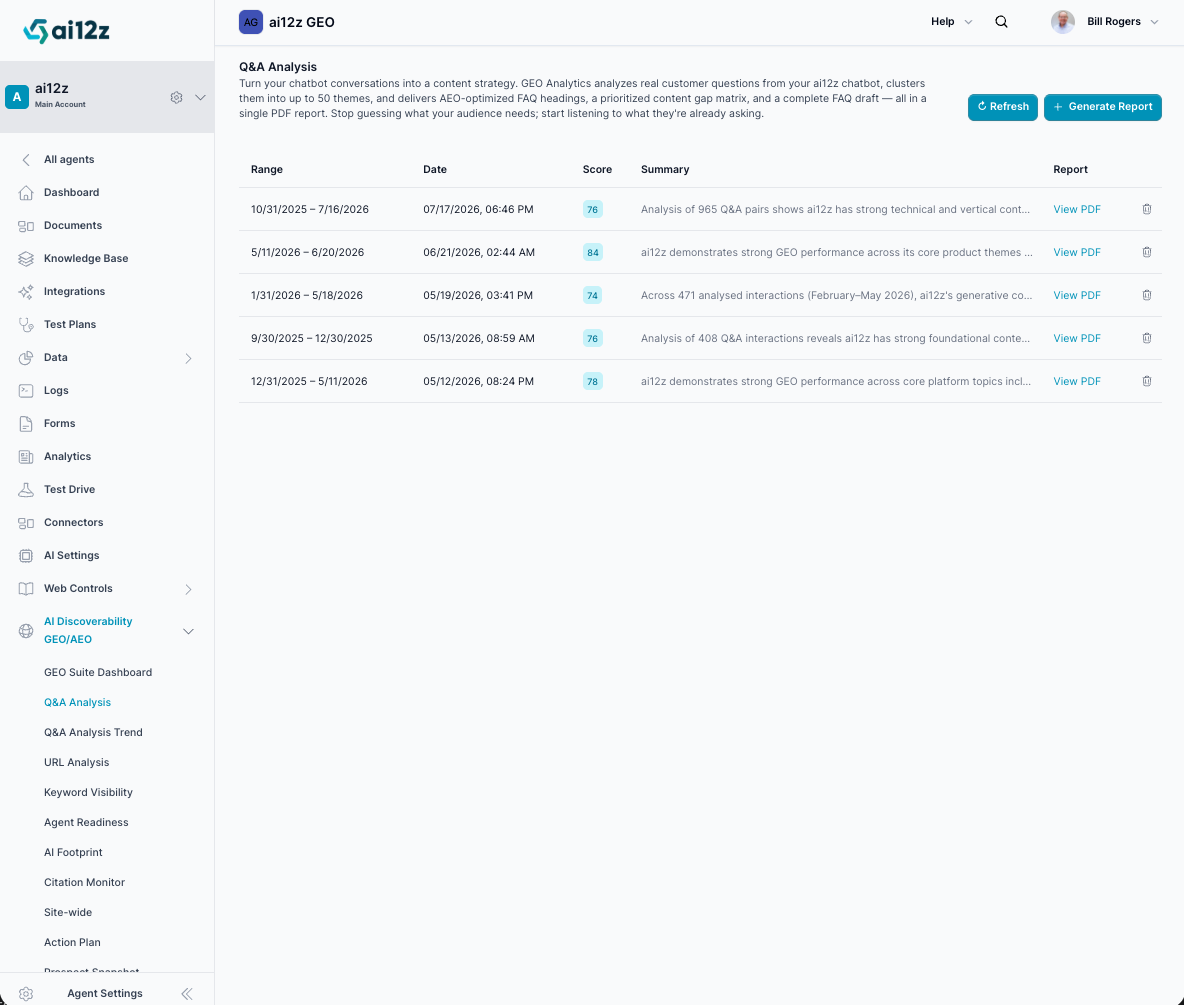
The report list shown above is a real example of what this looks like in practice: five separate runs, each covering a rolling window a few weeks apart:
| Range | Generated |
|---|---|
| 10/31/2025 – 7/16/2026 | 07/17/2026 |
| 5/11/2026 – 6/20/2026 | 06/21/2026 |
| 1/31/2026 – 5/18/2026 | 05/19/2026 |
| 9/30/2025 – 12/30/2025 | 05/13/2026 |
| 12/31/2025 – 5/11/2026 | 05/12/2026 |
Two cadence patterns both work well:
- Rolling trailing window (e.g., "last 90 days," re-run monthly): smooths out short-term noise and is the better choice if your conversation volume is low or seasonal.
- Discrete, non-overlapping periods (e.g., calendar months or quarters): isolates exactly what changed in that specific period and makes month-over-month comparison cleaner.
Once you have two or more completed reports, open GEO Trend Comparison and select an earlier and later report from this same list. It computes the GEO score delta, question volume change, IDK rate change, competitive intent rate change, and exactly which theme clusters grew, shrank, appeared, or disappeared between the two periods, turning this report from a snapshot into a trend line.
From Conversations to Citations
Every other report in the AI Visibility Suite tells you what content should rank or get cited. Q&A Analysis is the one report that tells you what your own audience is already asking, which is the highest-confidence source of queries you should be tracking for real-world AI citation.
How the loop closes:
- The Query Frequency Histogram computes an exact, normalized frequency count of every question typed into your chatbot, before any thematic clustering happens, so you see raw demand, not an AI's interpretation of demand.
- The top 20 most-asked normalized queries are evaluated as Citation Phrase Suggestions. Any phrase already being tracked is labeled Already Tracking, so you only ever add what's new.
- Selected phrases merge into your Citation Monitor query list with one click: no manual retyping, no guessing which keywords matter.
- Run Citation Monitor against that list to see whether ChatGPT, Gemini, Claude, and Bing are actually citing you for the exact questions your customers ask, then re-run the same list later to measure whether new content moved the needle.
Most GEO tools ask you to guess which phrases are worth monitoring. Because ai12z is the chatbot your customers are already talking to, Q&A Analysis skips the guessing: it hands you a ranked, de-duplicated, real-world query list on a plate.
How to Generate a Report
🛠️ Step 1: Navigate to Q&A Analysis
From the ai12z GEO portal, select Q&A Analysis from the navigation menu.
🛠️ Step 2: Click + Generate Report
Click the + Generate Report button in the top-right corner.
🛠️ Step 3: Configure the Job
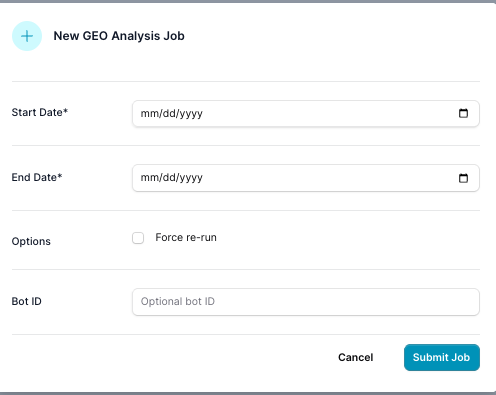
Fill in the following fields:
| Field | Description |
|---|---|
| Start Date | Beginning of the date range to analyze |
| End Date | End of the date range to analyze |
| Bot ID | Optional: filter the analysis to conversations from one specific content source/bot |
If you run multiple bots against different content sources (e.g., a docs bot vs. a support bot), use Bot ID to analyze each one separately rather than blending their conversations into a single report.
If you plan to track trend over time, pick a date range you can repeat consistently (e.g., "trailing 90 days" or "last calendar quarter") so future runs stay comparable in GEO Trend Comparison.
🛠️ Step 4: Submit and Wait
Click Submit Job. The analysis runs asynchronously in the background. You can monitor progress from the report list and click Refresh to check for completion.
🛠️ Step 5: View Your Report
Once complete, click View PDF to download the full report, or use the underlying data to push queries into Citation Monitor or compare periods with GEO Trend Comparison.
Processing Pipeline
Under the hood, each run moves through the following phases:
- Read conversation insights, including per-answer quality scores already captured at conversation time
- Compute the Query Frequency Histogram: exact-match query counts, percentile breakpoints, and long-tail stats
- Chunk conversations into batches
- Summarize each batch, including a per-cluster average quality score
- Aggregate the batch summaries
- Cluster into up to 50 question themes, each tagged
isCompetitive - Detect IDK / unanswered questions and split them into
Uncertainvs.No Information Available - Detect competitive intent: comparison patterns and named competitors
- Synthesize the final report: executive summary, content gap analysis, and Poorly Answered Themes
- Generate the FAQ draft (Markdown)
- Generate the sitemap draft (Markdown)
- Produce the PDF report
Scoring Dimensions (GEO Score 0–100)
Each report receives a GEO Score based on five dimensions:
| Dimension | What It Measures |
|---|---|
| Coverage | Do answers span the full topic area? |
| Authority | Specific data, examples, expert framing? |
| Clarity | Concise, jargon-free language? |
| Discoverability | Questions phrased naturally for AI? |
| Intent Match | Does the answer match the user's question intent? |
What's Inside the PDF
The report is organized so that leadership can read the first page and a content team can execute from the rest:
| Section | Covers |
|---|---|
| Executive Summary & Score Breakdown | Overall GEO Score, the five dimension scores, top strengths, top weaknesses, and the five highest-priority actions |
| Topic Cluster Intelligence | Every question cluster (up to 50) with volume, GEO score, status (Strong / Moderate / Needs Work), the specific gap, and a recommended action |
| FAQ Recommendations | High-priority individual questions to publish, ranked by an impact score, each with a suggested URL slug |
| Content Gap Analysis | Missing topic areas rather than single questions: typed as comparison, trust, pricing, glossary, procedural, and more |
| Sitemap Suggestions | Proposed new pages your site doesn't have yet, each with a title, URL slug, and the exact user questions it must answer |
| Multilingual Opportunities | Non-English languages your users are asking in, with volume and localization recommendations |
| Ambiguous Query Insights | Off-topic, out-of-scope, or unclear queries: a UX/guardrail fix, not a content fix |
| Poorly Answered Q&A Examples | Every theme averaging below 40–50/100 quality, with the specific issue and a concrete fix |
| Top Question Themes | All clusters ranked by volume with sample questions and related keywords |
| Unanswered Question Analysis | Every "I don't know" response, grouped by theme and split into Uncertain vs. No Information Available |
| FAQ Draft: All Topics | Full publish-ready FAQ copy in Markdown, one answer per recommended question |
| Content Sitemap Draft | Full publish-ready sitemap draft in Markdown, organized by category with page purpose and priority |
| Query Frequency Histogram (Appendix) | Top queries ranked by exact volume, with percentile breakpoints and long-tail stats; also the source list for Citation Phrase Suggestions |
Key Outputs
- GEO Score (0–100): Overall ranking of your content's AI-readiness with a breakdown across all 5 dimensions
- Query Frequency Histogram: Top 100 normalized queries ranked by exact volume, with percentile distribution (P50/P75/P90/P95/P99) and long-tail stats
- Citation Phrase Suggestions: The top 20 most-asked queries evaluated as Citation Monitor candidates, with "Already Tracking" flags and one-click add
- Top 50 Question Themes: Ranked by volume with readable labels, sample questions, related keywords, and a competitive-intent tag per cluster
- AEO-Ready FAQ Headings: Question-format H2s with 40–60 word answer-first paragraphs per cluster
- Content Gap Priority Matrix: Each gap typed (glossary, FAQ, explainer, comparison, multilingual, procedural) and ranked by estimated impact
- FAQ Draft (Markdown): Complete draft ready to hand directly to your content team, organized by cluster
- Sitemap Draft (Markdown): Recommended page structure with proposed titles, URL slugs, and questions covered
- Unanswered Question Analysis: IDK rate %, total and unique unanswered questions, the
Uncertainvs.No Information Availablesplit, and recurring patterns - Competitive Intent Analysis: Competitive rate %, identified competitors with question counts and sample questions, top comparison patterns, and recommended content actions
- Poorly Answered Themes: Topic clusters with an average quality score below 50, each with the specific content issue and a concrete fix recommendation
- Ambiguous Query Insights: Off-topic and inconsistent-answer patterns with UX/guardrail recommendations, kept separate from content gaps
- Multilingual Opportunities: Languages detected, question volume per language, and localization recommendations
- Executive Summary: Top strengths, top weaknesses, and prioritized actions for leadership
- Structured JSON: Every section above (clusters, FAQ recommendations, content gaps, IDK analysis, competitive intent, and the query histogram) is also available as structured data for teams building custom dashboards or feeding a BI tool
- PDF Report: Full report with all sections above, downloadable and shareable
Understanding the Report Table
The report list shows every analysis you've ever generated, and it's never pruned automatically: treat it as your GEO history for this project.
| Column | Description |
|---|---|
| Range | The date range analyzed |
| Date | When the report was generated |
| Score | GEO Score (0–100) |
| Summary | Brief description of findings |
| Report | Link to download the PDF |
Because every run stays here, this table is also where you'll pick reports from when running GEO Trend Comparison; the "Earlier Report" and "Later Report" selectors pull directly from this list.
Perfect For
- Content strategists planning editorial calendars and building a repeatable monthly content review
- SEO and GEO teams tracking AI discovery performance over time, not just at a single point
- Product teams understanding customer pain points directly from conversation data
- Marketing teams identifying high-value content opportunities and feeding real query data into citation tracking
- Leadership reviewing a single trended GEO score instead of a pile of disconnected audits
Example Use Cases
Closing a content gap. A healthcare SaaS company runs Q&A Analysis on 3 months of chatbot conversations. They discover that 40% of questions relate to HIPAA compliance implementation, a topic barely mentioned on their website. The IDK analysis shows a 15% unanswered rate on compliance topics. Within 2 weeks, they publish comprehensive HIPAA guides.
Proving the fix worked. The same company runs Q&A Analysis again the following month on the same trailing-90-day window, then runs GEO Trend Comparison against the prior report. The HIPAA cluster's GEO score rises from 55 to 89, the overall IDK rate falls, and AI assistant citations for HIPAA-related queries increase by 200%, all visible as a single before/after diff instead of two disconnected PDFs.
Turning conversations into a citation watchlist. A B2B platform reviews the Query Frequency Histogram and notices three pricing-related queries appear hundreds of times each, far outpacing everything else. None of them show up as "Already Tracking" in the Citation Phrase Suggestions panel. They add all three to Citation Monitor and discover ChatGPT isn't citing them for any of it, a gap they never would have known to check for without seeing it in their own conversation data first.
Related Documentation
- GEO Trend Comparison: Diff any two Q&A Analysis reports to see whether your GEO performance is improving, stable, or declining
- Q&A Insights: The live, per-conversation table these monthly theme clusters are built from
- Citation Monitor: Test whether ChatGPT, Gemini, Claude, and Bing actually cite you for the queries surfaced here
- AI Visibility Suite Overview: How Q&A Analysis fits alongside the rest of the AI Visibility Suite
- Google Analytics 4 Integration: Cross-reference AI referral traffic with the topics your chatbot conversations cover