GEO Insights Bot
Every report in the AI Visibility Suite, one conversation away.
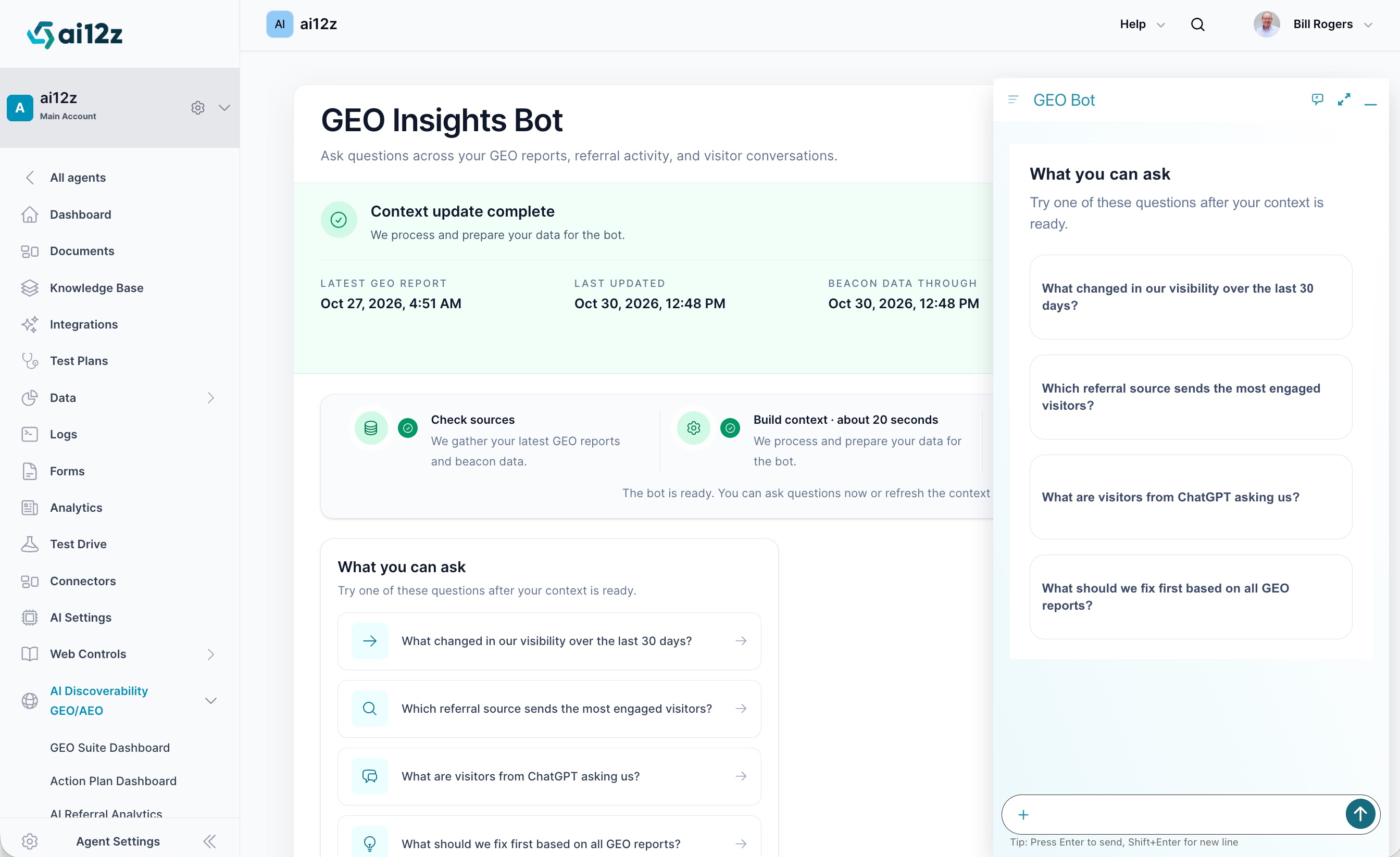
GEO Insights Bot (shown simply as GEO Bot in its own docked chat header) is a dedicated chat assistant built on top of everything the AI Visibility Suite already knows about your site: every GEO report you've run, every Beacon referral event, and every visitor conversation your chatbot has ever had. Instead of opening the Dashboard, scrolling through a PDF, or cross-referencing three separate reports to answer a question, you just ask it in plain language, "what changed in our visibility over the last 30 days?", and it answers from the same data those reports are already built from.
What It Does
- Indexes the data behind every report in the AI Visibility Suite, GEO reports, AI Referral Analytics (Beacon) activity, and Q&A Insights visitor conversations, into a single queryable context
- Answers free-form questions in plain language instead of requiring you to open and interpret a specific report
- Surfaces suggested questions so you don't have to guess what it can answer
- Runs as a docked chat panel you can open from anywhere in the portal, with an expand icon to go full-width and a minimize control to tuck it away
- Keeps its context current automatically and shows exactly how current via three timestamps, and lets you force a refresh on demand
How Context Gets Built
Before you can ask it anything, GEO Bot has to assemble its context: a snapshot of every report, Beacon event, and conversation available to it. You'll see this happen in two steps:
| Step | What It Does |
|---|---|
| Check sources | Gathers your latest GEO reports and Beacon data |
| Build context (~20 seconds) | Processes and prepares that data for the bot |
Once both steps complete, a Context update complete banner confirms the bot is ready, along with three timestamps so you always know exactly how fresh its answers are:
| Field | What It Tells You |
|---|---|
| Latest GEO Report | The most recent report run (any report in the Suite) that's been folded into the bot's context |
| Last Updated | When the context itself was last rebuilt |
| Beacon Data Through | How recent the referral activity in its context is, i.e. how current its answers about traffic and referral sources will be |
The bot stays usable while context is a little stale, but if you've just run a new report or know Beacon has new activity, you don't have to wait for the next automatic cycle: refresh the context on demand so the bot's answers reflect it immediately.
What You Can Ask
GEO Bot is built to answer across all three of its data sources at once, not just one report at a time. The suggested prompts shown in the product give a sense of the range:
- Visibility trends: "What changed in our visibility over the last 30 days?"
- Referral performance: "Which referral source sends the most engaged visitors?"
- Visitor intent: "What are visitors from ChatGPT asking us?"
- Prioritization: "What should we fix first based on all GEO reports?"
Because the bot draws on live report data, Beacon referral activity, and conversation history together, it can answer questions that would otherwise mean opening two or three different reports and connecting the dots yourself, like linking a referral spike from a specific AI engine to what those visitors actually asked once they landed.
Where the Answers Come From
GEO Bot doesn't run its own separate analysis, it reads from the same data every other report in the Suite is already built from:
- GEO reports: results already generated by Keyword Visibility, Citation Monitor, Agent-Readiness Audit, AI Footprint, URL Analysis, Site-Wide Sweep, Q&A Analysis, and the Consolidated Action Plan
- Beacon referral activity: the same event stream that feeds AI Referral Analytics
- Visitor conversations: the same per-conversation records shown live in Q&A Insights
That means GEO Bot is only as current and as complete as the reports and data feeding it: if you haven't run a given report yet, or haven't installed the Beacon, it has nothing to draw on for that part of a question. See The Full Assessment Sequence for what unlocks what.
Accessing GEO Insights Bot
From the ai12z portal, find GEO Insights Bot under AI Discoverability GEO/AEO in the left-hand navigation, right after AI Referral Analytics. The main page gives you the full status view, context freshness, suggested questions, and a larger chat surface, and the same assistant is also available as a docked panel (labeled just GEO Bot) on the right side of the screen, so you can ask it a question without leaving whatever report you're currently looking at.
Perfect For
- Getting a fast, conversational answer instead of opening and cross-referencing multiple reports
- Account managers and agencies who need to answer a client's question live, on a call, without digging through a PDF
- Spot-checking a specific trend or referral source before deciding which full report to run next
- Anyone who wants the Consolidated Action Plan's "what should we fix first" framing, but as an answer to a specific question instead of a static list
Related Documentation
- GEO Suite Dashboard: The equivalent at-a-glance view when you want to see everything on one screen instead of asking a question
- AI Referral Analytics: Full reference for the Beacon data GEO Bot draws on
- Q&A Insights: Full reference for the visitor conversation data GEO Bot draws on
- Consolidated Action Plan: The static, cross-report prioritized list GEO Bot's prioritization answers are grounded in
- AI Visibility Suite Overview: Full reference for every report GEO Bot can draw on