AI Referral Analytics
Track and analyze website traffic originating from generative AI platforms.
Every other AI Visibility Suite report tells you whether AI assistants could cite or recommend you. AI Referral Analytics tells you whether that's already happening in the wild: it listens for the moment an answer engine like ChatGPT or Perplexity actually sends someone to your site, and turns that traffic into a live dashboard: which engine sent them, which page they landed on, whether they engaged, and whether they converted. This is one of the ways ai12z measures real-world GEO impact, not just theoretical citation potential.
Prerequisite: A Beacon or a Live Control on the Page
This dashboard has nothing to show until something on the site is actually capturing referral traffic. That's either the Beacon, a lightweight, standalone tracking control with no visible UI, or any full ai12z-bot / search control already embedded on the page, which captures the same referral data as a side effect of being there. Neither changes what a visitor sees; the Beacon in particular exists specifically for sites that want this data without adopting a chatbot at all. See The Low-Friction Go-to-Market Playbook for how this fits into a client engagement.
What It Does
- Detects when a visitor arrives from a generative AI answer engine, using both the HTTP referrer domain (e.g.
chatgpt.com,perplexity.ai) and UTM parameters when present, so attribution works even when a referrer header is stripped - Recognizes ChatGPT, Perplexity, Gemini, Claude, Copilot, Grok, Meta AI, and You.com as distinct answer engines, with everything else bucketed into a catch-all so nothing goes untracked
- Classifies every referrer as either a traditional search engine (Google, Bing, and others) or a generative AI answer engine, so the Overview and Engines views show both side by side instead of only AI traffic in isolation
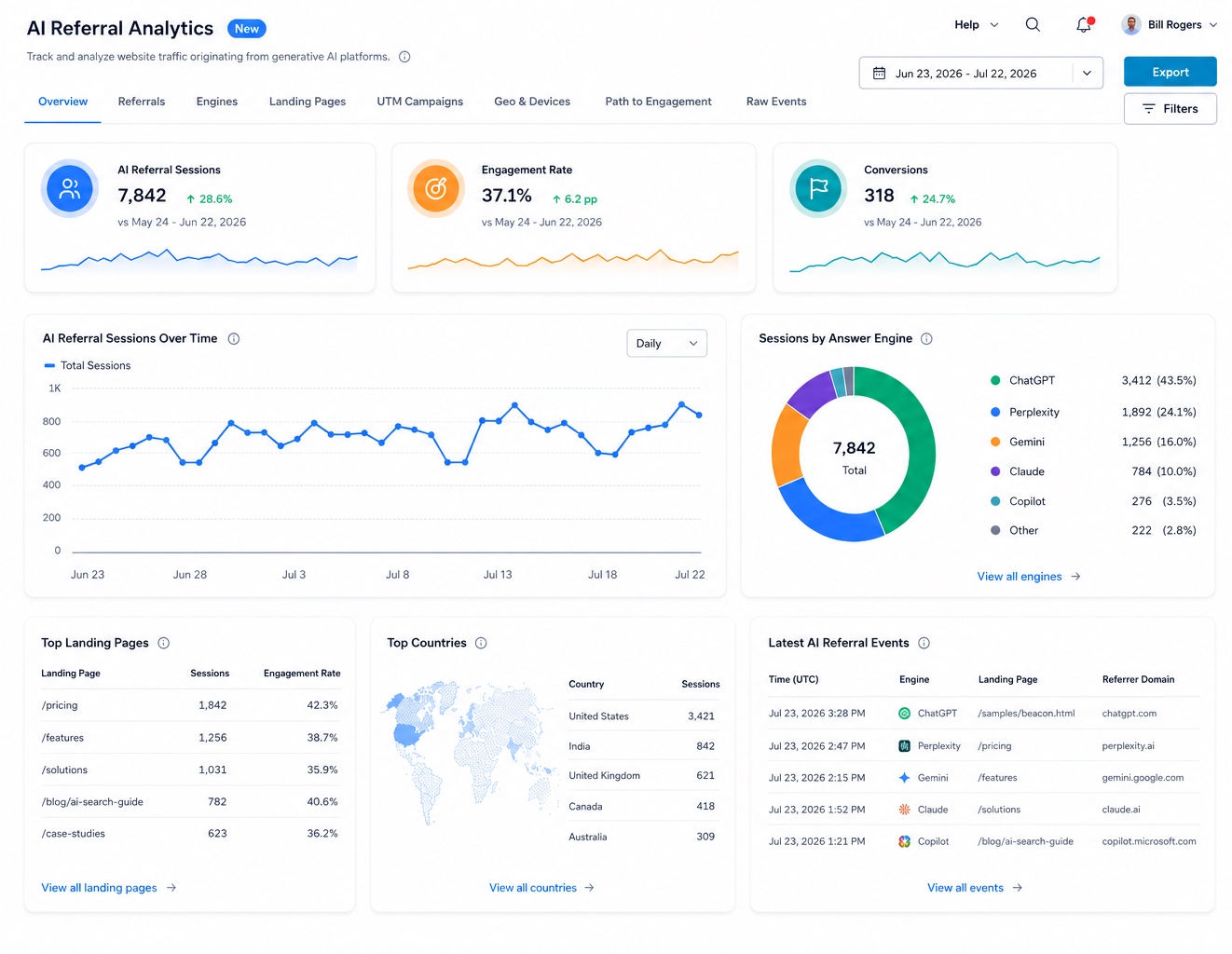
- Reports three headline KPIs: AI Referral Sessions, Engagement Rate, and Conversions, each with a trend sparkline and a period-over-period delta
- Breaks down sessions over time (daily/weekly/monthly) and sessions by answer engine as a donut chart, so you can see which platform is actually driving traffic
- Surfaces Top Landing Pages with session count and engagement rate per page: the fastest way to see which content is winning AI referrals
- Surfaces Top Countries so you know which markets are discovering you through AI
- Streams a live event feed of the most recent AI referral sessions: time, engine, landing page, and referrer domain, down to the individual visit
- Organizes everything into eight views: Overview, Referrals, Engines, Landing Pages, UTM Campaigns, Geo & Devices, Path to Engagement, and Raw Events
- Applies a shared date range picker across every view, with automatic comparison against the prior period of equal length
- Supports Filters and Export for slicing the data or pulling it into a report
How Engine Detection Works
Under the hood, every inbound session is matched against a source map that normalizes both referrer hostnames and UTM source values down to a single canonical engine identifier, for example:
const utmSourceMappings: Record<string, Engine> = {
  "chatgpt.com": "chatgpt",
  chatgpt: "chatgpt",
  perplexity: "perplexity",
  "perplexity.ai": "perplexity",
  gemini: "gemini",
  "gemini.google.com": "gemini",
  claude: "claude",
  "claude.ai": "claude",
  copilot: "copilot",
  "copilot.microsoft.com": "copilot",
  grok: "grok",
  "grok.com": "grok",
  meta_ai: "meta_ai",
  "meta.ai": "meta_ai",
  you: "you",
  "you.com": "you",
};
This is why AI Referral Analytics keeps working even for links that arrive without a clean referrer: a ?utm_source=chatgpt on the URL is enough to attribute the session correctly. Sessions from smaller-volume engines are still captured individually; the Overview donut simply groups the long tail into Other so the six highest-volume engines stay readable at a glance.
How to Use It
Unlike the rest of the AI Visibility Suite, there's no "Generate Report" step: this is a live, always-current dashboard, not a report you run against a date range.
🛠️ Step 1: Navigate to AI Referral Analytics
From the ai12z GEO portal, select AI Referral Analytics from the navigation menu. Look for the New badge if you're not sure you're on the latest version.
🛠️ Step 2: Set Your Date Range
Use the date picker in the top-right (e.g. "Jun 23, 2026 – Jul 22, 2026") to choose the period you want to review. Every KPI and chart recalculates against this window, with deltas computed against the immediately preceding period of equal length.
🛠️ Step 3: Explore the Eight Views
| View | What It Shows |
|---|---|
| Overview | The headline KPIs, sessions-over-time chart, sessions-by-engine donut, top landing pages, top countries, and the latest events feed |
| Referrals | Full detail on individual referral sources beyond the top-level engine grouping |
| Engines | Every answer engine broken out individually, including lower-volume ones grouped into "Other" on the Overview |
| Landing Pages | The complete list of pages receiving AI-referred traffic, not just the top 5 |
| UTM Campaigns | AI referral traffic segmented by any UTM campaign tags you're running |
| Geo & Devices | Full geographic and device/browser breakdown of AI-referred sessions |
| Path to Engagement | What AI-referred visitors do after they land: the click path toward engagement or conversion |
| Raw Events | The unaggregated event log, for drilling into a specific session |
🛠️ Step 4: Filter, Export, or Drill In
Use Filters to narrow the view (e.g. to a single engine or landing page), and Export to pull the current view out for a report. Where available, drill into an individual event in the live feed to see the full context of that visit, including, if the visitor went on to interact with your ai12z chatbot, the actual conversation that followed.
What Each Panel Means
AI Referral Sessions
Total sessions attributed to a generative AI answer engine in the selected period: 7,842 in the example, up 28.6% versus the prior period. This is the topline number for "is our GEO work actually driving traffic."
Engagement Rate
The share of AI-referred sessions that engaged with the site rather than bouncing immediately: 37.1%, up 6.2 percentage points. Read this alongside session volume: rising sessions with a falling engagement rate can mean you're attracting the wrong queries, not just more of them.
Conversions
Goal completions from AI-referred sessions: 318 in the example, up 24.7%. This is what ties AI referral traffic back to actual business outcomes, not just visits.
AI Referral Sessions Over Time
A daily (or weekly/monthly) trend line of total AI-referred sessions across the date range, so you can spot spikes or drops and correlate them with specific content launches or GEO fixes.
Sessions by Answer Engine
A donut chart plus a ranked list showing exactly which engines are sending you traffic and in what proportion. In the example, ChatGPT leads at 43.5% (3,412 sessions), followed by Perplexity at 24.1%, Gemini at 16.0%, Claude at 10.0%, Copilot at 3.5%, and Other at 2.8%. This is often the single most useful panel: it tells you which answer engine to prioritize when you're deciding where to focus citation and content work.
Top Landing Pages
Which pages AI-referred visitors actually land on, with session count and engagement rate per page (e.g. /pricing: 1,842 sessions, 42.3% engagement). Cross-reference this list with URL Analysis: a high-traffic AI-referral landing page with a weak GEO score is your highest-leverage page to fix next.
Top Countries
Geographic distribution of AI-referred sessions, shown as both a map and a ranked list: useful for spotting international markets discovering you through AI before your traditional analytics would show it.
Latest AI Referral Events
A live, row-by-row feed of the most recent AI-referred sessions: timestamp (UTC), engine, landing page, and referrer domain. This is the ground truth the rest of the dashboard is aggregated from: useful for confirming attribution is working correctly on a brand-new campaign or page.
Why This Matters for the Rest of the AI Visibility Suite
AI Referral Analytics isn't just a traffic dashboard: it's a feedback signal for the rest of the suite:
- The landing pages and countries here tell you which URL Analysis audits and which Multilingual Opportunities are worth prioritizing next
- A landing page getting real AI referral traffic but converting poorly is a strong candidate for a Site-Wide Sweep check or a dedicated URL Analysis pass
- Rising sessions from an engine you aren't yet tracking in Citation Monitor is a signal to add it to your tracked query list
Perfect For
- Marketing and content teams who want to prove GEO work is driving real traffic, not just theoretical citation scores
- Anyone who wants to know which answer engine (ChatGPT, Perplexity, Gemini, Claude, Copilot) is actually sending visitors, before deciding where to invest
- Teams correlating a content launch or citation fix with a real change in AI-referred sessions
- Identifying new international markets discovering the brand through AI before they show up anywhere else
Related Documentation
- Citation Monitor: Confirm whether the engines sending you traffic here are also citing you when prospects ask directly
- URL Analysis: Audit the landing pages receiving the most AI-referred traffic
- Q&A Analysis: See what AI-referred visitors ask your chatbot once they arrive
- Q&A Insights: Open the actual conversation behind a referral, with the same engine, landing page, and device metadata shown per-visit
- GEO Suite Dashboard: See referral signal alongside every other GEO metric in one view
- AI Visibility Suite Overview: How AI Referral Analytics fits alongside the rest of the AI Visibility Suite
- The Low-Friction Go-to-Market Playbook: Where the Beacon fits in a client engagement, and what to run before asking for it