Action Plan Dashboard
Cross-report action items, prioritized and deduplicated for execution and client reporting, not frozen the moment you generate them.
Consolidated Action Plan answers "what should I pull together into one ranked PDF?" Action Plan Dashboard answers a different question: "what's left to do right now, and what did we already fix?" It takes the same underlying action items, every finding from every report you've run, deduplicated and prioritized, and puts them in a live, filterable dashboard instead of a static document: searchable, taggable, and automatically re-checked so items you've actually fixed move themselves to Resolved without you going through the list by hand.
What It Does
- Pulls every action item from every GEO report you've run (Q&A Analysis, Site-Wide Sweep, AI Footprint, URL Analysis, Agent Readiness, Citation Monitor, Keyword Visibility, and more) into one live, continuously-updated list, the same underlying data Consolidated Action Plan assembles into a point-in-time PDF
- Automatically marks items Resolved: instead of manually checking items off, the dashboard re-evaluates open actions and flags the ones that have actually been addressed, so "Resolved Since Last Plan" reflects real fixed issues, not self-reported progress
- Tracks what's New Since Last Plan, so you can see exactly what changed between this check-in and the last one
- Flags Corroborated actions: the same underlying issue independently flagged by more than one source report, surfaced once instead of as duplicate cards
- Lets you filter by source report, free-text search across actions/tags/source, and a full set of filter chips: report source, Effort (High/Medium/Low), Impact (High/Medium/Low), Owner (e.g. Brand/Marketing, Content/Dev, Dev/Ops, Marketing/SEO, Content/Marketing), and topic tags (Schema, Sitemap, Meta, Pricing, Content, Citation)
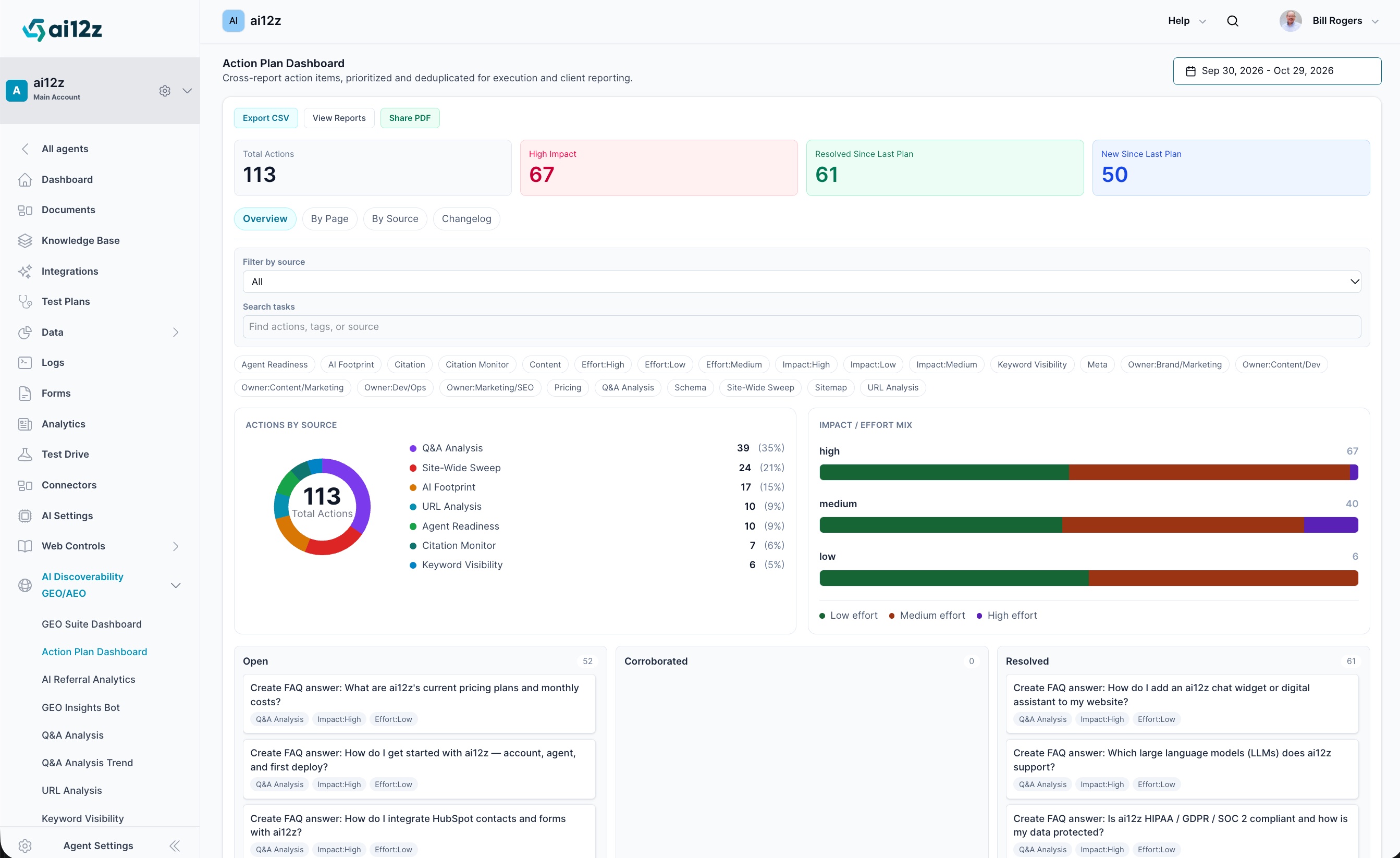
- Visualizes the whole list two ways: an Actions by Source donut chart (share of total actions per contributing report) and an Impact/Effort Mix stacked bar chart (how High/Medium/Low-impact actions break down by Low/Medium/High effort)
- Organizes actions into three status columns: Open, Corroborated, and Resolved, each card showing the action text plus its source-report and Impact/Effort chips
- Four views via tabs: Overview (the dashboard above), By Page, By Source, and Changelog
- Export CSV, View Reports (jump to the source reports behind any action), and Share PDF for a point-in-time snapshot to send externally
How to Use It
Like the GEO Suite Dashboard, there's no "Generate Report" step: the Action Plan Dashboard is always live against whatever reports you've run.
🛠️ Step 1: Navigate to the Dashboard
From the ai12z GEO portal, select Action Plan Dashboard from the left-hand navigation, directly under AI Discoverability GEO/AEO.
🛠️ Step 2: Set Your Date Range
Use the date picker in the top-right corner (e.g. "Sep 30, 2026 – Oct 29, 2026") to scope the window that New Since Last Plan and Resolved Since Last Plan are measured against.
🛠️ Step 3: Read the Stat Cards
Four cards summarize the whole list at a glance:
| Card | What It Shows |
|---|---|
| Total Actions | Every open, corroborated, and resolved action currently tracked |
| High Impact | How many of those are High-impact, your top priority regardless of source |
| Resolved Since Last Plan | Actions the dashboard has confirmed are fixed since the last check-in |
| New Since Last Plan | Actions that have newly appeared since the last check-in |
🛠️ Step 4: Filter and Search
Use Filter by source to narrow the list to a single contributing report, or type into Search tasks to match against action text, tags, or source. Below the search box, click any filter chip (report source, Effort, Impact, Owner, or topic tag like Schema, Pricing, or Sitemap) to narrow the board instantly; chips combine, so you can, for example, filter to Owner:Dev/Ops and Impact:High at the same time.
🛠️ Step 5: Work the Board
Each action card in Open, Corroborated, or Resolved shows the action text, its source-report tag, and its Impact/Effort chips. Click View Reports to jump back to the full source report behind any action, or use the By Page and By Source tabs to regroup the same list by URL or by contributing report instead of by status.
🛠️ Step 6: Export or Share
Export CSV pulls the current filtered view out as a spreadsheet; Share PDF generates a point-in-time snapshot suitable for a client or leadership update, the same kind of deliverable Consolidated Action Plan produces on its own.
Understanding the Status Columns
| Status | What It Means |
|---|---|
| Open | Not yet addressed |
| Corroborated | The same issue was independently flagged by more than one source report, a stronger signal than a single report's finding |
| Resolved | The dashboard has confirmed this action is no longer an active issue |
Actions by Source and Impact/Effort Mix
The Actions by Source donut chart breaks the total down by contributing report (e.g. Q&A Analysis 35%, Site-Wide Sweep 21%, AI Footprint 15%), so you can see at a glance which report is currently surfacing the most work.
The Impact/Effort Mix chart cross-tabs the two dimensions every action already carries (see Action Item Fields in Consolidated Action Plan): for each Impact tier (High/Medium/Low), a stacked bar shows how many of those actions are Low, Medium, or High effort. A tier dominated by Low effort is your fastest path to visible progress; a High-impact tier with a lot of Medium/High effort is where the real work is.
Key Outputs
- Stat cards: Total Actions, High Impact, Resolved Since Last Plan, New Since Last Plan
- Actions by Source: donut chart with count and percentage per contributing report
- Impact/Effort Mix: stacked bar chart per impact tier
- Open / Corroborated / Resolved board: every action as a card with source, impact, and effort chips
- Filter chips: source, Effort, Impact, Owner, and topic tags
- Export CSV and Share PDF
Perfect For
- Teams that want to actually work a to-do list day to day, not just read a PDF once a quarter
- Confirming fixes landed without manually re-checking every item: the dashboard marks resolved items for you
- Client reporting that shows real progress ("61 resolved since last plan"), not just a fresh static list
- Assigning and filtering work by owner or team (Dev/Ops, Content/Marketing, Brand/Marketing) instead of working through one combined list
Related Documentation
- Consolidated Action Plan: The same underlying action items, as a point-in-time PDF with an executive summary
- GEO Suite Dashboard: The equivalent live pulse-check for GEO scores and citation metrics, rather than action items
- Site-Wide Sweep: One of the highest-volume contributing sources, ranked by pages affected
- Q&A Analysis: Typically the largest single contributor of High-impact, Low-effort FAQ actions
- AI Visibility Suite Overview: How the dashboard fits alongside the rest of the AI Visibility Suite