Consolidated Action Plan
Your cross-report GEO to-do list: prioritized, deduplicated, and ready to execute.
After running several GEO reports, the next challenge is knowing what to actually do first. Each report produces its own recommendations in its own PDF: the Consolidated Action Plan's only job is to pull every action item from every report you've run into a single, deduplicated, ranked list, so nothing falls through the cracks between seven different documents.
What It Does
- Reads the latest completed report of each type for the project: Q&A Analysis, URL Analysis, Citation Monitor, Agent Readiness, AI Footprint, GEO Trend Comparison, Site-Wide Sweep, and Keyword Visibility
- Extracts every action item from each report it finds: a report type only shows up on the cover's "Reports included" list if it actually contributed at least one action; if you haven't run a report type yet, it's simply left out rather than shown empty
- Deduplicates actions across sources: if two reports flag the same issue, you see it once
- Sorts by impact and effort: High impact before Medium before Low; within the same impact tier, Low-effort actions first, so the fastest wins in each tier surface at the top
- Generates an LLM executive summary covering: a narrative overview of your GEO readiness state, the top 3 priority actions with reasoning, key themes recurring across reports, and a one-sentence summary per source report
- Renders a professional PDF with a cover, executive summary page, and three action tables (High / Medium / Low impact)
How to Generate a Report
This is the simplest report in the AI Visibility Suite to run: there's no configuration modal at all.
🛠️ Step 1: Navigate to Action Plan
From the ai12z GEO portal, select Action Plan from the navigation menu.
🛠️ Step 2: Click + Generate Report
Click + Generate Report in the top-right corner. Unlike every other report in the suite, this doesn't open a configuration dialog: clicking the button submits the job immediately. There's nothing to fill in, because the job always reads whatever completed reports already exist for your project.
🛠️ Step 3: Refresh and View
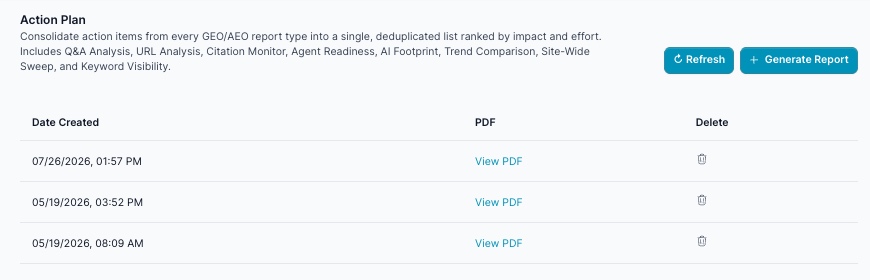
Click Refresh to check for completion, then click View PDF once it's done.
Executive Summary Sections
- GEO Readiness Narrative: 2–3 sentence synthesis of your current state and biggest opportunity
- Top 3 Priorities: The three most important actions to start immediately, each with a specific reasoning paragraph
- Key Themes: Recurring patterns across all reports (e.g. "Missing structured data and schema markup across the site limiting AI citation eligibility")
- Report Findings by Source: One-sentence summary per source report showing what each flagged most
Action Item Fields
Each action carries:
| Field | Values |
|---|---|
| Action | The specific action to take |
| Source Report | Which report flagged it |
| Impact | High / Medium / Low |
| Effort | Low / Medium / High |
| Status | Open |
What's Inside the PDF
| Section | Content |
|---|---|
| Cover | Organization name, generated date, count pills (High / Medium / Low / Total), and the "Reports included" badges for whichever report types actually contributed at least one action |
| Executive Summary | Narrative paragraph, numbered Top 3 Priorities with reasoning, Key Themes chips, and a Report Findings by Source table |
| Section 01: High-Impact Actions | All High-impact actions, sorted low-effort first within the tier |
| Section 02: Medium-Impact Actions | All Medium-impact actions, same sort order |
| Section 03: Low-Impact & Maintenance Actions | All Low-impact actions: housekeeping to address once the higher tiers are done |
Understanding the Report Table
| Column | Description |
|---|---|
| Date Created | When the plan was generated |
| Link to download the report | |
| Delete | Remove this plan from your list |
The plan reflects a point-in-time snapshot: it doesn't update itself. Re-generate whenever you've run new reports or fixed enough items that you want a fresh ranked list; the description on this page puts it plainly: "this plan refreshes automatically when new reports run" only in the sense that a fresh generation always pulls the latest completed report of each type; it does not silently rewrite an existing PDF in place.
Key Outputs
geoactionplandocument: full record includingexecutiveSummary, the full action list, counts per tier, and which sources were included- PDF Report: cover, executive summary page, and High / Medium / Low action tables with source badges, impact and effort chips
Perfect For
- Leadership reviews: one document summarizing every open GEO initiative across all reports
- Content and dev teams that need a single prioritized to-do list without reading seven separate reports
- Quarterly planning: run after all other reports to get a complete ranked action plan
- Stakeholder presentations: the PDF cover shows counts at a glance; the exec summary page gives the narrative
Example Report Walkthrough
A real Consolidated Action Plan run for ai12z.com pulled in 7 of the 8 possible source reports (no GEO Trend Comparison had been run yet) and produced 42 total actions: 28 High, 12 Medium, 2 Low.
Top 3 Priorities in the Executive Summary were, in order: (1) build a structured FAQ hub answering the top 20 buyer questions with FAQPage schema, called out because Q&A Analysis had already found inconsistent pricing figures ($99 vs. $131) actively causing LLM hallucinations; (2) publish llms.txt and JSON-LD Organization schema with sameAs links, since 39% of the site had no schema at all; and (3) upgrade the Trust Center with real certifications, encryption specifics, and a compliance matrix, since generic language like "industry-standard encryption" wasn't building the trust signals LLMs need to cite the site in enterprise evaluations.
Report Findings by Source gave a one-line summary for each of the 7 contributing reports, for example, Site-Wide Sweep's line read: "Widespread technical hygiene issues, including slow pages (44.5%), missing schema (39.4%), thin content (22.8%), and heading/image problems, degrade AI crawlability at scale."
What makes this report genuinely useful is watching the same underlying findings surface from completely different reports side by side. In this run:
- Actions #1–5 (High, Low effort) were all Q&A Analysis FAQ answers, see Q&A Analysis
- Action #6 (High, Low effort) was publishing the generated
llms.txtstarter file: the exact file Agent-Readiness Audit generates for you - Actions #7–11 (High, Low effort) were AI Footprint findings (Organization schema, a Google Business Profile, and social profile cleanup); see AI Footprint
- Actions #22–26 (High, Medium effort) were the five biggest Site-Wide Sweep issues by page count: fixing image dimensions on 219 pages, optimizing 199 slow pages, adding schema to 176 pages, fixing H2 structure on 165 pages, and expanding 102 thin pages; see Site-Wide Sweep
- Actions #17–19 and #32–34 were all URL Analysis findings against the same
/trust-center/page: certifications, an FAQ section, a visible "last updated" date, a compliance matrix, encryption specifics, and uptime data; see URL Analysis - Actions #29–30 and #41 were Agent-Readiness items: fixing the future-dated sitemap timestamp, adding explicit crawler
Allowdirectives, and adding TL;DR summaries to long pages - Actions #38–40 were Keyword Visibility gaps, including that same $99-vs-$131 pricing inconsistency showing up yet again from a completely different report
That last point is the whole value of this report in one example: the pricing inconsistency was independently flagged by both Q&A Analysis and Keyword Visibility. Without deduplication and consolidation, a team would have seen it twice, in two different PDFs, and might have fixed it twice, or worse, only noticed it in one.
Related Documentation
- Q&A Analysis: One of the most frequent contributors of High-impact, low-effort FAQ actions
- Site-Wide Sweep: Source of the highest-volume technical hygiene actions, ranked by pages affected
- URL Analysis: Source of page-specific fixes like the Trust Center findings above
- Agent-Readiness Audit: Source of the generated
llms.txtand crawler-directive actions - AI Footprint: Source of entity and social-profile actions
- GEO Suite Dashboard: For a live pulse-check instead of a point-in-time action list