Citation Monitor
Find out if external AI systems are actually recommending you.
Every other GEO report tells you what you should be cited for. Citation Monitor tells you whether you are cited, right now, by the AI systems your prospects are actively using. It runs your tracked queries through five separate signals (three closed-book/web-grounded LLM engines, ChatGPT's own web search, and optional Google organic rank), detects your brand in the responses, scores sentiment, tracks competitor share of voice, and hands back a diagnostic quadrant per query plus a short, prioritized list of what to fix first.
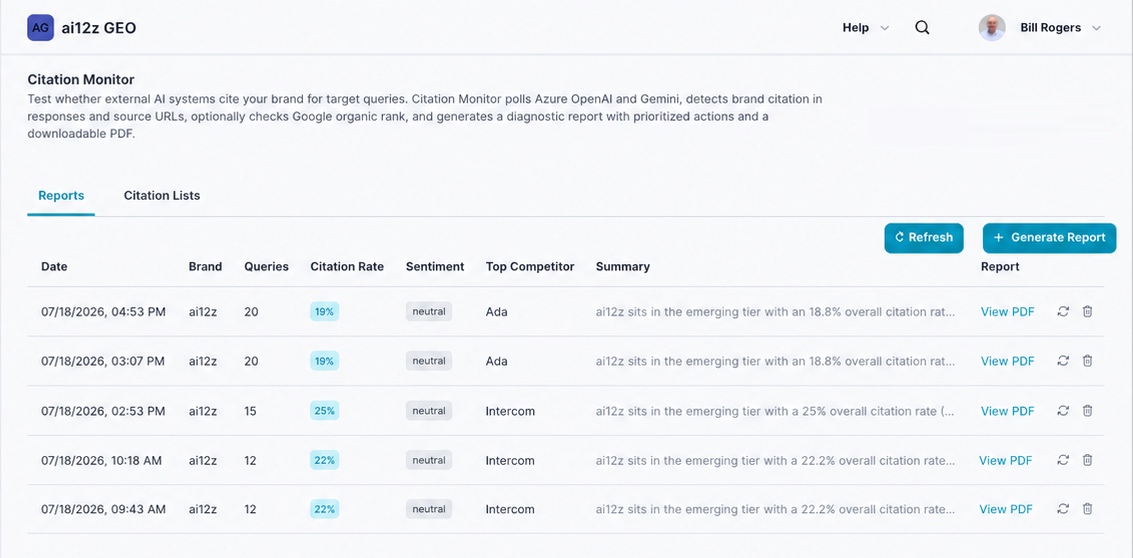
The in-app description under the page title still reads "Citation Monitor polls Azure OpenAI and Gemini", that's leftover copy from an earlier version. The actual report tests five signals (see What It Does below), not two. This page documents the real, current report output.
What It Does
- Runs every query in your selected Citation List(s) through five signals:
- ChatGPT: is the brand in the model's training data?
- Claude: is the brand in the model's training data?
- Google Gemini: is the brand in the model's training data?
- Bing Web Search (web-grounded via Bing's index): the same source ChatGPT itself uses when it grounds an answer in live web results
- Google organic rank (optional, via Google CSE): your actual search position for the same query, for side-by-side comparison against citation
- Detects brand citation three ways per engine: brand name in the response text, brand domain in a cited source URL, or not cited, and shows the exact snippet where your brand appeared
- Classifies the sentiment of every citation (positive / neutral / negative / mixed) and rolls it up into a dominant sentiment and a pos/neg/neutral split
- Tracks a competitor watchlist and computes Share of Voice: how often each competitor is cited across your queries, and on exactly which queries they're cited instead of you
- Computes a diagnostic quadrant per query and an overall quadrant for the brand, combining citation status with Google ranking
- Runs a Google vs. Bing citation gap analysis specific to ChatGPT: since ChatGPT grounds web answers in Bing's index, ranking in Google but not appearing in Bing is a direct, fixable predictor of a ChatGPT citation miss
- Distills findings into Key Wins (queries you're winning, use as a benchmark) and Key Gaps (queries competitors are winning, your next content targets, each with a one-click Create action)
- Produces numbered, prioritized Recommended Actions, each with the reasoning behind it. These feed directly into the Consolidated Action Plan
- Every run is saved, so a Citation List is a re-testable baseline: run it again after publishing new content to measure whether your citation rate actually moved
How to Generate a Report
🛠️ Step 1: Navigate to Citation Monitor
From the ai12z GEO portal, select Citation Monitor from the navigation menu. You'll land on the Reports tab; Citation Lists is the second tab (see below).
🛠️ Step 2: Click + Generate Report
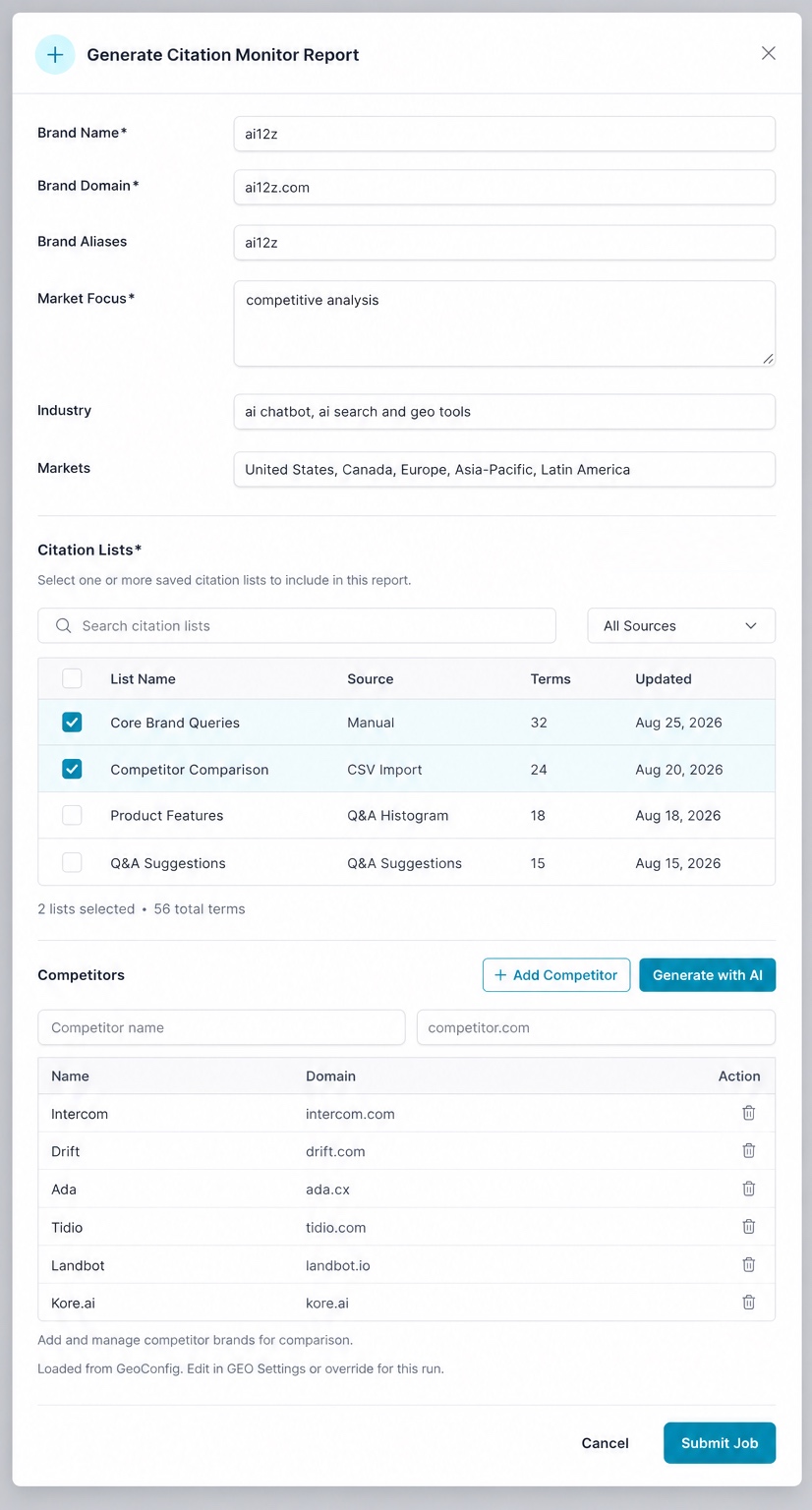
Brand & context fields:
| Field | Description |
|---|---|
| Brand Name* | Required. Usually pre-filled from your Organization Settings |
| Brand Domain* | Required. Your primary domain, pre-filled from Organization Settings |
| Brand Aliases | Optional. Alternate names or spellings to also detect as a citation |
| Market Focus* | Required. Free-text context for this run (e.g. "competitive analysis") |
| Industry | Optional. Plain-language description of what you do |
| Markets | Optional. Target regions, used for context |
Citation Lists* (required): search and select one or more saved lists to supply the queries for this run. The picker shows each list's name, source, term count, and last-updated date, with a live counter ("2 lists selected · 56 total terms") as you check boxes. See Citation Lists below for how these are built.
Competitors: add competitors manually one at a time, or click Generate with AI to have Claude suggest a competitor set based on your brand context. This table is pre-loaded from your org-wide GEO Settings config, but edits here only apply to this run; they don't overwrite your saved settings unless you update them separately.
🛠️ Step 3: Submit and Wait
Click Submit Job. The analysis runs asynchronously. Click Refresh to check for completion.
🛠️ Step 4: View Your Report
Once complete, click View PDF for the full citation audit.
Citation Lists
Citation Lists are the query sets Citation Monitor runs, and the same list can be reused across as many report runs as you want, which is what makes before/after comparison possible. Switch to the Citation Lists tab to manage them.
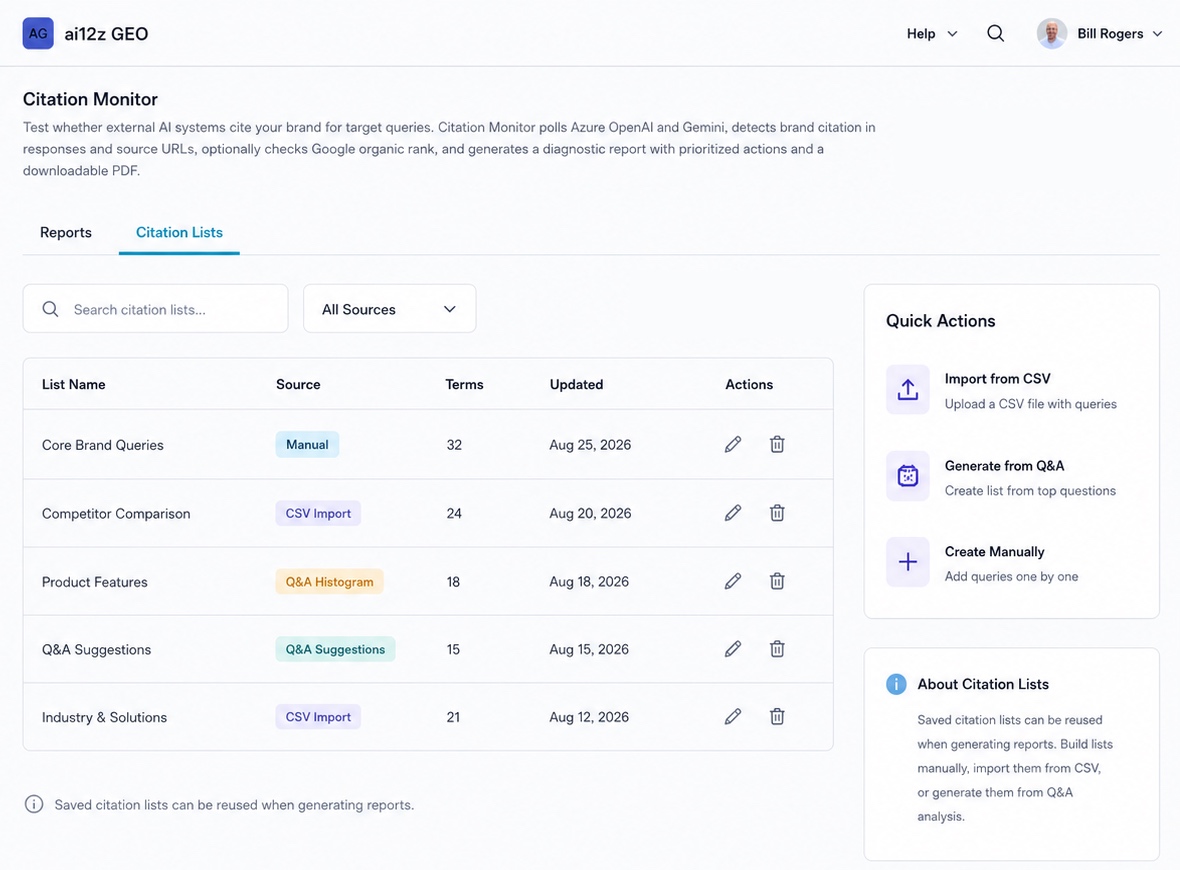
There are three core ways to get queries into a list, before layering on the Q&A-driven options below:
- Manual entry — type queries in one at a time via Create Manually.
- AI-generated from a prompt — in that same Create Manually flow, click Generate with AI and describe your brand and context; the assistant proposes a starting set of queries for you instead of you having to brainstorm every one yourself.
- CSV upload — import an existing list of queries. This is the best way to seed a list with real, already-proven demand instead of a guess: export your Google Search Console query report (or GA4, SEMrush, Ahrefs) for the keywords that are already bringing visitors to your site. Search Console's export in particular comes pre-ranked by frequency (clicks/impressions), so the top rows are already your highest-value queries to track.
A list's Source tells you how it was built:
| Source | How It's Built |
|---|---|
| Manual | Queries typed in one at a time via Create Manually |
| CSV Import | Uploaded from a CSV file (e.g. exports from Google Search Console, GA4, SEMrush, or Ahrefs) |
| Q&A Suggestions | One-click adds from the Citation Phrase Suggestions panel in Q&A Analysis: the top 20 most-asked queries from that report, already flagged if they're new or already tracked |
| Q&A Histogram | Built from the fuller Generate Citation List from Q&A wizard (below): lets you pull from specific report months and includes both question themes and raw histogram queries, with dedup controls |
The right-hand Quick Actions panel is the fastest way to start a new list: Import from CSV, Generate from Q&A, or Create Manually.
Generate a Citation List from Q&A
This is the more deliberate of the two Q&A-driven paths: where the one-click Citation Phrase Suggestions in Q&A Analysis hands you the top 20 queries from a single report, this wizard lets you pull from multiple months at once and control exactly what gets included.
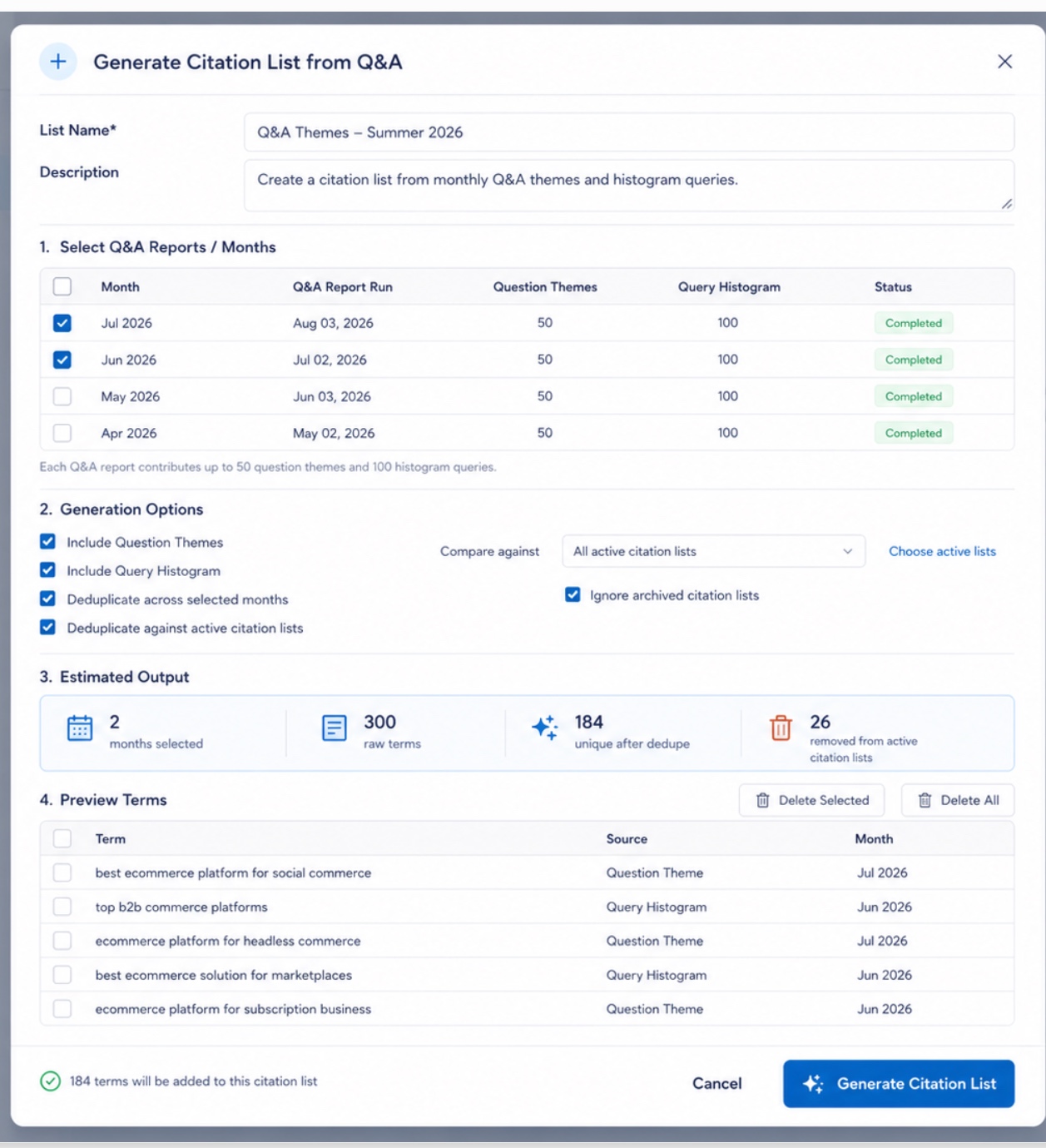
1. Select Q&A Reports / Months: check off which completed Q&A Analysis runs to pull from. Each contributing report supplies up to 50 question themes and 100 histogram queries.
2. Generation Options:
| Option | Effect |
|---|---|
| Include Question Themes | Pull in the readable cluster names/questions from each selected report |
| Include Query Histogram | Pull in the raw, exact-match query text from each selected report |
| Deduplicate across selected months | Collapse repeated terms that appear in more than one selected month |
| Deduplicate against active citation lists | Drop any term that already exists in another active list; set which lists count via Compare against / Choose active lists |
| Ignore archived citation lists | Exclude archived lists from that deduplication check |
3. Estimated Output updates live as you change selections: e.g. selecting 2 months might surface 300 raw terms, collapsing to 184 unique after dedup, with 26 more removed because they already exist in an active list.
4. Preview Terms shows the final term list with its source (Question Theme or Query Histogram) and originating month, so you can hand-remove anything irrelevant (per-row, via Delete Selected, or Delete All to start over) before committing. The confirmation line ("184 terms will be added to this citation list") always reflects your current preview, not the original estimate.
Interpreting the Five Signals
| Signal | High | Low |
|---|---|---|
| ChatGPT (closed-book) | Brand is established in AI training data | Brand lacks training-data presence: publish more, consistently, over time |
| Claude (closed-book, via Bedrock) | Second training-data confirmation signal | Low here + high ChatGPT = a model-specific training gap |
| Google Gemini (web-grounded) | Your current content is being crawled and cited live | Live content isn't reaching LLMs: check robots.txt, schema, entity density |
| Web Search (web-grounded via Bing) | Bing is surfacing and ChatGPT is citing your live content | Missing from Bing's index: check Bing Webmaster Tools and Bing Places |
| Google organic rank (optional) | You rank, giving LLMs a page to find in the first place | Even great content won't get cited if it isn't rankable |
A high Gemini rate with a low ChatGPT/Claude rate means your live content is being found, but your brand isn't yet well-represented in training data. A high ChatGPT/Claude rate with a low Gemini/Bing rate means the opposite: you're known in training data, but current pages aren't being surfaced in real-time grounded answers.
The Diagnostic Quadrant
Every query, and the report as a whole, gets a quadrant combining citation status with Google ranking:
| Quadrant | Cited? | Ranked? | What It Means | What To Do |
|---|---|---|---|---|
| Winning | ✅ | ✅ | Cited and ranked | Protect; expand schema, entity density, syndication |
| Authority Gap | ✅ | ❌ | Cited (web-grounded) despite low/no Google rank | Push for a top-3 Google rank |
| Training Data Only | ✅ | ❌ | Cited by closed-book engines (ChatGPT/Claude) but not ranking live | Build live web presence: publish current, crawlable content |
| Amplify | ❌ | ✅ | Ranked with strong content quality, but LLMs still don't cite | Distribution problem: syndication, schema, entity density |
| SEO/GEO Gap | ❌ | ✅ | Ranked, but with weaker content quality and no citation | Fix content depth, then GEO distribution |
| Content Gap | ❌ | ❌ | No rank, no citation, and weak content quality | Create content first |
| Full Gap | ❌ | ❌ | Neither Google nor any LLM surfaces you at all | Create and distribute content from scratch |
Note that a report's own inline quadrant legend sometimes shows a shorthand 4-item version (Winning / SEO GEO Gap / Authority Gap / Full Gap): the full 7-quadrant taxonomy above is what's actually assigned per query, so don't be surprised to see "Amplify," "Training Data Only," or "Content Gap" on individual rows even when the summary legend only spells out four.
Key Outputs
- Citation Health Score (0–100): Overall citation coverage, signal quality, and quadrant position
- Verdict:
Dominant(cited on most queries) /Strong(cited on the majority) /Present(cited on some) /Emerging(rarely or not yet cited) - Overall Citation Rate: What share of all LLM responses across all queries and engines cited you
- Per-Engine Breakdown: ChatGPT, Claude, Gemini, and ChatGPT Web Search rates shown side by side
- Google Ranked / Bing Cited: How many queries you rank for in Google, and how many Bing/ChatGPT actually cites
- Query Scorecard: Per-query citation status by engine, the exact cited snippet, Google rank, sentiment, and quadrant
- Google Organic Rankings: Full top-10 breakdown per query, marking your brand's URL, snippet mentions, and page mentions
- Google vs. Bing Citation Gap: A 2×2 breakdown (Both Ranked / Google Only / Bing Only / Neither) flagging your highest-risk ChatGPT citation gaps
- Key Wins / Key Gaps: Queries you're winning (benchmark these) vs. queries competitors are winning (create content for these)
- Competitors Detected: Brand names surfacing near competitive signal words in the raw AI responses, beyond your tracked watchlist
- Competitor Share of Voice: Per-competitor citation count and percentage, with the exact queries where each one is "ahead" of you
- Recommended Actions: Numbered, prioritized fixes with reasoning; these roll directly into the Consolidated Action Plan
- PDF Report: Complete citation audit with all sections above
Understanding the Report Table
| Column | Description |
|---|---|
| Date | When the report was run |
| Brand | The brand this run was scoped to |
| Queries | How many queries from the selected Citation List(s) were tested |
| Citation Rate | Overall citation rate for this run |
| Sentiment | Dominant sentiment across scored citations |
| Top Competitor | The competitor with the highest share of voice this run |
| Summary | Opening line of the report narrative |
| Report | Link to download the PDF, plus re-run and delete icons |
Perfect For
- Marketing teams measuring real-world impact of GEO content improvements
- Content strategists who've acted on Q&A Analysis recommendations and want to know if it's working
- SEO specialists who rank on Google but aren't appearing in AI-generated answers
- Any team that needs to answer "Is ChatGPT/Gemini actually recommending us, or a competitor instead?"
Example Report Walkthrough
A real run against ai12z.com on 4 queries produced a Citation Health Score of 32/100, verdict Emerging, overall quadrant Amplify.
Overview showed an overall citation rate of 18.8% (3 of 16 LLM responses), split evenly at 25% each across ChatGPT, Claude, and Google Gemini, with ChatGPT Web Search at 0%. Google Ranked stood at 2 of 4 queries (avg position #4.5), Bing Cited at 0 of 4. Top competitor: Ada, at 19% share of voice, with 9 query-instances where a tracked competitor was cited and ai12z wasn't. Sentiment on the 3 scored citations was 100% neutral: no negative signal, but no advocacy either.
Query Scorecard told the real story per query: the one branded query, "magnolia answers is that ai12z," was cited by all three closed-book/web-grounded engines, ranked #4 in Google, scored Neutral sentiment, and landed in the Amplify quadrant. The other three, all unbranded category queries ("ai search and geo tools," "ai chatbot and ai search with geo tools," and "geo aeo tools and ai digital assistant with cms connectors"), scored zero citations across every engine. Two came back Full Gap (no rank, no citation); the third ranked #5 in Google but still got zero LLM citations, landing in Content Gap.
Google vs. Bing Citation Gap flagged exactly 2 queries ranking in Google with zero Bing citation: the report calls these out explicitly as "your highest-risk ChatGPT citation gaps" since ChatGPT grounds its web answers in Bing's index specifically.
Competitor Share of Voice tracked roughly 20 competitors. Most (Intercom, Drift, Tidio, Zendesk, and over a dozen others) sat at 0% ("brand cited alongside," meaning no head-to-head loss). Ada led at 19%, winning all three of the uncited category queries outright; Algolia, Coveo, Glean, Writesonic, Jasper, and Otterly.AI each held 6%, splitting the remaining category-query citations among them.
Recommended Actions (3, numbered and prioritized) were: (1) publish a definitive "ai12z vs Ada" comparison page plus a category pillar page for "AI search and GEO tools with CMS connectors," with FAQ/Product schema and clear pricing tables; (2) create three cornerstone content assets, one per uncited category theme, and syndicate them to G2, Capterra, and martech publications; (3) shift the neutral sentiment to positive with named case studies, ROI numbers, and pitched third-party reviews. These three items appear verbatim in the Consolidated Action Plan sample walkthrough, a direct example of the same finding flowing from Citation Monitor into the cross-report to-do list.
Related Documentation
- Q&A Analysis: Source of the Q&A Suggestions and Q&A Histogram Citation List types
- Consolidated Action Plan: Where Citation Monitor's Recommended Actions roll up alongside every other report's findings
- GEO Suite Dashboard: See Citation Rate and the diagnostic quadrant alongside every other GEO metric in one view
- AI Visibility Suite Overview: How Citation Monitor fits alongside the rest of the AI Visibility Suite