Q&A Insights
Every question your chatbot has ever answered, scored the instant it happened, and one click away from the full conversation behind it.
Q&A Analysis groups conversations into themes over a date range you choose, run monthly or quarterly. Q&A Insights is the live table underneath that report: every individual question and answer, in the order it happened, each already carrying the same 1–100 quality score computed at the moment the conversation occurred. There's no job to generate: the list is simply always current, which makes it the fastest way to spot-check a single answer, a single visitor, or a single low-scoring response without waiting for the next monthly run.
What It Does
- Lists every question asked and every answer given by your ai12z chatbot for this project, newest first (sortable by date)
- Shows the Quality Score computed for that specific answer at the moment it was given: the same per-conversation score Q&A Analysis later rolls up into its theme clusters and topic scores
- Tracks Feedback separately from Quality Score: whether a real visitor gave explicit positive/negative feedback on that answer, distinct from the automatic score
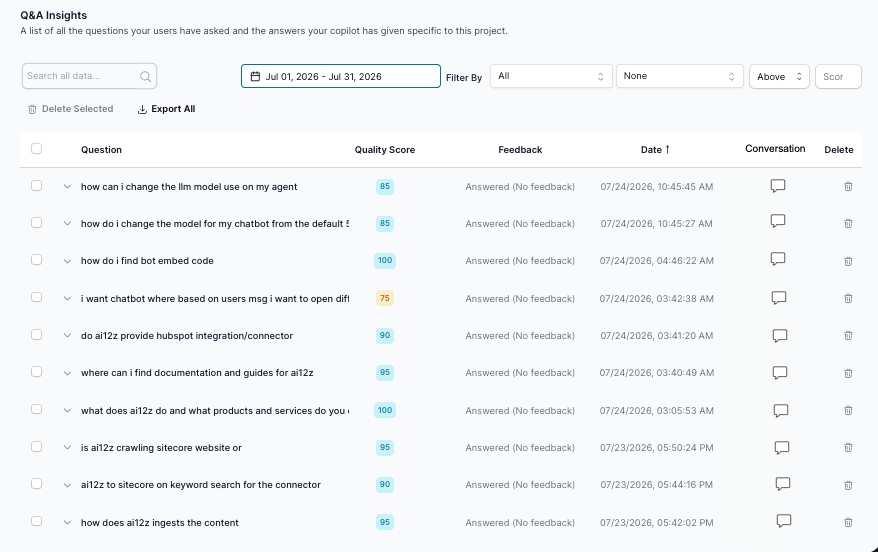
- Lets you search all data by question text, and filter by score threshold, feedback status, and Answer Engine Referral, narrowing the whole table down to only conversations that started from an AI answer engine, instead of opening rows one at a time
- Provides a Conversation icon on every row that opens the complete, multi-turn transcript for that visit
- Supports Select All, Delete Selected, and Export All for bulk cleanup or exporting the raw Q&A log
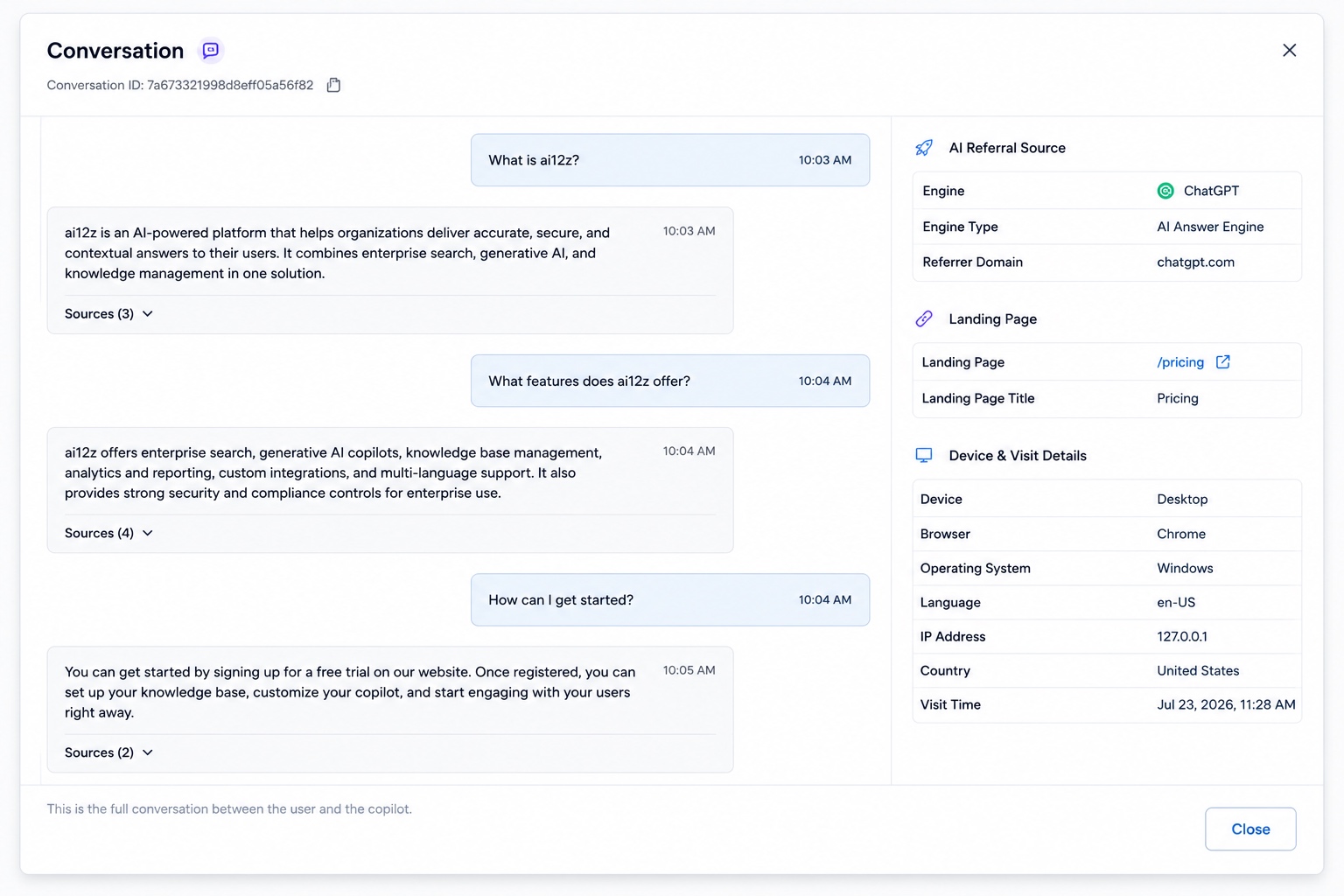
- When a conversation originated from an AI answer engine referral, the conversation view surfaces the exact referral metadata: which engine, which landing page, and full device/visit details, right alongside the transcript
- Provides an Analyze button on every answer, opening a review dialog that turns a vague "this answer wasn't great" into a specific, actionable diagnosis
Understanding the Report Table
| Column | Description |
|---|---|
| Question | The visitor's question, verbatim |
| Quality Score | 1–100 score for that specific answer, computed at the moment it was given |
| Feedback | Whether a visitor left explicit feedback (shown as "Answered (No feedback)" when none was given) |
| Date | Timestamp of the exchange, sortable |
| Conversation | Opens the full transcript for that visit |
| Delete | Remove this Q&A record |
A real sample from this table shows the score doing real work, not just decorating the row: a clean, well-scoped question like "how do i find bot embed code" scored a perfect 100, while a garbled, cut-off question like "i want chatbot where based on users msg i want to open dif..." scored 75: the same signal Q&A Analysis would later fold into a theme's aggregate score, visible here at the individual-conversation level instead.
Viewing a Full Conversation
Clicking the Conversation icon on any row opens the complete transcript: every turn between the visitor and your copilot, each answer showing its Sources count (e.g. "Sources (3)") so you can see exactly what content the bot drew from, with a footer note confirming "this is the full conversation between the user and the copilot."
AI Referral Source Metadata
This is the detail that makes Q&A Insights more than a transcript viewer: when the platform detects that a conversation started from a visitor who arrived via a generative AI answer engine, the conversation view displays a dedicated AI Referral Source panel alongside the transcript, showing:
| Field | Example |
|---|---|
| Engine | ChatGPT |
| Engine Type | AI Answer Engine |
| Referrer Domain | chatgpt.com |
Directly beneath it, a Landing Page section shows which page the visitor arrived on and its title (e.g. /pricing: "Pricing"), and a Device & Visit Details section shows the full context of the visit: device type, browser, operating system, language, IP address, country, and the exact visit timestamp.
This is the same engine-detection logic documented in AI Referral Analytics: a referrer domain like chatgpt.com normalized to the canonical engine chatgpt. Q&A Insights is where that detection becomes concrete: instead of an aggregate "43.5% of sessions came from ChatGPT" statistic, you get the actual conversation a specific ChatGPT-referred visitor had, word for word.
You don't have to open conversations one at a time to find these: use the Answer Engine Referral filter to narrow the entire table down to only conversations that started from an AI answer engine: useful for auditing every ChatGPT- or Perplexity-referred conversation in a period at once, rather than spot-checking individual rows.
Analyzing an Answer
Beyond reading the transcript, every answer carries an Analyze button that opens a detailed review dialog: the mechanism for turning "this answer wasn't great" into a specific, actionable diagnosis instead of a subjective impression. This requires logging to be enabled in Agent Settings; without it, there's no captured context for the dialog to analyze.
- Describe the concern: explain what's wrong with the answer (wrong facts, wrong tone, missed the point) and get back concrete improvement suggestions
- Context review: the system inspects the question, the answer, which tools or controls were invoked, and the prompts behind the response, and returns specific optimization recommendations rather than a generic critique
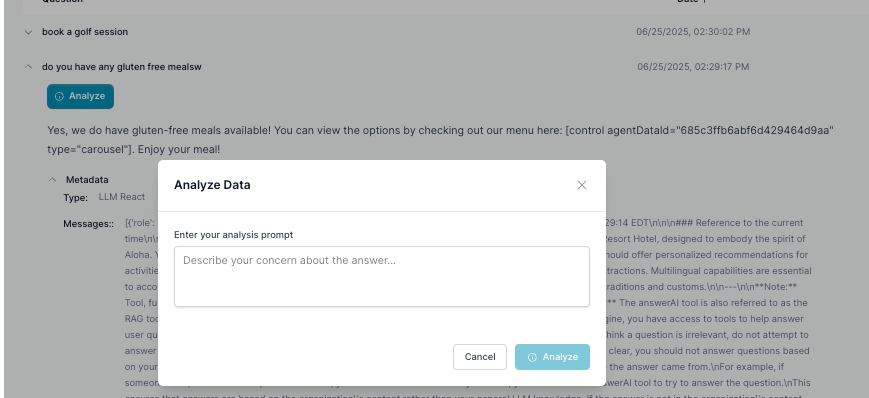
Pair this with a low Quality Score row: instead of just knowing an answer scored poorly, Analyze tells you specifically what to fix: in the prompt, the knowledge base, or the tool configuration behind it.
Perfect For
- Spot-checking a specific low-scoring answer without waiting for the next Q&A Analysis run
- Reading the real conversation behind a citation or a referral session, turn by turn
- Confirming which AI engine referred a visitor and what they asked once they arrived: the individual-conversation counterpart to AI Referral Analytics
- Filtering the whole log down to only Answer Engine-referred conversations for a focused audit
- Getting a specific, actionable diagnosis on a weak answer via the Analyze dialog, instead of just a low score
- Exporting the raw Q&A log for a support or content-quality review
Related Documentation
- Q&A Analysis: The monthly, theme-clustered report built from these same individual conversations
- AI Referral Analytics: The aggregate dashboard behind the AI Referral Source metadata shown here
- Web Content Quality: The equivalent live, per-page view, for ingested content instead of conversations
- AI Visibility Suite Overview: How Q&A Insights fits alongside the rest of the AI Visibility Suite