Prospect Snapshot
A teaser GEO report you can hand a prospect before they've committed to anything, built to start a conversation, not close one.
Prospect Snapshot turns a prospect's public website alone into a short, branded PDF: a readiness score, a handful of live technical and citation checks, a few AI-generated findings and quick wins, and a preview of all 12 reports in the full GEO Suite. It costs about 16 credits (≈$0.16) to generate, one of the cheapest reports in the Suite, cheap enough to run for every prospect worth a conversation. Generated in under 60 seconds.
Prospect Snapshot only appears in the portal for partner accounts; it's not a report an end customer runs for themselves inside their own project. If a visitor comes to ai12z.com directly, they can generate the equivalent snapshot for themselves there, for free.
What It Does
- Runs a handful of live checks against the prospect's public site: social and brand presence across 6 platforms, and five AI crawler readiness signals (robots.txt, llms.txt, XML sitemap, token budget, markdown endpoints)
- Runs a real AI citation check: asks ChatGPT, Bing, Claude, and Gemini a handful of buyer questions for the prospect's category, and reports whether the prospect is named, alongside a competitor share-of-voice table
- Generates a handful of AI findings: specific, live-scan observations about the homepage (missing copy, missing heading structure, weak llms.txt, and so on)
- Generates 2–3 quick-win recommended actions, each with an effort estimate
- Shows example "questions your prospects are already asking AI assistants", framed as what the full Q&A Analysis report would score
- Previews all 12 reports in the full GEO Suite with sample, not the prospect's real, data, so the prospect can see what a full engagement unlocks
- Closes with a branded call-to-action page: a book-a-demo link plus the partner's own name and email as the point of contact
How to Generate a Report
🛠️ Step 1: Navigate to Prospect Snapshot
From the ai12z portal, select Prospect Snapshot, the last item under AI Discoverability GEO/AEO. Only visible to partner accounts.
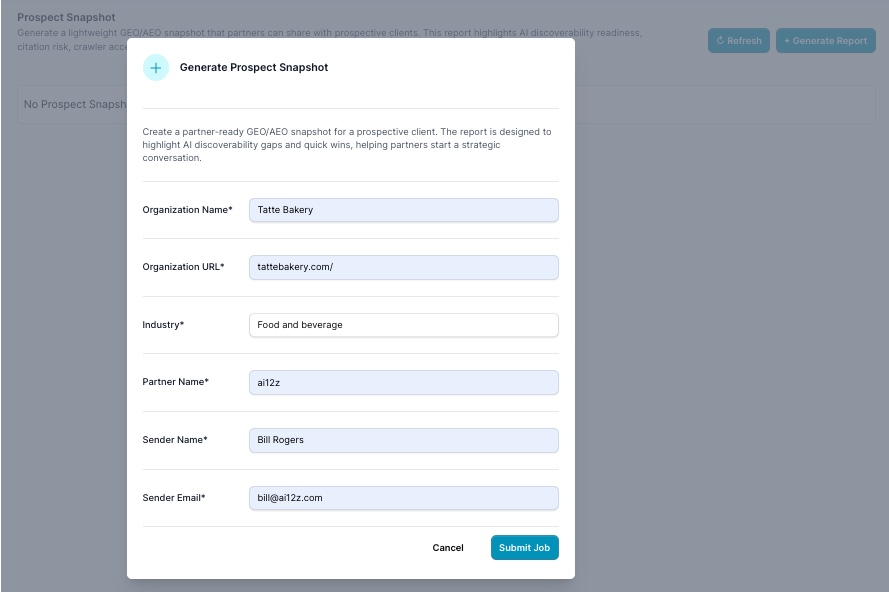
🛠️ Step 2: Click + Generate Report
Fill in:
| Field | What It's For |
|---|---|
| Organization Name* | The prospect's company name, shown on the cover and throughout the PDF |
| Organization URL* | The prospect's public website; this is the only data source the report scans |
| Industry* | Short category description (e.g. "Food and beverage"), used for the peer-average comparison and sample buyer questions |
| Partner Name* | Your agency or organization name, shown as the report's sender |
| Sender Name* | The individual partner contact shown on the closing CTA page |
| Sender Email* | The contact email shown on the closing CTA page |
🛠️ Step 3: Submit and Download
Click Submit Job. The report generates in under a minute, no report list to wait on, no refresh needed. Download the PDF and send it directly to the prospect, or walk them through it live.
What's Inside the Report
An 11-page PDF, built entirely from the prospect's public site and a handful of live AI citation checks:
| Page | Section | What It Shows |
|---|---|---|
| 1 | Cover | Agent-Readiness score out of 100 vs. an industry peer average, a one-line AI-generated headline, and a verdict like "Mostly Ready" |
| 2 | Digital Presence | Social & brand presence across 6 platforms (LinkedIn, X/Twitter, Facebook, Instagram, YouTube, Reddit), live |
| 3 | AI Crawler Readiness | Pass/warn/fail on robots.txt, llms.txt, XML sitemap, token budget, and markdown endpoints, live |
| 4–5 | AI Citation Landscape | Citation rate across ChatGPT, Bing, Claude, and Gemini for real buyer questions in the prospect's category, a share-of-voice table against named competitors, and a by-query breakdown, live |
| 6 | Findings & Prospect Questions | AI-generated homepage findings (thin copy, missing headings, weak llms.txt, and so on), plus example questions prospects are already asking AI assistants |
| 7 | Recommended Actions | 2–3 quick wins, each with an effort estimate (e.g. "1 hour," "1 day") |
| 8–10 | The Full GEO Suite | A preview card for each of the 12 reports in the Suite (Q&A Analysis, URL Analysis, Keyword Visibility, AI Footprint, Agent-Readiness Audit, GEO Trend Comparison, Citation Monitor, Site-Wide Sweep, Consolidated Action Plan, Real-Time Reports, GEO Bot, AI List Generation), each with sample data |
| 11 | Call to Action | "Book a Demo" link plus the partner's name and email as the point of contact |
Sections marked LIVE DATA or LIVE FINDING in the PDF reflect checks actually run against the prospect's site at generation time; the 12-report preview section is explicitly sample data, a preview of what the full Suite looks like once the prospect is a real customer, not a result specific to this prospect.
Using It in a Pitch
- Lead with the cover score and the citation landscape. A concrete number (e.g. "74/100, ahead of the category average") and a named competitor winning a query the prospect should be winning are the two things that land hardest in a first conversation; see Presenting the Findings for the same framing applied to the full assessment sequence.
- The 12-report preview section is the upsell, not filler. It shows exactly what unlocks once this prospect becomes a real engagement, with their own data instead of samples.
- Treat a weak snapshot as useful too. The Fast Path: Prospect Snapshot already frames this as a triage step: a strong snapshot is your cue to move into the full assessment sequence, a weak one might mean this prospect needs a different angle entirely.
What Happens Next: Run All Reports, Once, Without a Subscription
Once a prospect shows real interest, the next step isn't the subscription conversation yet, it's one more free-feeling step that gives you, and them, real data instead of a teaser.
- Create a sub-organization for the prospect, scoped and isolated from your own account and every other client. See Organization.
- Switch into that sub-organization and open the GEO Suite Dashboard.
- Click Run All Reports. The Run All GEO Reports wizard can be run once per sub-organization without a subscription, pre-filled from the prospect's public site, and it runs the full GEO Suite, this time with the prospect's own real data instead of the snapshot's sample previews, in a single batch.
That one free run is what turns a Prospect Snapshot conversation into a consulting session: you now have the prospect's real GEO Score, real citation gaps, and a real Consolidated Action Plan to walk them through, the exact evidence that makes the upsell to a paid subscription straightforward.
Perfect For
- The very first outreach to a prospect who hasn't committed to anything, a teaser, not an audit
- Agencies who want a branded, personalized leave-behind after a discovery call
- Triage: deciding which prospects are worth the deeper, full assessment sequence before investing the time
- The bridge from "here's a teaser" to "here's your real data," using the one free Run All Reports pass
Related Documentation
- The Low-Friction Go-to-Market Playbook: The full assessment sequence and pitch this snapshot feeds into
- Run All GEO Reports: The wizard behind the one-time, subscription-free full report run
- GEO Suite Dashboard: Where the Run All Reports button lives
- Organization: Full reference for creating a sub-organization for a new client
- AI Visibility Suite Overview: Full reference for every report previewed in this snapshot