Web Content Quality
Every page you've ingested, scored, sorted so the weakest content finds you instead of the other way around.
Every other report in the AI Visibility Suite is something you generate against a date range or a single page. Web Content Quality is different: it's the live, searchable list of every webpage already ingested into this project, each carrying the quality score it was assigned automatically at ingestion. There's nothing to configure and no job to run: open the page and the whole ingested library is already sitting there, sortable by score, so the pages actively dragging down your AI answer quality are the fastest ones to find.
What It Does
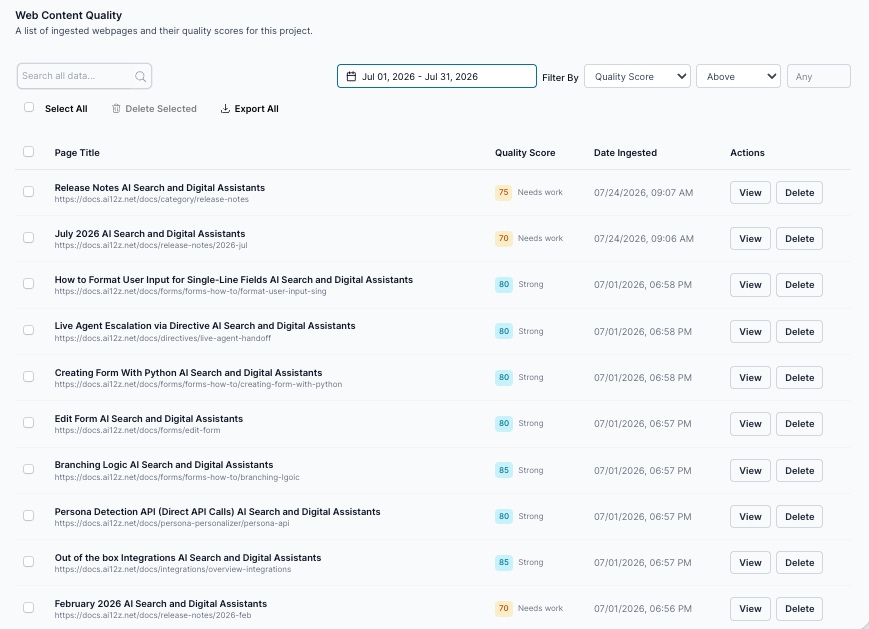
- Lists every page ingested for this project: title, source URL, quality score, and the date it was ingested
- Scores each page automatically at ingestion time, with no separate report to generate and no AI cost to view the list
- Displays the score as a color-coded badge: in the screenshot above, scores of 70–75 render as an amber Needs work badge and scores of 80–85 render as a blue Strong badge, so a weak page is visible at a glance without reading a single number
- Lets you search all data by title or URL to jump straight to a specific page
- Filters by a Quality Score threshold: the field/operator/value combination shown (
Quality Score/Above/ a numeric value) lets you isolate, for example, every page scoring above 80, or narrow the list down to your weakest content - Supports Select All, Delete Selected, and Export All for bulk cleanup or pulling the full list into a spreadsheet
- Gives each row View (open the ingested page) and Delete (remove that page from this project's content index) actions
Understanding the Table
| Column | Description |
|---|---|
| Page Title | The page's title as ingested, with its source URL shown beneath it |
| Quality Score | A color-coded score badge: amber for weaker content, blue for strong content |
| Date Ingested | Timestamp of when this page was last crawled and scored |
| Actions | View to open the page, Delete to remove it from the project's ingested content |
Reading the Quality Score
The badge coloring is the fastest signal on the page: in the real sample above, every score of 75 or below rendered amber ("Needs work") and every score of 80 or above rendered blue ("Strong"), so the exact cutoff sits somewhere between those two values. You don't need to read the number to spot a problem page; scan for amber.
This score is doing the same job Site-Wide Sweep calls its geoScore: an AI-assessed measure of how clear, authoritative, and citable a page's content is, computed automatically at ingestion rather than something you request. Site-Wide Sweep reads that same ingest-time signal and rolls it up into a whole-site scorecard and a bottom-20%-weakest-pages table generated as a point-in-time report; Web Content Quality is the live, page-by-page view of it: search, sort, and filter any ingested page directly, at any time, without waiting for a sweep to run.
Tying a Low-Quality Page to URL Analysis
This is the workflow the report is built for:
- Sort or filter for your weakest pages. Use the Quality Score filter to surface everything below a threshold you care about, or scan for amber "Needs work" badges directly in the list.
- Copy the source URL shown beneath the page title.
- Run URL Analysis against that exact URL. Where Web Content Quality gives you one number, URL Analysis gives you the full 19-section breakdown: structure, metadata, schema, trust signals, tone, and every other scored dimension, plus the exact rewrite or missing element behind the low score.
- Fix the page, let it re-ingest, and check back here to confirm the Quality Score badge moved from amber to blue.
Think of Web Content Quality as the smoke detector across your entire ingested library, and URL Analysis as the detailed inspection you run once the smoke detector points at a specific page.
Perfect For
- Quickly finding which pages in your knowledge base are actively weak, without running or waiting on a report
- Deciding which page to send to URL Analysis next, instead of guessing
- Bulk-cleaning stale or low-value ingested content with Select All / Delete Selected
- Exporting the full ingested content list, with scores, for a content audit spreadsheet
Related Documentation
- URL Analysis: The deep, 19-section audit to run against any page this list flags as weak
- Site-Wide Sweep: The point-in-time, whole-site rollup of the same ingest-time quality signal
- Q&A Insights: The live, per-conversation counterpart to this live, per-page view
- AI Visibility Suite Overview: How Web Content Quality fits alongside the rest of the AI Visibility Suite